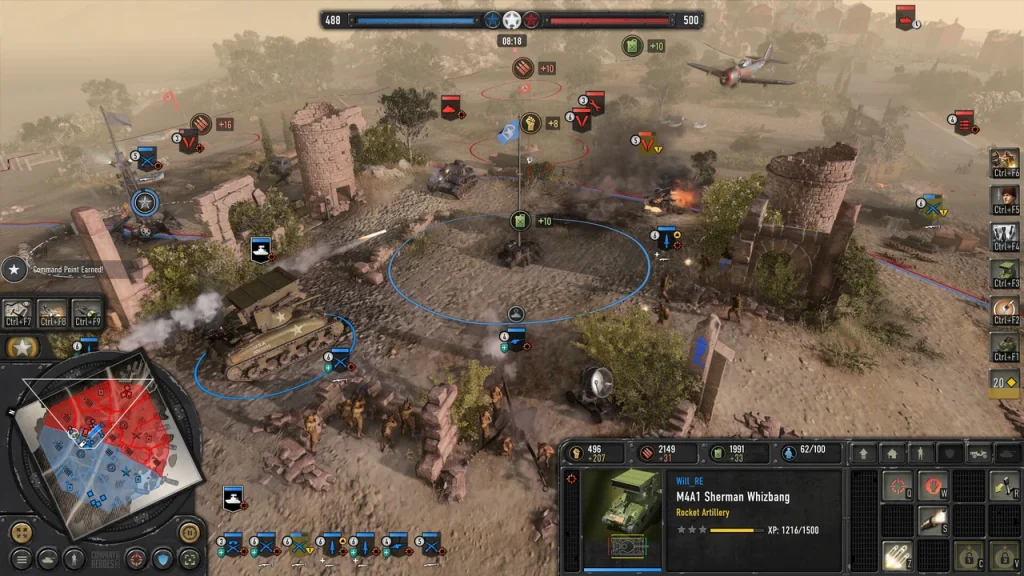
TL;DR: Company of Heroes 3 battlegroup selection works best when the group adds a capability your base army needs. Identify the faction, your planned opening and the problem you want specialist units or abilities to solve. Compare the relevant branch, unlock requirements and resource spending before treating a powerful-looking late option as an immediate answer.
A useful selection creates a follow-up action: infantry support for taking ground, a specialist response to an observed threat, or an ability that helps your existing force finish a job. The battlegroup should strengthen a working army, while ordinary production, reinforcement and map control continue.

Checked November 9, 2026. This source-based guide uses official game descriptions and dated developer announcements, with the unofficial COH3 Stats explorer for unit and ability labels. It does not claim personal playtesting or a current competitive ranking. Exact prices, unlock costs and balance values should be read in the installed build.
On this page
Company of Heroes 3 battlegroup selection starts with the faction
Battlegroups belong to factions and provide different specialist options. The official product description distinguishes the four multiplayer and co-op factions from the campaign map. Start with the army you actually selected, rather than looking for every unit shown in a trailer inside one faction’s choices.
The US roster in the community explorer illustrates the variety: Airborne, Armored, Advanced Infantry and Special Operations have different stated roles. Use those descriptions to shortlist capabilities. They are not interchangeable labels for an identical set of reinforcements.
1. Give your base army an opening job
Decide which ordinary units will capture ground, provide information and respond to the first contacts. A battlegroup does not replace the need to have units on the map. Delaying the whole opening while waiting for a later specialist leaves the army without a practical starting plan.
For example, suppose your ordinary infantry are securing territory while a team weapon protects an approach. Ask what the group needs next: support for moving that front, stronger infantry, reconnaissance or a different response to vehicles. Those questions are more useful than choosing the most dramatic unit portrait.
Keep the initial problem concrete. Infantry failing to move past a stationary defensive position is different from a vehicle appearing against a force without suitable weapons. A choice designed for one problem can be valuable without solving the other.
Use the existing beginner guide if you are still learning the base production and control loop. Battlegroup decisions are easier to understand once you know what the faction’s regular army already provides.

2. Compare the specialist role with the actual gap
The developer’s Hammer and Shield announcement provides a clear contrast. Advanced Infantry emphasizes elite infantry and artillery support. Italian Coastal Defense emphasizes fortifications and supporting artillery for defensive play. These are different ways to add capability.
An infantry-oriented choice makes sense when your plan gives those squads a useful role and supplies the support they need. A defensive choice makes sense when holding a position serves the objective. Neither description proves an automatic win on every map or with every opening.
Do not buy a role twice without a reason. If your existing army already performs one task well, another unit doing the same task may leave the original weakness untouched. Complementarity is a practical selection criterion even when both individual units look attractive.
In a team game, tell allies what specialist role you expect to contribute. This gives another player a chance to cover a different need. It also prevents several teammates from silently building around the same expensive late option while neglecting the current front.
3. Trace the branch before choosing the destination
Open the selected battlegroup’s tree and follow the route to the option you want. Distinguish an immediate ability from a destination with earlier requirements. Command-point decisions should form a usable sequence rather than a list of isolated attractive icons.
The official Dare and Destroy tech-tree preview explicitly presents alternative choices, including Railway Artillery or a Char B1 Heavy Tank for Free French. Its dated examples show why you should inspect the choice represented by the actual node.
Compare the function of the alternatives. An artillery option and a tank option answer different battlefield jobs. Do not describe them as a simple better-versus-worse ranking without explaining whether you need an effect on a defended area or a mobile unit in your force.
Use the current tree for exact requirements and availability. A preview can explain a role while its pictured costs later change. The useful habit is tracing the full sequence and identifying the first option that helps the present army.
4. Keep command points and resource spending separate
A tree unlock and a battlefield purchase are different decisions. Reaching an option does not mean you can spend without considering the rest of the army. Read the actual call-in or ability cost before planning the next move around it.
For a specialist unit, ask what you must still maintain alongside it. Existing squads can need reinforcement, and the ordinary production plan still competes for resources. An unlocked unit that consumes the budget for every supporting action may arrive in an army unable to use it well.
For an ability, define its purpose before spending. A strike on a target that has moved is not made useful by the fact that the icon was available. Check the observed target, intended effect and follow-up your units can actually perform.
Avoid stockpiling without a stopping rule. If the anticipated specialist is still unavailable while your current force is losing the map, reassess what ordinary production can accomplish. Saving is a choice with an immediate opportunity cost, not a substitute for a functioning front.

5. Tie a call-in to information and a follow-up
Use a simple sequence: observe the problem, choose a suitable response, prepare the supporting units and then commit. This makes the specialist part of an action. Calling it because resources happen to be available leaves its purpose undefined.
Consider a hypothetical defended approach where stationary enemy infantry are delaying your advance. An available indirect-fire capability could help pressure that position, but your own infantry still need to move when the defender relocates. The ability is support for the advance, not the entire advance.
For a mobile specialist, decide where it will contribute and which friendly units can support it. A tank arriving beside an isolated position is not automatically a complete combined-arms force. Keep the job limited to what its actual weapons and nearby support can perform.
The official game description emphasizes terrain, line of sight and flanking. Those mechanics remain relevant after choosing a battlegroup. A specialist’s label does not remove terrain or provide information about threats you have not observed.

6. Separate ownership and mode eligibility from tactical fit
Confirm that the selected battlegroup is available to your account and chosen mode. The Hammer and Shield announcement identifies its groups as multiplayer and co-op/skirmish versus AI content. Do not assume a pack’s battlegroup also works as the same selectable company on the campaign map.
Read the current pack listing when ownership is unclear. The official announcements describe past bundle and redemption changes, including retained access for earlier purchasers. A dated store price or former redemption route is not a guarantee of today’s purchase conditions.
If the group you wanted is unavailable, return to the capability question. You may have another owned choice or an ordinary faction unit that covers part of the need. Buying content is a separate decision from learning how the current army can act.
Keep purchase advice bounded. This guide does not rank DLC value or recommend a transaction solely to solve one lost match. The tactical task is selecting a usable capability within the options you actually have.
7. Review the choice by its contribution
After the round, ask whether the battlegroup delivered the job you selected it for. Did the specialist arrive while the need still existed? Did an ability create an opening your army used? Did saving for it leave a preventable gap in ordinary production?
Also distinguish a poor selection from a poor use. A relevant unit can fail after arriving unsupported, while an appropriate strike can miss a moving target. Changing battlegroups after every loss can conceal a repeated timing or support problem.
Keep one specific adjustment for the next match. Choose an earlier useful node, preserve a reinforcement budget or coordinate the intended role with an ally. Each change should address something observed in the last round rather than chase an unsupported universal meta list.
Use the Company of Heroes 3 hub for related army, terrain and support guides. Continue with the problem that remains after the selection, rather than expecting the tree to teach every mechanic at once.
Frequently asked questions
Which battlegroup is best for a beginner?
Choose an owned group whose specialist role you understand and can support with the base army. A clear purpose and usable early option are more helpful than a complex late plan you cannot yet maintain.
Does unlocking an option supply the whole response?
No. Check its actual spending requirements and the supporting force needed afterward. An unlocked call-in or ability should be part of a planned action, while the rest of your army continues operating.
Should I choose by a late heavy unit alone?
Inspect the route to it and the alternatives you give up. The late unit can be a valid destination, but earlier battlefield needs and resource commitments still matter. A tree choice should support the full sequence.
Are campaign companies the same as multiplayer battlegroups?
Treat them as different selection contexts. The official product description separates campaign play from multiplayer faction content. Check the actual mode and the pack’s supported use before assuming the same options apply.
Sources and further reading
- https://store.steampowered.com/app/1677280/
- https://coh3stats.com/explorer/races/american
- https://coh3stats.com/explorer/races/american/units/mortar_81mm_us
- https://steamstore-a.akamaihd.net/news/externalpost/steam_community_announcements/1829528821318555
- https://steamstore-a.akamaihd.net/news/externalpost/steam_community_announcements/1831432155569233
Keep exploring
Games Like Company of Heroes 3: three different tactical choices
Choose COH2 for familiar squad tactics, Gates of Hell for direct unit control, or Steel Division 2 for division decks and Army General.
Company of Heroes 3 Mortar Tactics: 7 Practical Decisions
Use mortar fire to change a defended position, choose damage or smoke by the task, and move the supported army while the opportunity exists.
Company of Heroes 3 vs Steel Division 2: 6 Useful Buying Checks
Compare Company of Heroes 3 vs Steel Division 2 through six useful buying checks for campaigns, game controls, army selection, modes and platforms.