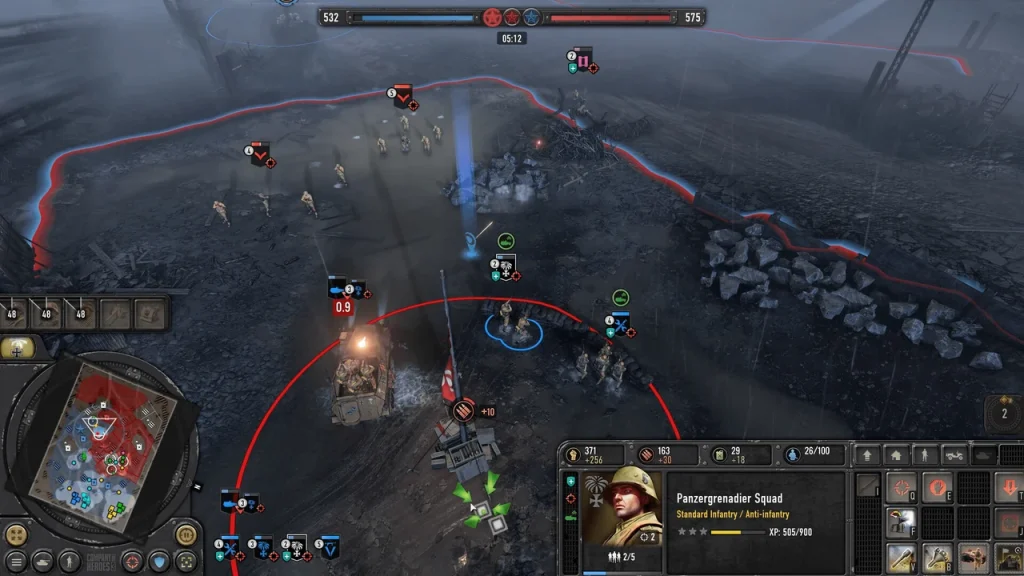
TL;DR: Start Company of Heroes 3 team game strategy with a shared session setup: the same mode, correct team assignments, a readable map and an agreed way to communicate. During the match, track the team objective and give short updates about availability and needs. Review one coordination problem together afterward.
Quick answer: A team match is won through the selected shared victory condition, not by each player pursuing an unrelated personal score. Choose between human opposition and a co-op AI session deliberately. Confirm the lobby and rules before building a plan around a map or mode your group did not actually select.

This guide covers multiplayer menus and cooperation habits, rather than a tested competitive opening. The official Steam page confirms multiplayer and co-op play. Relic’s 3.0 update notes document game-browser region information, player-color changes, team matchmaking changes and improved teammate information. The Rock Paper Shotgun beginner tips provide broad victory-point context; this guide does not adopt their launch-era ticket rates or fixed timings.
On this page
Company of Heroes 3 team game strategy: seven cooperation steps
1. Agree on the session’s mode and purpose
Decide whether the group wants a human-versus-human match or a co-op session against AI. These produce different expectations about difficulty, pacing and what you want to practice. Agree before entering the queue or lobby.
For a first cooperation drill, choose a setting where everyone can identify units and read the map without feeling overwhelmed. The goal can be learning how to give useful updates, rather than producing a competitive result immediately.
Keep the selected mode clear in the discussion. A custom co-op practice session does not demonstrate how the same group will perform in matchmaking. It gives you a place to learn coordination before changing the type of opposition.
2. Check party membership and team assignments
Use the available party or invitation controls to bring the intended players into the session. Verify the displayed members before proceeding. In a custom lobby, also inspect the team assignments and occupied slots so the group is actually on the intended side.
Read any party or matchmaking message instead of assuming that every invitation produces an eligible queue. The 3.0 notes describe team-skill matchmaking and limits on the rating range within a party. These rules can affect a group’s ability to queue together and may be tuned later.
If a custom lobby is the appropriate alternative, choose it deliberately. Correcting an eligibility problem should not silently change the group’s opposition or victory rules.
3. Inspect the map and lobby rules together
Confirm the map, player count, occupied slots and selected victory condition. A map name alone does not communicate every match setting. Read the lobby information before assuming that a previous session’s rules still apply.
Relic added a game server region column to the game browser in 3.0. Use that information when choosing a listed game, alongside the mode and settings. It identifies the listed region; it does not promise identical connection quality for every member of your group.
The Select Map screen also shows weather tags for snow and rain maps. Note the chosen variant when repeating a practice session. This makes your group’s reference to a map more precise than relying on a familiar loading-screen background.
4. Choose a readable team display
Inspect the player-color settings and the match’s player information. The 3.0 default changed from Team-Based to Unique, while vehicle color decals no longer appear by default. A returning player may therefore see a different visual presentation from an older guide or screenshot.
Use the player list and actual ownership information when identifying a teammate. Agree on names or clear map references that everyone understands. Do not assume the player using a particular color in one session will have that same color in every later match.
The useful outcome is being able to locate each teammate’s contribution without lengthy explanation. Readability is part of cooperation because an update cannot help if the listener cannot identify the player or location being discussed.
5. Read the shared victory condition
At the start, inspect the match objective and team indicators. In a Victory Point match, the opposing team’s ticket pool and the objective-point situation matter to the result. Your personal elimination total is not a substitute for the selected team victory condition.
Discuss which parts of the map each player is initially watching and how you will notice an unattended objective. Treat that as a starting arrangement that can be revised, rather than a permanent ownership rule preventing anyone from responding to a changed match.
If the lobby uses another victory rule, read that rule before applying Victory Point assumptions. The team’s immediate plan should follow the actual match, not whichever scoring example someone remembers from an earlier session.
6. Give updates that lead to a clear response
Use the game’s available communication controls or a voice channel the group already uses. Keep an update short: identify the place, the current need and whether you are asking for help or simply sharing information. Check the keybindings for the controls you intend to use.
A useful practice message might be, ‘I am recovering units; please watch the central objective briefly.’ The recipient should acknowledge whether help is available. Silence is not evidence that the request was understood or that someone has taken responsibility.
Update the group when the situation changes. If your units are ready again or the need has passed, say so. This prevents a teammate from making a decision based on an old request that no longer describes the match.
7. Review one coordination problem after the match
Use the result and available post-match information to identify one shared problem. It might be an unclear request, a misunderstood team assignment or an objective that every player assumed someone else was monitoring.
Describe the event in terms the group can check. ‘We did not acknowledge the request’ is easier to improve than a vague claim that another player contributed nothing. Decide on one communication habit for the next session.
If a compatible replay is available, review the relevant moment together. Relic’s 3.0 notes include replay-browser fixes and allow players to remain on the battlefield after playback ends. That feature supports review, but it does not guarantee that every older replay will provide the evidence you need.
Coordinate roles without locking players into assumptions
Before the match, ask each player which faction and controls they are comfortable managing. A beginner may benefit from a familiar production route while another player is practicing a different roster. Agree on what each person is ready to contribute instead of assigning a role solely from a faction name.
During the session, distinguish a planned unit from an available unit. Starting construction or research does not make the eventual purchase ready to help immediately. A clear production update should describe the current state without promising an arrival time you have not verified.
Use the beginner guide for surrounding controls and the skirmish AI settings guide for a repeatable practice environment. Familiar controls make it easier to communicate because the player can describe what is actually available.

Practice case: everyone thought another player was watching
Imagine a co-op group finishes a session and discovers that an important objective was unattended while each member focused elsewhere. Every player believed someone else had responsibility, but the group never confirmed the arrangement.
Review the initial discussion and the first update about that objective. Was someone explicitly assigned, did they acknowledge it, and did they later report becoming unavailable? A map reference without a clear request can be interpreted as information rather than responsibility.
For the next practice, name the person initially monitoring the objective and agree on a short handover message. If that player needs to recover units, another member should confirm whether they can temporarily take over the observation task.
Afterward, review whether the handover happened clearly. This is a communication exercise, not proof that one permanent allocation is the strongest strategy for every map. A useful arrangement remains understandable when the match changes.
Keep matchmaking and practice expectations realistic
The 3.0 matchmaking changes compare team-average skill ratings and adjust search parameters toward closer matches. The announcement also notes that a wider-rating party can wait longer. Read current queue messages rather than interpreting every delay as a broken invitation.
A co-op AI result does not establish a human-opponent win rate. AI behavior and matchmaking opposition are different environments, and the update changes both. Keep practice notes attached to the actual mode, team size and settings.
The fuel-control guide explains the surrounding resource-interface decisions. Use it when the group needs a common vocabulary for production and income, while continuing to judge the match through the selected shared objective.
Troubleshoot the team setup
A friend is missing from the session. Check party membership and the lobby’s occupied slots before launching. An invitation and an accepted session entry are separate states.
The group appears split between teams. Inspect the custom lobby assignments. Correct the intended sides before starting instead of relying on the party list alone.
Player colors look unfamiliar. Review the display settings and player list. The 3.0 default changed, so color memory from an older session can mislead you.
A request receives no help. Ask for acknowledgment and clarify the place and need. The recipient may be unavailable or may have understood the message differently.
A queue rejects the party. Read its current eligibility message and rating restrictions. Use an appropriate custom practice session only after the group agrees on that different setup.


Frequently asked questions
Should beginners practice co-op first?
It can provide a manageable place to learn communication and menus. Choose difficulty and session settings that match the group’s actual learning goal.
Do personal scores decide a Victory Point team match?
Follow the shared match objective and ticket situation. Personal statistics can support review, but they are not a replacement victory condition.
Should each player keep one permanent map assignment?
Use a clear initial arrangement and revise it with acknowledged updates when availability or the objective situation changes.
What should the group practice next?
Repeat the same setup while improving one acknowledgment or handover habit. The Company of Heroes 3 hub links supporting mode and production guides.
Sources and further reading
Keep exploring
Games Like Company of Heroes 3: three different tactical choices
Choose COH2 for familiar squad tactics, Gates of Hell for direct unit control, or Steel Division 2 for division decks and Army General.
Company of Heroes 3 Mortar Tactics: 7 Practical Decisions
Use mortar fire to change a defended position, choose damage or smoke by the task, and move the supported army while the opportunity exists.
Company of Heroes 3 Battlegroup Selection: 7 Useful Decisions
Choose a battlegroup to supply a specific capability, then match its unlock path and spending to the battlefield problem you observed.