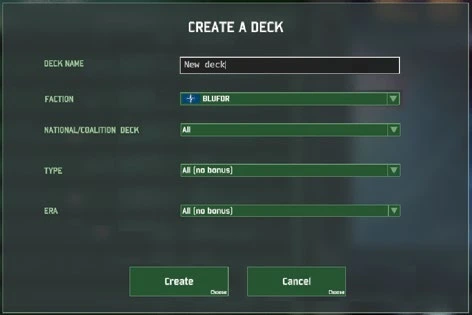
Wargame Red Dragon deck building works best when you choose a playable role mix before spending activation points on favorite units. Start with command, infantry, reconnaissance, anti-air protection, ground firepower and supply; then select cards, transports and veterancy levels that support your match settings. A deck is the menu of units you may buy, not an army that automatically appears on the battlefield.
Build around an opening you can afford and understand. A legal collection of premium cards may leave you unable to purchase enough roles with the deployment budget. Likewise, choosing the highest available experience everywhere can reduce the number of units available for reinforcement. Balance the options you need with how often you expect to call them in.

Checked November 9, 2026. This is a source-based guide, not a hands-on deck test or a current ranked tier list. The official 2014 manual, especially printed pages 28–31, explains the builder. Later balance patches change card details. Our Wargame: Red Dragon review covers the game as a whole.
On this page
1. Wargame Red Dragon deck building: choose a purpose
Decide which environment the deck serves before adding cards. A small ground-focused Skirmish session is different from a large team lobby with different income settings. Read the intended map, victory mode and available deployment budget. The builder cannot decide those priorities for you, and a shared deck code does not explain the assumptions behind another player’s choices.
For a learning deck, begin with an unrestricted theme and the era setting that gives you the roster you want to study. This is an editorial starting suggestion, not a rule that specialization is always inferior. Specialization can be useful when you understand its bonuses and exclusions. Initially, keeping broad role access makes it easier to see which function is actually missing.
Copy a starter deck if you want a reference you can edit. The manual distinguishes the protected white starter decks from user-created copies. Give the copy a name reflecting its purpose, such as a specific map practice session. Keep a record of the constraints and major changes so that you do not confuse an older experimental version with the one selected in the lobby.
Write a short role statement before buying the first card: this deck should establish control, deliver infantry into cover, observe important approaches and keep its useful ground units supported. That statement makes card decisions concrete. When a proposed unit does not help any of those jobs, compare its activation cost with an option that does.
2. Allocate activation points by the next slot’s cost
Activation points determine which cards can be included in the deck. Deployment points pay for individual units during the match. Card availability determines how many copies remain to buy. These are separate constraints. Never assess an opening by adding activation costs as though they were battlefield purchase prices; inspect the deployment prices of the actual units instead.
The deck overview shows activation points used and allowed, spending by category, and the cost of adding another card. Check that next-slot cost before making a category crowded. Another card in a heavily populated tab may use points you need to add an entirely missing role elsewhere. The best comparison is what each proposed addition lets you do in a match.
For example, a third similar tank card expands one existing option. A first suitable recon or supply card creates another function. If the current deck lacks that function, it deserves attention before another duplicate. This is a role-based allocation method, rather than a fixed number of cards in every tab. Theme, coalition and era settings can alter the builder’s costs and available slots.
The archived manual says naval units do not use activation points. Do not turn that statement into a reason to add irrelevant naval choices to a ground-only practice plan. Read the current builder and lobby restrictions before depending on any category rule. The main habit is to check the visible cost and explain what the added option contributes.

3. Cover essential roles before buying luxury alternatives
Work through the categories in terms of jobs. LOG includes command and supply options; INF provides infantry with transport choices; REC is reconnaissance; SUP includes anti-air and artillery. Tank and vehicle choices add their own ground capabilities. Names and category placement help locate options, but the complete card tells you whether the model serves the job you need.
| Deck decision | Practical check | Reason to reconsider |
|---|---|---|
| Command card | Can it establish and retain control? | No affordable opening command option |
| Infantry and transport | Can the pair reach useful cover? | Carrier cost crowds out supporting roles |
| Recon card | Does its observation suit the intended area? | Buying only for its weapon |
| Anti-air card | Which airborne target types can it address? | Confusing a category with a complete capability |
| Ground combat card | Which target and terrain does it suit? | Several cards duplicate an existing job |
| Supply card | Can it support the units you expect to use? | No practical replenishment option |
Check command affordability before committing to an opening. A command card is not just another ground combat card, and command infantry has a transport-and-unload step before capture. If the selected option makes your initial group unaffordable, compare another legal command choice instead of discovering the problem after the deployment timer has started.
Do the same with support. You do not need to buy every included card immediately, but the deck should offer an answer when reconnaissance reveals a missing capability. Including many impressive units that all solve the same problem narrows your response. Preserve room for the less glamorous options that keep useful units informed, supplied and protected.
If you include a FOB, account for its initial purchase in the opening plan. The manual limits its deployment to the deployment phases; it is not an ordinary later reinforcement. Compare that commitment with the supply vehicles and combat roles you need immediately. Including a supply facility in the deck and actually budgeting for it are separate decisions.
4. Choose veterancy together with card availability
The manual says the available experience ranks of a selected unit have the same deployment price but different availability. Higher experience can improve performance, while the selected card may provide fewer units. Compare the displayed counts at each available rank. You are deciding how much of that capability remains accessible through the match, not simply selecting a better label.
A frequently purchased infantry role needs enough replacements to remain useful. If you choose a rank that leaves very few copies, the deck may lose that option long before the match ends. Conversely, a rarer specialist might justify prioritizing experience when its intended job and likely use support the choice. There is no single veterancy setting that is automatically correct for every card.
Use your practice purchases to judge the tradeoff. If a card regularly runs out while you still have deployment money, availability has become a real limit. If several copies remain unused in every test, adding another similar card may not improve the deck. Observe which units you actually call in and whether their chosen experience supports the role.
Read availability after applying coalition, theme and era settings, rather than copying a count from a different deck. These restrictions can affect the selection context and bonuses. An old guide’s numbers are not proof of the count in your builder. The useful comparison is between the legal ranks and counts shown for your exact deck in the installed version.
5. Evaluate infantry and transport as one purchase
For transported infantry, inspect both the squad and the carrier. The infantry supplies one set of weapons and characteristics; the transport supplies mobility, protection and possibly its own weapons. A suitable squad with an unnecessarily costly transport can consume money that would have bought reconnaissance or support. A cheaper carrier may fit a delivery role better, depending on the options available.
Compare road and off-road movement fields when deciding how the pair reaches the intended area. The manual distinguishes these movement characteristics. A transport suited to a road route is not automatically the best fit for every terrain approach. Look at your chosen map and how you intend to unload, rather than selecting a carrier because its model name appears stronger.
After unloading, the squad and carrier are separate pieces to manage. Infantry can enter buildings and use forest cover; its vehicle remains outside buildings. If you plan to retain the carrier for ground fire support, inspect its weapon and protection for that secondary job. Do not count a loaded infantry squad as already occupying the cover you want to hold.
Make one affordable opening purchase list using the selected squad-and-transport combinations. Add command, reconnaissance and the other roles you need, then compare the total with the lobby’s deployment budget. This exercise tests whether the deck can produce your intended starting group. It is more informative than judging the whole deck by the number of premium cards it contains.

6. Recheck coalition, theme, era and prototype access
Faction, national or coalition selection, theme and era are separate choices. BLUFOR and REDFOR units cannot be mixed in one deck. A named coalition limits the nation pool; a theme can alter access, experience and category costs; an era restricts eligible equipment dates. A unit missing from the list may be excluded by any one of those conditions.
Prototype access is part of the national and coalition restriction system described by the manual. However, a prototype does not override every other restriction. If a desired unit does not appear, remove or review the relevant filters one at a time in a separate test deck. Do not change all constraints at once, because that hides which condition actually caused the exclusion.
Coalition availability bonuses are not a universal percentage. The September 2021 SADF release update changed Commonwealth availability from zero to ten percent in that patch. It is a dated example showing that bonuses can change, not a promise that the same percentage applies to every coalition or future version.
The August 2024 Italy release announcement describes Italy as a standalone NATO nation. Owning a nation pack does not establish that its cards belong to any coalition you select. Verify the nation pool and ownership requirement in the builder before basing the deck on a downloadable card or shared list.

7. Test the deck, record the gap and change one card
Save the deck and confirm it is selected in the lobby. In Skirmish, test the opening you designed under the settings that matter to you. Observe whether command control works, infantry reaches useful cover, reconnaissance supplies information and your supporting units remain usable. A deck that looks complete in the builder can still have an opening that is too expensive or difficult to manage.
Record the first limiting factor in plain language. Useful examples are no remaining copies of a needed infantry role, no legal response to a detected target, an unaffordable transport combination, or a useful group that repeatedly runs short of supply. The description should identify a missing capability or constraint. A single loss is not enough to conclude that every card needs replacement.
Change one card, transport choice or veterancy setting, then retest. Compare the new option’s activation cost, deployment price and availability with the one it replaces. Keep a copy of the previous version so you can reverse the change if it creates a larger gap. This gives the next match a clear question rather than a completely different deck whose result is hard to interpret.
You can export the finished deck as a text string, as described in the manual. When sharing it, include the intended mode, restrictions and reason for its unusual choices. When importing somebody else’s string, check the current legal cards and ownership before relying on it. Use our game guide library to investigate the specific system that your next test exposes.
Sources and further reading
Keep exploring
wargame red dragon radar anti air management: coverage and weapon-state decisions
A source-backed guide to managing specific radar-related weapons within a complete Wargame Red Dragon air defense.
wargame red dragon sead aircraft: choose a mission that helps
A concise source-backed guide to choosing and reassessing a useful SEAD mission in Wargame Red Dragon.
wargame red dragon korean war campaign: keep a usable campaign roster
A practical wargame red dragon korean war campaign guide using the official manual, with explicit assumptions and the limits of archived game information.