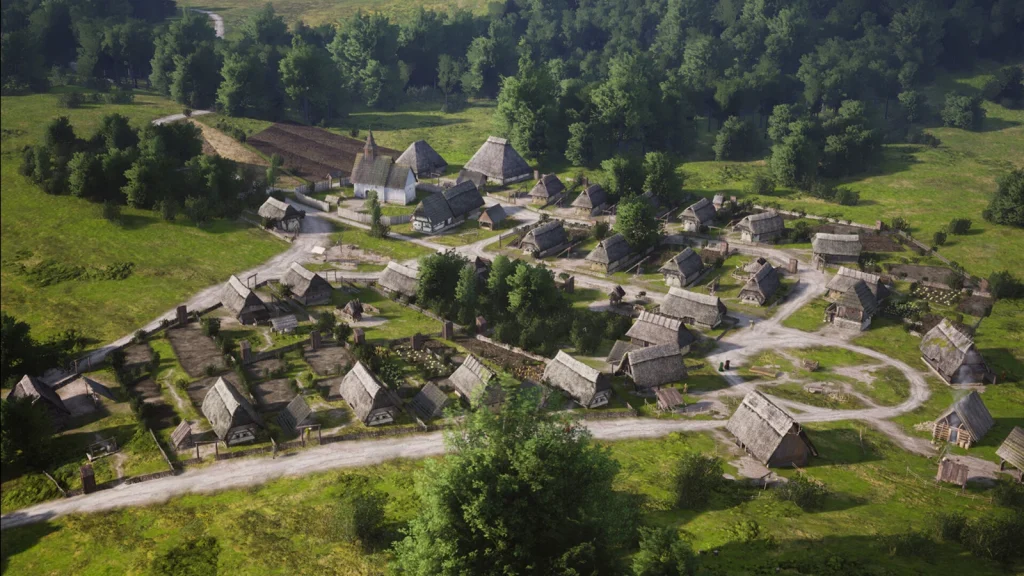
Manor Lords road layout should make regular trips clear and reasonably short while preserving useful plot shapes and resource areas. Start with the existing route into the settlement, connect storage and production deliberately, and expand housing in small sections. A tidy road pattern is helpful only when workers can use it and buildings retain the space they need.
On this page
Manor Lords Road Layout: Draw the first route around real destinations
Place the main connection where it serves the town’s working center rather than through the middle of every future residential plot. Think in destinations: storage, the marketplace, production workplaces, housing and the outside route used by trade.

The official game description presents gridless placement shaped by trade routes and terrain. You do not need a perfect square grid. A gentle curve can fit the land better while still providing a readable connection between the places residents visit.
Keep the first plan modest. Long speculative roads create more borders to fit plots around and can consume useful space before you know the settlement’s industry or housing requirements. Connect the buildings you are actually preparing to use.

Use the terrain and plot preview together
Open the terrain overlay when drawing routes near slopes, water or awkward ground. The August 2026 update made that overlay available in road mode. Inspect the route before committing rather than discovering a poor building approach after the houses are laid out.
Preview burgage plots alongside the road. Check the displayed capacity and extension possibilities, not only the visible yard area. A narrow wedge or an abrupt turn can make a plot less useful for the job you intend behind the home.
Protect valuable resource ground. A road and row of houses can be attractive on the map while encroaching on woodland, gathering space or fertile land. Decide which areas should remain production or resource areas before extending the urban edge.
Follow the goods when choosing storage locations
A practical road connects a route that gets used many times, not merely the shortest line between two icons. Watch how workers move goods from the source to storage and then toward households or processors. Repeated long trips reveal where placement matters most.
Do not assume a road eliminates every walking delay. Workers still collect and carry goods, and access to the building remains relevant. A remote storage building can produce long detours even when its road is straight.
Timber transport has its own behavior. The October default update made oxen less strict about following roads. Therefore, an ox crossing open ground does not automatically mean the route is broken. Inspect its actual task and destination before redrawing the whole transport network.
Separate the construction queue from the permanent town plan. Building materials or supplies are temporary destinations; October says Supplies no longer create road snapping points. Avoid extending permanent streets around temporary piles as though they define the future center.
Treat wide roads and bridges as specific tools
Wide roads are influenced by the buildings and plot borders they serve. The October update added the Wooden Church as a wide-road trigger and extended wide-road stretches along plot borders. Use the current placement preview and resulting road rather than assuming every drawn street has the same width.
The January 2025 update introduced bridge building through the Road Tool. At a river, inspect the valid connection and bank approaches. A crossing that reaches the far bank still needs a usable onward route for the destination you intend.
Roads also affect military movement commands. January described units aligning narrow formations when sent with a single click to a road or bridge, while October added orders for squads to follow roads. Use those commands when the route is helpful, then deploy deliberately before combat; a marching column is not necessarily the fighting formation you want.
After one housing or industrial expansion, watch ordinary trips before drawing the next. Keep connections that serve real work, revise awkward borders early and leave future resource space intact. The Manor Lords guides hub connects road planning with burgage, storage and timber transport when the route is only one part of the problem.
Sources and further reading
- https://store.steampowered.com/app/1363080/Manor_Lords/
- https://steamstore-a.akamaihd.net/news/externalpost/steam_community_announcements/1788311419046724
- https://steamstore-a.akamaihd.net/news/externalpost/steam_community_announcements/1842212951300554
- https://steamstore-a.akamaihd.net/news/externalpost/steam_community_announcements/1847920302241640
Keep exploring
Manor Lords vs Crusader Kings 3: build a town or guide a dynasty?
Pick Manor Lords for a medieval settlement and its household economy; pick Crusader Kings III for rulers, relationships and a realm passed between generations.
Northgard vs Manor Lords: clan objectives or settlement planning?
Choose Northgard for clan-specific strategy and explicit victory routes; choose Manor Lords for the placement, households and production of a medieval settlement.
Manor Lords Militia Equipment: Build a Complete Loadout
Manor Lords militia equipment: check squad requirements, starter delivery conditions, artisan output and replacement stock before rallying.