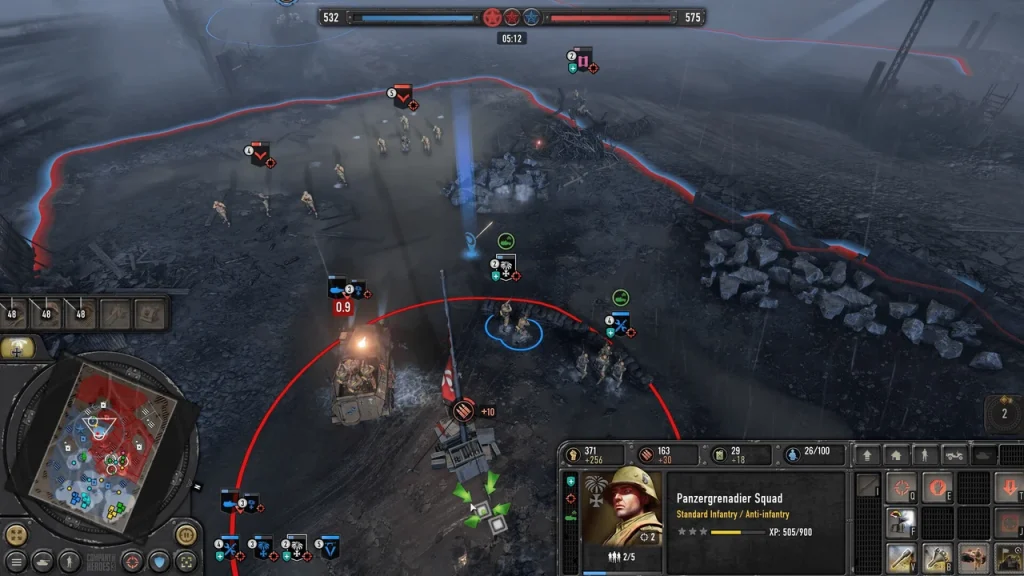
TL;DR: This Company of Heroes 3 Wehrmacht build order is a production exercise: construct the Infanterie Kompanie, produce Grenadiers and a machine gun team, then choose a second-tier building for a specific roster need. The example continues through the Panzergrenadier Kompanie. Research an unlock only when you intend to use its units.
Quick answer: Wehrmacht production is organized around Headquarters, the Infanterie Kompanie, two different intermediate buildings and the Panzer Kompanie. A unit listed in a building’s roster can still need a research unlock. Read the production card and the building’s upgrade menu separately before spending.

The named menus were checked against the COH3 Stats Wehrmacht building overview, labeled patch 3.0.0, and the official 3.0 update notes. This is a standard AI-skirmish learning path, not an optimized competitive sequence or a claimed result from our own matches.
Its purpose is to make the next production choice understandable. Do not read the suggested unit counts as a rule for every mode. Use the installed game’s requirements and resource costs when the practice route branches.
On this page
Company of Heroes 3 Wehrmacht build order: seven menu steps
1. Construct the Infanterie Kompanie
Open the base construction controls, select the Infanterie Kompanie and confirm its placement and progress. While it is building, select Headquarters and identify the Pioneer and Kettenkrad production options. Those are different units from the Grenadiers you will produce next.
The Wehrmacht unit directory identifies Pioneers as repair and defense-building support. Do not treat another Pioneer purchase as the automatic answer to every unfinished base task. Inspect which action or structure is actually waiting.
When the Infanterie Kompanie completes, select it deliberately. Notice its production and research controls. A finished building makes a roster available, but the unit queue remains a separate part of the interface.
2. Queue the first Grenadier squad
Select Grenadiers from the Infanterie Kompanie and verify the production entry. The faction’s checked unit descriptions identify Grenadiers as standard infantry, which makes them a clear starting point for learning selection, resource tasks and recovery.
Assign a nearby task once the squad appears, then return to the base menu. The exercise is successful when you can produce a unit and continue checking the queue while controlling it. Waiting for a perfect map result before looking at production makes the next purchase arrive through neglect rather than planning.
Use the beginner guide for the surrounding controls. Here, keep the focus on knowing which building produced the squad and what resources remain after the purchase.
3. Add a machine gun team from the same building
Inspect the machine gun production icon in the Infanterie Kompanie. The standard roster includes the MG42 team. Queue one for this exercise so you learn a second unit type without adding another production structure immediately.
Once it completes, give it a manageable in-game assignment and keep its selection separate from the Grenadiers. Do not infer that owning a different unit type means you have completed a new technology tier. Both purchases came from the same building.
This step is about production and unit ownership, rather than a detailed weapon-use tutorial. If you need help with the unit’s behavior, choose the relevant guide through the game hub after completing the menu exercise.
4. Produce a second Grenadier squad and review recovery
Add a second Grenadier squad when resources and the existing army’s condition support it. This creates a small roster that is easier to monitor than a long queue of units you have not yet learned to select.
Before committing the purchase, inspect the first squad. Missing soldiers create a reinforcement expense that competes with the second squad and the next building. A suggested count should not persuade you to leave the first useful unit unrestored while pretending the cost has vanished.
After the second squad arrives, check all current units for an assignment. If the base queue has become your sole focus, use the unit icons to locate the infantry already produced. More production cannot fix several completed squads remaining unused at their arrival point.
5. Select the Panzergrenadier Kompanie branch
Open the next construction options and compare the Panzergrenadier Kompanie with the Luftwaffe Kompanie. The two buildings contain different rosters. They should not be treated as the same upgrade with different artwork.
For this exercise, select the Panzergrenadier Kompanie when its displayed requirements and resource costs can be met. Its standard roster includes Panzergrenadiers, a 251 carrier and the Pak 40 team, with additional units behind Support Elements research.
The alternative Luftwaffe Kompanie provides options including Jägers, the 221 scout car and the Flak 30 team, with Marder and Wirbelwind access tied to Support Elements. Choose the building whose available unit you intend to produce, rather than purchasing both simply to make every icon visible.
6. Produce one unit from the selected branch
When the Panzergrenadier Kompanie completes, inspect the available Panzergrenadier and Pak 40 production cards. Pick the role you need in the game. For a calm learning exercise, producing a Panzergrenadier squad lets you compare another infantry option with your existing Grenadiers.
If an opposing vehicle creates the immediate role gap, inspect the Pak 40 option instead. This is a software purchase decision based on the unit’s stated game role, not a promise that one unit automatically resolves every situation.
Confirm the queue entry and completion before making another branch purchase. Record which unit you chose, which building provided it and what expense you postponed. That record helps distinguish a useful adaptation from an accidental queue change.
7. Decide between Support Elements and later construction
Inspect Support Elements in the relevant intermediate building. The checked description unlocks the StuG III G and Nebelwerfer in the Panzergrenadier Kompanie, and Marder and Wirbelwind options in the Luftwaffe Kompanie. The unlock is a research action, not production of those units.
Buy it in this exercise only if an unlocked option has a defined place in the next plan. After research completes, select the production building again and verify the changed unit card. You still need the resources and queue entry for the unit itself.
Alternatively, inspect the Panzer Kompanie’s requirements and roster. The practice route can stop before this larger investment. Learning why you deferred an unlock is more useful than clicking it solely because it appears next to an available icon.
Separate unit unlocks from Officer Quarters
The intermediate buildings contain more than one kind of research. Support Elements opens specific production choices. Officer Quarters provides veterancy-related benefits described by the selected upgrade. These functions are not interchangeable.
If your desired unit remains locked, buying Officer Quarters because it looks like the next technology button can leave the original requirement unfinished. Read the unit card, identify the named unlock and find that research in the building’s menu.
Likewise, do not buy Support Elements expecting it to perform the Officer Quarters function. The two expenses can compete for resources even when both may eventually be useful. Write the intended result of each purchase before you add another item to the plan.
The official 3.0 notes adjust Wehrmacht infantry and Officer Quarters-related balance. That is another reason to use current descriptions instead of an old screenshot’s values. This guide names the menu functions without presenting a fixed veterancy multiplier or tested combat advantage.

What the Panzer Kompanie changes later
The Panzer Kompanie is a later production building with options including the Panzer IV, Stoßtruppen and the Sturmpanzer IV. Constructing it provides a different roster; it does not make every earlier purchase retrospectively necessary.
Relic’s 3.0 notes introduce its Battle Phase passive, which discounts technology upgrades and production buildings after this tier is reached. That verified change matters when reviewing the cost of returning to an earlier building later in the match.
Do not plan the initial intermediate building purchase around receiving a discount you have not unlocked yet. The current production stage determines the available cost, and the actual game display should confirm it. A later discount is not resources you can spend during the earlier practice steps.
Vehicle production pacing also changed in 3.0. The drill uses completed prerequisites and visible queues instead of promising an exact Panzer IV arrival time. Treat a historical timestamp as context, not as proof that your current resource plan is failing.
Decision exercise: the right building, the unfinished unlock
Imagine you constructed the Panzergrenadier Kompanie and selected a unit shown in its full roster, but its production card remains unavailable. You have been saving resources and assume the structure’s completion should have finished the whole requirement.
Start with the unavailable unit card. Read the requirement shown there and distinguish research from resources. If it names Support Elements, return to the building’s research menu. Another Grenadier purchase, Officer Quarters upgrade or unrelated structure will not complete that named unlock.
Next, decide whether you still want the gated unit. Its full cost includes the research you have not yet bought and the unit production that follows. If the immediate game need can be met by an already available option, compare that route before spending merely to justify the building choice.
If you continue with Support Elements, confirm research completion, reselect the structure and queue the unit. The useful exercise is following the dependency all the way from requirement to completed production. Do not stop observing at the moment the research progress bar finishes.
Afterward, note whether the delay came from an overlooked unlock or a changed resource position. Those are different errors. The first calls for reading the unit card earlier; the second calls for revising the purchase plan around the costs you actually paid.
Troubleshoot the opening without adding random purchases
Keep a small record of your intermediate-building choice: which roster you wanted, whether its named unlock is complete and which unit you actually queued. A Panzergrenadier Kompanie plan should name its own purchases. A Luftwaffe Kompanie plan should name the alternatives in that building instead of borrowing a unit from the other branch.
When a purchase changes, revise the record before saving for the next stage. This makes it easier to see whether you deliberately changed the roster or merely clicked the wrong structure. It also separates money spent on veterancy research from money spent opening additional production options.
The new building is finished but the desired icon is locked. Check the unit card for a research requirement. Find the exact named upgrade instead of guessing that every nearby technology button performs the same function.
The expected unit is absent from this roster. Confirm whether you chose Luftwaffe or Panzergrenadier Kompanie. Their different unit lists are the reason the branch exists. Check the source roster before treating a missing option as a bug.
Production keeps stopping while infantry returns for reinforcement. Review the resources committed to recovery and existing queue entries. Use the retreat timing article for preservation choices, then reserve actual resources for the next purchase.
Two intermediate buildings exist but neither is producing. Identify the purchase you meant each one to support. If no role was defined, the problem is construction without a follow-up unit plan. Avoid adding a third structure until that gap is understood.
A later discount differs from the old opening’s cost list. Check whether Battle Phase has become active and compare the actual game display. Do not mix pre-discount and later-tier costs in the same resource calculation.


Frequently asked questions
Is the Panzergrenadier route mandatory?
No. It is the chosen production exercise. The Luftwaffe branch has a different roster and can form another learning route.
Does Support Elements produce its unlocked units?
No. Research changes availability. Each unit still needs its own purchase and completed production queue.
Should Officer Quarters always come first?
Choose it for its stated benefit. It does not replace a required production unlock or restore resources spent elsewhere.
Is this a current competitive build?
It is a source-checked learning sequence, with no competitive ranking or match-test claim. Mode and game needs can change the order.
How should I review the exercise?
Identify one purchase whose expected result did not match its menu function. Use the Company of Heroes 3 hub to continue with the relevant production or resource problem.
Sources and further reading
Keep exploring

Games Like Company of Heroes 3: three different tactical choices
Choose COH2 for familiar squad tactics, Gates of Hell for direct unit control, or Steel Division 2 for division decks and Army General.
Company of Heroes 3 Mortar Tactics: 7 Practical Decisions
Use mortar fire to change a defended position, choose damage or smoke by the task, and move the supported army while the opportunity exists.
Company of Heroes 3 Battlegroup Selection: 7 Useful Decisions
Choose a battlegroup to supply a specific capability, then match its unlock path and spending to the battlefield problem you observed.