The best war strategy games Linux players can shortlist from official Linux support are The Battle for Wesnoth, Into the Breach and Total War: ROME REMASTERED. Choose Wesnoth for fantasy campaigns, Into the Breach for compact mech-defense tactics, or Rome for ancient campaign warfare and large battles. Their official Linux requirements give a clearer starting point than assuming every Windows strategy game will work through a compatibility layer.
This guide compares the published Linux builds and requirements. It does not certify every distribution or test Proton versions. Your distribution, graphics driver and display setup remain part of the purchase decision, particularly for Rome’s Vulkan-based requirements.

On this page
Best War Strategy Games Linux: Wesnoth: the campaign-focused starting point
The Battle for Wesnoth is an open-source turn-based game with fantasy armies, story campaigns, multiplayer factions and a map editor. It is the best fit here when you want a continuing adventure and army decisions across multiple battles rather than a single short tactical board.
The official Linux minimum names Ubuntu 20.04 or compatible, a dual-core 2.0 GHz processor, 2 GB RAM and 800 MB storage. The recommended listing names Ubuntu 22.04 or compatible and raises memory to 4 GB. Use those references to compare your setup instead of reading Linux support as a distribution-independent guarantee.
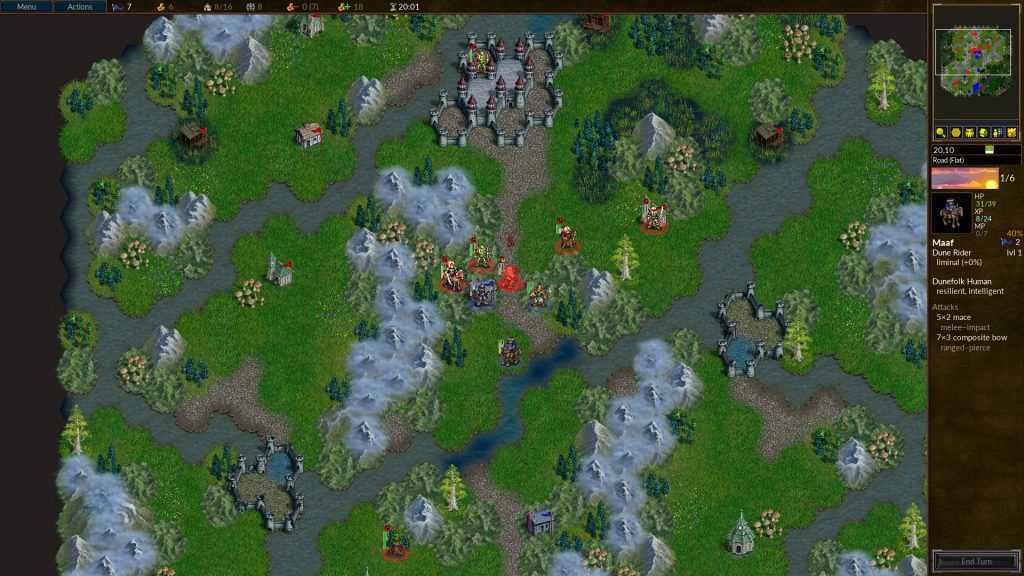
Its battlefield image shows hex terrain, mountains, castles and a unit panel. The appeal is reading that board and building a force suited to it. The fantasy setting is also the main limitation for a war-game search: it includes armies and campaigns, but not historical equipment or a simulation of a real conflict.
Start with the included campaigns rather than collecting community additions immediately. That keeps the initial decision about the base game clear and avoids making a large mod collection your first compatibility check. Multiplayer exists, but no current server population is needed or assumed for this recommendation.

Into the Breach: a small board with visible threats
Into the Breach is the option for concentrated tactical decisions. You command mechs against creatures threatening cities. Enemy attacks are shown in advance, and civilian buildings supply the power that keeps your defense going. Planning which threat to stop is central to each turn.
Its Linux minimum names Ubuntu 14.04 or more recent, a 1.7 GHz processor, 1 GB RAM, OpenGL 2.1 support and 400 MB storage. Intel HD 3000 or better is mentioned in the graphics requirement. This is a comparatively modest published target, not a benchmark performed on your distribution or integrated graphics hardware.
Choose it when you want to inspect a compact board without a real-time clock. The viewed screenshot places objectives and the End Turn button around the grid, making its limited battlefield scale clear. It suits a focused evening of tactical defense better than a request for empire administration or a historical campaign map.
The drawback is scope. Mechs against the Vek are science-fiction tactics rather than conventional military warfare. A reader who specifically wants infantry divisions and tanks should not choose it only because the system requirements look convenient. Compatibility helps you play a game; it does not make the setting match your interest.

ROME REMASTERED: larger battles need a stricter graphics check
Total War: ROME REMASTERED combines a classical campaign with large real-time battles. Updated tactical maps, unit displays and range markers support battlefield command, while campaign overlays cover areas such as diplomacy and security. Alexander and Barbarian Invasion are included.
The Linux minimum names Ubuntu 20.04 64-bit, 6 GB RAM and 45 GB storage. Its graphics examples are a GTX 660 with 2 GB VRAM or an AMD R9 285 with 2 GB VRAM. The listing explicitly requires a Vulkan-capable GPU and supplies Nvidia and Mesa driver guidance.
Those conditions make Rome a different selection from the two smaller games. Check the current full requirements and driver notes before installing, particularly if your computer uses older integrated graphics. A Linux platform flag alone does not tell you that your GPU supports the required API.
Choose Rome for formation battles and the broader campaign. Its drawback is the larger hardware and storage commitment, alongside the workload of commanding many units. Also note that the included original ROME: Total War Collection is Windows-only; the remaster is the Linux-supported product discussed here.
Choose a native starting point, then test your setup
For fantasy campaigns, begin with Wesnoth. For small tactical defense problems, compare Into the Breach. For ancient armies and a larger campaign, check Rome’s graphics requirements first. Keep your initial test simple: launch the base game, inspect text and controls, and run a small battle before adding mods.
If you are using a handheld, consult the Steam Deck selection, where Valve’s device-specific reports add information beyond the general Linux listing. This desktop guide makes no claims about untested compatibility-layer versions or every available Linux distribution.
Sources and scope
Official Steam descriptions and Linux requirements support the recommendations. No distribution-wide test matrix, native performance benchmark or Proton guarantee is claimed.
Sources and further reading
Keep exploring
Hearts of Iron 4 occupation laws: control resistance without draining reserves
Match occupation policy to resistance, compliance and a garrison you can actually supply; use stronger control only when the situation justifies its cost.
wargame red dragon radar anti air management: coverage and weapon-state decisions
A source-backed guide to managing specific radar-related weapons within a complete Wargame Red Dragon air defense.
wargame red dragon sead aircraft: choose a mission that helps
A concise source-backed guide to choosing and reassessing a useful SEAD mission in Wargame Red Dragon.