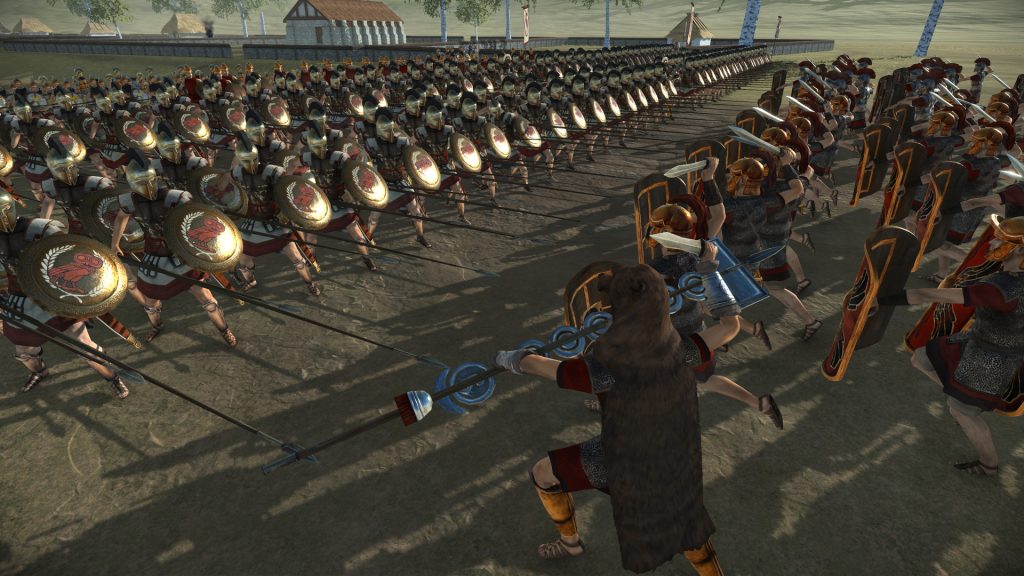
For the best war strategy games Mac players should compare Total War: ROME REMASTERED, Unity of Command II and The Battle for Wesnoth. Rome offers ancient armies and real-time battles, Unity of Command II focuses on WWII divisions and supply, and Wesnoth supplies turn-based fantasy campaigns. All three list macOS support, but their processor, graphics and operating-system requirements differ substantially.
Begin with your exact Mac model and chip, not the Apple logo on a store page. An Intel-era minimum requirement is not automatically an Apple Silicon guarantee. These choices use official platform fields and requirements; they are not results from a personal Mac benchmark.

On this page
Best War Strategy Games Mac: ROME REMASTERED for ancient armies and a campaign map
Total War: ROME REMASTERED is the choice when you want a campaign of expansion leading into battles between large formations. It adds updated cameras, tactical map features, range markers and campaign overlays to the classic game. The package includes the Alexander and Barbarian Invasion expansions.
Its Mac minimum lists macOS 11.6.1, 8 GB RAM and 45 GB storage. Apple M1 is included in the graphics requirement with Rosetta 2 required. The official description also supplies a supported-model list, rather than treating every Mac as equivalent. Check your model against the current full listing and meet all listed elements of the specification.
The tradeoff is size and workload. A large battle and a substantial install are a different proposition from a small hex-map game. You are choosing this for formation combat and the wider campaign. Do not buy solely because your chip appears in one line of the specification while ignoring memory or the rest of the model guidance.
One package detail matters: the included original ROME: Total War Collection is explicitly Windows-only. Mac support belongs to ROME REMASTERED. Do not treat the older bonus copy as a second playable Mac game or confuse its requirements with the remaster’s.

Unity of Command II for WWII logistics
Unity of Command II fits someone who wants to command divisions rather than individually manage soldiers. Its Western Allied campaign puts supply and logistics alongside combat. Headquarters handle reorganization, bridging and resupply, while reconnaissance and captured stragglers help reveal enemy positions.
The Mac minimum lists a 64-bit macOS 10.12 or newer system, a dual-core processor, 4 GB RAM and a GPU supporting OpenGL 3.3 with 1 GB VRAM. There is also a specific Nvidia instruction: users must install the Old GPU Shader Fix mod. That qualification deserves attention on an older Intel Mac.
The recommended specification names macOS 11 Big Sur, 8 GB RAM and Apple M1 or newer, with an M1 eight-core GPU. These official requirements offer a more concrete Apple Silicon reference than an unspecified Mac badge. They still do not establish measured performance on your machine, and this guide does not repeat an untested frame-rate promise.
Choose it for the problem of keeping an advance supplied. Its drawback is that success can depend on logistics and headquarters decisions you cannot solve by buying a stronger tank. A player mainly interested in watching real-time formations clash should choose Rome; a player who enjoys tracing a supply route should start here.

Wesnoth for fantasy campaigns on modest specifications
The Battle for Wesnoth is an open-source, turn-based fantasy strategy game. The official store describes more than a dozen adventures, multiplayer factions, community campaigns and a built-in map editor. It suits a reader who wants army development and terrain-based battles without requiring a historical setting.
Its Mac minimum lists OS X 10.12 or later, a dual-core 2.0 GHz processor, 2 GB RAM and 800 MB storage. The recommended listing increases memory to 4 GB and names macOS 10.15 or later. These figures are modest compared with Rome, although a lower published requirement does not by itself verify every chip and operating-system combination.
The main limitation is subject matter. Orcs, undead and fantasy kingdoms will not replace WWII divisions if that is the specific experience you want. It is also a game in which learning the rules matters: a smaller install does not make campaign planning shallow. Begin with an included adventure before adding a large set of community content.
Match the game to the Mac and the evening
Check the current requirements, available storage and any model-specific note before purchasing. Then choose Rome for large ancient battles, Unity of Command II for WWII operational decisions or Wesnoth for fantasy campaigns. Launch a small scenario first so you can confirm readable text, stable controls and acceptable performance at your chosen settings.
For handheld compatibility, use the separate Steam Deck shortlist. A Deck classification does not replace a Mac requirement check. For a Mac, the exact chip, OS version and graphics guidance are the useful starting points.
Sources and scope
Platform support, features and requirements come from the linked official Steam pages. No personal Mac playtest, Apple Silicon performance comparison or blanket compatibility promise is claimed.
Sources and further reading
Keep exploring
Hearts of Iron 4 occupation laws: control resistance without draining reserves
Match occupation policy to resistance, compliance and a garrison you can actually supply; use stronger control only when the situation justifies its cost.
wargame red dragon radar anti air management: coverage and weapon-state decisions
A source-backed guide to managing specific radar-related weapons within a complete Wargame Red Dragon air defense.
wargame red dragon sead aircraft: choose a mission that helps
A concise source-backed guide to choosing and reassessing a useful SEAD mission in Wargame Red Dragon.