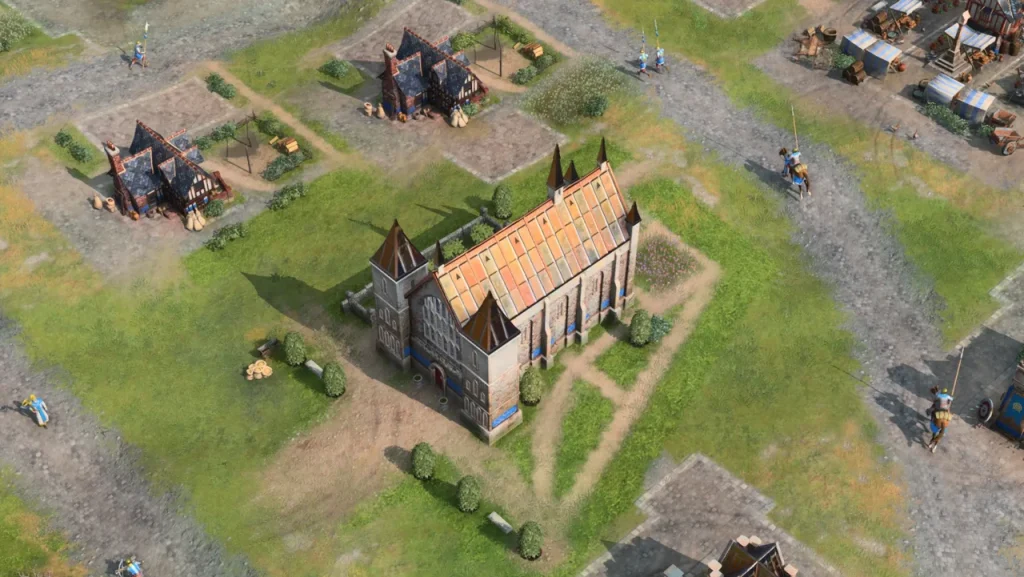
Age of Empires 4 Landmark victory is one of the victory conditions described in the official Quickstart Guide. It is defined around the opponent’s Landmarks, while Sacred and Wonder victories use different objectives. Read the enabled match rules and the objective state to understand which condition applies and whether the game has announced a result.
For team games, the official Season Two update adds an important rule: players are eliminated only when all allied Landmarks are destroyed. The state of one player’s base therefore does not establish the team’s elimination result. This guide explains that rule and how to read match status, without prescribing combat tactics.

Use these checks in an ordinary skirmish or custom match whose rules you can inspect. Campaign objectives and custom game modes can use their own conditions. If general game controls are unfamiliar, the Age of Empires 4 beginner guide provides the starting context.
On this page
Age of Empires 4 Landmark victory in 6 interface checks
Separate the condition selected for a match from the state displayed during it and the final result. They answer different questions: what can end the game, what is happening now, and whether the game has actually ended. Keeping those three states separate makes the official team rule easier to interpret.
1. Read the selected match rules
Before starting a skirmish or custom game, inspect the configured victory conditions. Confirm which options the host or mode has enabled. The existence of Landmark victory in the official game guide does not mean every campaign mission or user-created mode is required to use it in the same way.
After the match loads, read its displayed objectives as well. A lobby setting is useful context, but an active mode can present additional requirements or a different scenario objective. If the two appear inconsistent, identify the selected mode first rather than assuming the standard guide describes every custom ruleset.
2. Identify which kind of victory is being described
The official Quickstart Guide lists three types: Landmark, Sacred, and Wonder. Its Landmark description refers to the opponent’s Landmarks. Its Sacred description concerns taking and maintaining control of map locations. Its Wonder description concerns constructing and protecting a Wonder for a specified period.
These descriptions explain why a progress indicator for one condition is not automatically a result for another. A Sacred countdown belongs to its own objective. A Wonder notification also has its own meaning. Read the condition named by the interface before deciding what a status message says about Landmark victory.
3. Read team status using the allied rule
The official Season Two update states: “Landmark Victory condition in Team Games updated so that players will only be eliminated when all allied Landmarks are destroyed.” The word allied is essential. It changes the interpretation from the state of one player alone to the relevant team’s Landmark state.
When reviewing a team game, read the player and team information alongside the objective. One player’s situation can look final while the allied condition is still unresolved. The continued presence of that player in the match is therefore not, by itself, evidence of an interface error or a failed result notification.
4. Distinguish an active match from a finished result
An objective indicator is a progress display. A final victory or defeat result is the game’s outcome display. Treat an ongoing match as ongoing until the game reports the result. A visual impression, a remembered earlier status, or a comment from another player is not equivalent to that outcome announcement.
If an objective appears complete but the match remains active, return to the enabled rules, mode, and team condition. Those checks can explain the apparent gap without guessing an undocumented cause. In a custom game, the host’s selected mode may also have additional rules that a standard Landmark description does not cover.
5. Read notifications with their surrounding context
A notification is easier to interpret when you know which player or team it concerns and which objective is active. Keep the player list, team arrangement, and objective panel in view while reviewing the event. Avoid treating every message about a building or a player’s state as a final match result.
Interface wording and placement can vary with platform, updates, and the selected mode. This guide does not supply an invented exact click path or a screenshot of a menu that was never inspected. Use the displayed objective name and outcome message in your own game as the current interface reference.
6. Record the rules and outcome together
For a useful practice record, note the game mode, team arrangement, enabled victory conditions, and final result. Those details make a replay or screenshot understandable later. An isolated picture of a base or a brief notification can leave out the very rule that determines why the match continued.
If you review a replay, distinguish the point being shown from the match’s final outcome. A paused moment can document an active objective state without showing its resolution. Record which state the image captures rather than describing an intermediate frame as proof that a victory condition was completed.
What the official single-player description establishes
The Quickstart Guide establishes Landmark victory as a normal game condition and describes it in relation to the opponent’s Landmarks. That is the starting definition for a standard one-against-one rules explanation. It is different from a campaign mission asking for a named objective or a custom mode using additional requirements.
The same article gives Sacred and Wonder their own descriptions. It does not make every interesting event in a match a separate victory trigger. When learning the interface, start with the condition named in the match rules and then read the associated progress and result states.
This distinction also helps when reading old guides. A guide might accurately describe a particular setting without documenting the mode you selected today. Compare its stated context with the active match rather than treating a general tutorial as a complete specification for every scenario, mod, or platform interface.
The practical check is simple: identify the enabled condition, read its objective, and look for the actual result announcement. Those steps establish what the game is asking and what it has reported. They do not require a guessed universal Landmark count or a combat recommendation.

What the team update changes
The Season Two wording makes allied Landmark state part of player elimination in team games. It explains why looking only at one player can produce the wrong conclusion. The interface must be interpreted with the allied team in mind, because the quoted condition is broader than an individual player’s visible situation.
A useful review note therefore records the team arrangement and the state reported for the match. If you save only one player’s view, label it as that player’s view. Do not silently turn it into evidence about every ally or the final team outcome.
The cited update is a dated official rule announcement. It is strong evidence for that documented change, but it is not a claim that this guide has tested every later patch or custom mode. If your active game’s stated rules differ, preserve the current mode information when recording what happened.
This guide also avoids attaching unrelated assumptions to the announcement. The quoted rule concerns Landmark-based elimination in team games. It does not, on its own, specify the behavior of every custom objective, the current placement of every HUD element, or a complete result-screen troubleshooting procedure.
A useful HUD observation exercise
Create an AI skirmish with rules you can inspect. Before play, record the selected mode and enabled victory conditions. After loading, locate the displayed objective information and identify the condition names. This is a proposed observation exercise; no claim is made that an in-game test has already been run for this article.
During the match, save a clear record of an active objective state. Include enough interface context to show that the game is still active and which players or teams are involved. Keep the caption factual: it records the displayed state at that moment, rather than implying an outcome that the frame does not show.
At the final outcome, record the result announcement separately. Compare it with the earlier active state and the rules you wrote down. The useful result is an understanding of the difference between progress and completion, not a claimed victory timing or a demonstration of a particular combat method.
For a team-game review, include the allied rule in the notes. Read the match with its full team arrangement rather than treating one player’s view as the complete outcome. If a custom mode is involved, note its name and objective wording so the record remains useful when someone else reads it.


Troubleshooting and quick answers
Why is the match still active after one player’s Landmark state looks final? In team games, the official rule refers to all allied Landmarks before player elimination. Check team context and the current objective. In another mode, read its own configured requirements before concluding that a result announcement is missing.
Does the official guide say every match uses Landmark victory? It lists Landmark as one of three victory types. Your selected match settings and game mode determine the applicable condition. Campaigns and user-created modes can present their own objectives, so inspect those rather than assuming the general list overrides them.
Is an objective notification the same as a win screen? No. Read what the notification actually reports and whether the match remains active. A final outcome announcement establishes the game’s result; a progress message supplies context about the ongoing state.
Can a screenshot prove the final result? It can document the state actually visible in it. Include the objective and outcome information when making a result claim. A picture that shows only part of a match should be described as that partial view, with its time and mode context retained.
Which source should I use for the allied rule? The official Season Two update contains the explicit team-game wording. The Quickstart Guide supplies the broader victory-type definitions. Read both for their stated scope rather than asking either source to answer interface details it does not document.
Use your next practice record to connect selected rules, an active HUD state, and the final outcome. References read on November 8, 2026 are the official Quickstart Guide and official Season Two Update 17718. This article is a rules and interface overview; current match settings govern your own game.
Sources and further reading
Keep exploring
Games Like Age of Empires 4: economy, settlement or tactics?
Northgard fits resource and victory planning; Manor Lords fits settlement design; COH3 fits tactical combat with a campaign layer.
Age of Empires 2 Definitive Edition vs Age of Empires 4: where to start
Choose campaign breadth in AoE II DE or documented onboarding and newer presentation in AoE IV.

Age of Empires 4 Naval Combat: 6 Dock and Fleet Checks
A Dock-menu guide separating English combat, fishing, transport and trade ships, current per-item prices and unmeasured performance.