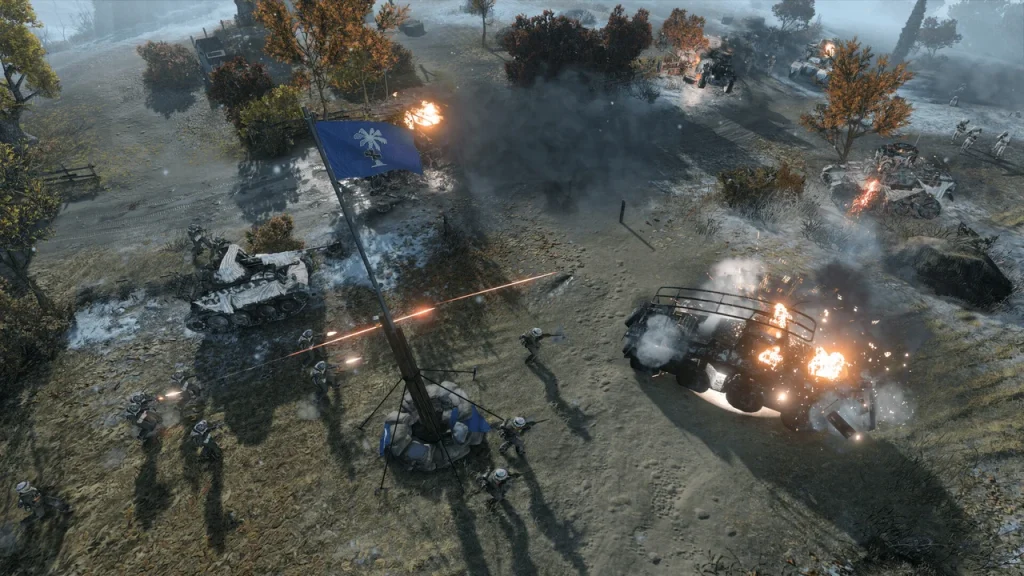
TL;DR: This Company of Heroes 3 Afrika Korps build order is a practice route through Headquarters production, Light Support Kompanie and one deliberate support purchase. Inspect Fire Support Elements before choosing a gated unit, then compare Mechanized Kompanie with the current research and recovery needs. Keep the queue small enough to understand each expense.
Quick answer: The Deutsches Afrikakorps can produce its initial infantry and the 250 Light Carrier from Headquarters. Later buildings add distinct rosters, while Fire Support Elements and Support Armor Elements unlock specific options. Constructing a building, buying research and producing a unit are different actions.

This is a standard AI-skirmish exercise, not a tested competitive opening or a promised arrival time. The names and menu dependencies were checked in the COH3 Stats Afrikakorps overview, labeled game patch 3.0.0, and Relic’s official 3.0 notes. Read the installed game’s actual requirements and costs before committing each purchase.
On this page
Company of Heroes 3 Afrika Korps build order: six menu steps
1. Learn the Headquarters roster first
Select Headquarters and inspect Panzergrenadiers, Panzerpioneers, the motorcycle team and the 250 Light Carrier. These are initial production options, so you should not search for them in a later building before checking the Headquarters menu.
For the exercise, produce a Panzergrenadier squad and observe its queue entry and completion. The unit directory distinguishes its infantry role from the repair and defense-building support of Panzerpioneers.
Give the completed squad an assignment you can monitor while returning to production. The useful first milestone is knowing which building supplied the unit and what the purchase cost, not extending the list until several completed units are idle.
2. Decide how much initial production you can manage
Inspect the current roster before adding a second Panzergrenadier squad or a 250 carrier. The suggested second squad is a learning choice, not a universal requirement. Account for missing soldiers and any resources already committed to the queue.
If you choose the carrier, inspect its unit role and available maintenance support. A new vehicle adds another unit to select and manage. It does not automatically replace the infantry task or remove the need to restore damaged units.
Keep a Panzerpioneer support option in view when planning vehicle recovery. Do not create a long vehicle queue before understanding how the units you already own will be maintained. Use the beginner guide if the selection routine is still unfamiliar.
3. Construct Light Support Kompanie and choose a role
Open the base construction controls and start Light Support Kompanie when its displayed requirements can be met. Confirm construction completion before looking for its production queue.
The building supplies options such as Assault Grenadiers, Panzerjägers, the MG34 team and the medical truck. These are different roles, not four mandatory purchases in a fixed chain. For this exercise, select one that answers a visible roster need in the game.
If your purpose is to inspect an infantry-based vehicle-response option, compare the Panzerjäger card with the other available choices. If recovery is the immediate problem, inspect the medical truck instead. Confirm the chosen unit’s queue entry and arrival before extending the plan.
4. Inspect Fire Support Elements before a gated purchase
Select Light Support Kompanie and read Fire Support Elements. The checked description unlocks the Flakvierling half-track, Pak 38 team and le.IG 18 team. These names in a full roster do not mean their production requirements are already complete.
Choose the research only when an unlocked option has a defined role in your next plan. After completion, inspect the changed production card and make the separate unit purchase. Resources reserved for research are not also available for the unit that follows it.
The checked description also connects this research to availability of Support Armor Elements from Mechanized Kompanie. Follow the actual requirement shown in the game rather than treating every building upgrade as an interchangeable technology button.
5. Compare Mechanized Kompanie with the current support needs
Mechanized Kompanie adds options including the 8 Rad armored car, Marder and 254 reconnaissance tractor. Its fuller roster also includes units behind Support Armor Elements research, including the StuG III D and recovery half-track.
Before starting construction, choose the first unit or unlock you intend it to support. If the immediate need can be met by an available Light Support option, compare that cost with opening another production stage. Another building does not itself produce the missing unit.
When the building completes, inspect the relevant card and queue. If you choose a gated option, complete its named research first. Keep construction, unlock and unit production visible as separate milestones rather than compressing them into one expected arrival.
6. Review Armory research before extending the roster
The Armory is a research menu, not another place to queue the Panzergrenadier squad you meant to buy at Headquarters. Inspect its available upgrades and the technology requirements shown for each one.
Choose a research option for units or buildings that are actually part of your plan. For example, inspect Improved Base Logistics when the corresponding base support functions matter. Do not buy a vehicle-oriented improvement merely because you might eventually produce a vehicle later.
The exercise can end with one understood research choice or with research deliberately deferred. Write which production or recovery expense you prioritized. A short list of explained purchases is more useful than unlocking several options whose effects you cannot connect to your current roster.
Distinguish the later production stage
Panzerarmee Kommand is a later production building with options including Panzer III units and the towed Flak 36 team. It belongs to a different roster stage from Headquarters and Light Support Kompanie.
Inspect its requirements when you have a defined later purchase. Do not save for the unit alone while omitting the cost of reaching its production building. The complete path includes any missing construction or research before the production queue can begin.
Relic’s 3.0 notes change vehicle build pacing and redistribute some fuel income toward base income. The update also lists Light Support Kompanie as the Afrikakorps technology requirement for resource caches. Those verified changes are reasons to check an old opening’s prerequisites and timestamps against the actual menu.
This guide does not promise a Panzer III at a particular minute or instruct you to purchase a cache as an automatic early step. Use completed technology and available resources to decide whether the next stage is funded.

Decision exercise: fuel available, production option locked
Imagine Light Support Kompanie has finished and you want the Flakvierling option, but its icon is unavailable. You have been watching fuel accumulate and assume that the resource total should make the purchase possible.
Read the production requirement first. If Fire Support Elements remains unfinished, the resource total does not replace the named unlock. Return to the building’s research controls and inspect its full cost before adding another unrelated unit to the queue.
Then decide whether the original unit still matches the game need. An available infantry or support option might be more relevant while the new research and production are pending. Continuing a plan merely because you have saved toward it can leave the actual roster problem unanswered.
If you continue, confirm the research completion and then start the separate production entry. Observe arrival before recording the purchase as finished. Your review should identify whether the delay was a misunderstood prerequisite, an unfunded queue or an unrelated expense consuming the reserve.
Troubleshoot the production sequence
Read the whole purchase chain before comparing costs
For each planned unit, write the producing structure first. Add the named research only when its card requires that dependency. Then add the final production purchase. A Flakvierling path in this exercise goes through Light Support Kompanie and Fire Support Elements; a gated Mechanized option uses its own building and Support Armor Elements. Keeping those paths separate prevents one completed upgrade from being mistaken for access to every vehicle in the faction.
Read the resources on each action rather than combining every expense into an assumed fuel bill. A new squad, construction, research and reinforcement can compete for different parts of the displayed resource balance. Enough fuel for the final vehicle does not establish that you can fund every missing step. Inspect population room as well before treating an available production card as a completed purchase.
After the chosen unit arrives, review whether the earlier support purchases still have a job. A medical truck or repair-capable unit should have an assignment connected to the force you actually own. If your roster changed while saving for the vehicle, revisit that support plan before adding another unit automatically.
End the drill by identifying one preventable delay: the wrong structure selected, an unfinished named unlock or a recovery expense omitted from the reserve. The next attempt should correct that particular mistake. You do not need to invent a faster competitive timing to show that you understand the production menus better.
An initial unit is missing from a later building. Check Headquarters. The initial Panzergrenadier and 250 carrier options belong there, rather than to every structure in the faction.
A Light Support unit remains unavailable. Inspect its research requirement and Fire Support Elements. Buying the structure does not automatically complete a gated production option.
A Mechanized option remains locked. Read whether Support Armor Elements is required and inspect that research’s own prerequisite. Do not substitute an unrelated Armory purchase for the named dependency.
Several vehicles exist but maintenance was overlooked. Review the support units and recovery choices already available. Adjust the next purchase instead of extending the vehicle queue while existing units cannot return to their intended tasks.
Reinforcement repeatedly consumes the building reserve. Count the expense before committing construction. The retreat timing guide can help connect unit preservation with the resources left for production.
Research is complete but no unit arrives. Select the correct production structure and look for a queue entry. A completed unlock does not place every enabled unit into the queue automatically.


Frequently asked questions
Is this a current optimized Afrika Korps opening?
It is a source-checked learning sequence. No competitive timing, ranking or match-test outcome is claimed.
Is a 250 carrier required in every opening?
No. It is an initial menu option to inspect. Purchase it when its role and management needs fit the exercise.
Does Fire Support Elements produce its listed units?
No. It changes their availability. Each unit still requires resources, its own purchase and completed production.
What should I practice next?
Follow one locked unit back to its named requirement and finish the complete purchase chain. Use the Company of Heroes 3 hub to choose the supporting resource or beginner article.
Sources and further reading
Keep exploring

Games Like Company of Heroes 3: three different tactical choices
Choose COH2 for familiar squad tactics, Gates of Hell for direct unit control, or Steel Division 2 for division decks and Army General.
Company of Heroes 3 Mortar Tactics: 7 Practical Decisions
Use mortar fire to change a defended position, choose damage or smoke by the task, and move the supported army while the opportunity exists.
Company of Heroes 3 Battlegroup Selection: 7 Useful Decisions
Choose a battlegroup to supply a specific capability, then match its unlock path and spending to the battlefield problem you observed.