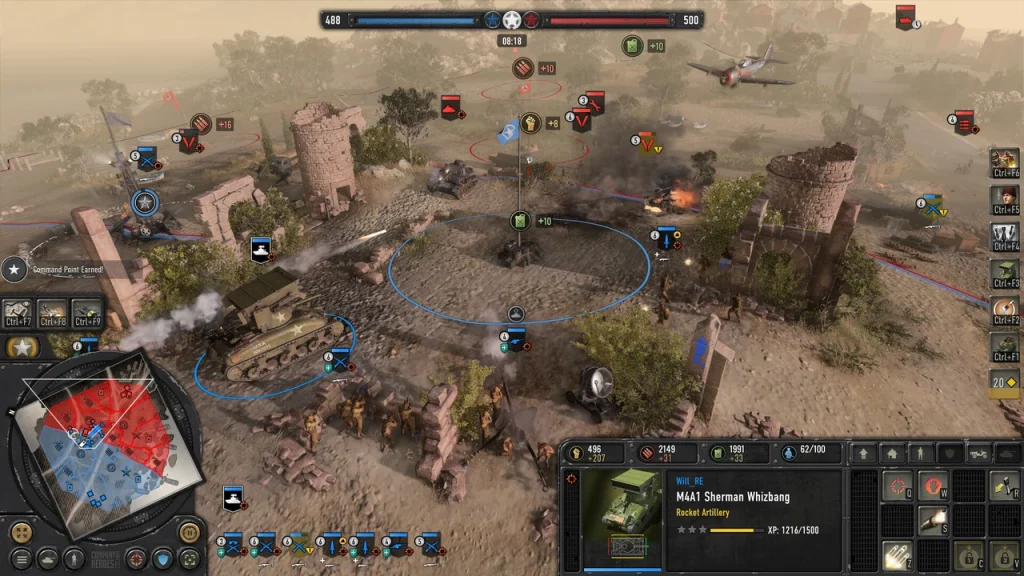
TL;DR: This Company of Heroes 3 US Forces build order is a practice sequence: Barracks, two Riflemen squads, an Infantry Support Center, then a Motor Pool and a unit that fills a visible role gap. Pause the sequence to restore damaged squads or meet an urgent requirement. Learn the production menus before trying to copy competitive timings.
Quick answer: The US Forces have separate production buildings and a Support Center choice. The Barracks provides Riflemen; activating a Support Center enables the Motor Pool and Tank Depot. Completing the building, researching an upgrade and producing a unit are separate actions with separate costs and completion states.

This route is for standard AI skirmish practice. It is not a tested tournament opening, a promised vehicle timing or a campaign mission walkthrough. The menus and named units were checked against the COH3 Stats US Forces overview, labeled game patch 3.0.0, and Relic’s official 3.0 notes. Costs should be read from the installed game before each purchase.
On this page
Company of Heroes 3 US Forces build order: seven practice steps
1. Start the Barracks and inspect Headquarters production
Open the faction’s base construction controls and select the Barracks. Confirm the location, available resources and construction progress. Keep the Headquarters selected briefly afterward so you can distinguish its unit menu from the building you are waiting to complete.
Headquarters provides Scout and Engineer squads in the standard roster. The US unit directory describes Engineers as repair and defense-building support, while Riflemen are the main infantry option this exercise will use. Do not buy several Engineers because their button is visible while the Barracks is unfinished.
Give the units already available a manageable map task, then return to the base when construction completes. A finished structure adds options; it does not automatically select its first unit or spend the remaining resources for you.
2. Produce the first Riflemen squad from the Barracks
Select the completed Barracks and click the Riflemen production icon. Confirm that the unit appears in the building’s queue. Check the queue’s progress rather than issuing repeated clicks when the squad has not appeared yet.
The first Riflemen squad gives this practice opening a main infantry unit to manage. Assign a nearby task connected to your existing map position. Use the beginner guide if selection, capturing and squad preservation are still unfamiliar.
Inspect the Barracks upgrade icons without immediately purchasing them. This separates learning where a feature lives from deciding that it is needed now. Your first goal is to produce and control a squad while continuing to monitor resources and construction.
3. Add a second Riflemen squad, then review the queue
Produce a second Riflemen squad when the resources are available and the first squad’s condition allows it. Two squads make the practice sequence concrete without claiming that two is the strongest count for every map or opponent.
Give them different assignments you can track. One can remain near the established route while the other handles a nearby task. Their job here is to help you learn how production and unit management happen at the same time, not to prescribe a real-world formation.
Before adding another squad, inspect what you already own. If the first squad needs reinforcement, acknowledge that cost. If both squads are idle, another purchase will increase the number of units you are failing to use. Repair the management problem before extending the queue.
4. Activate the Infantry Support Center
Select Headquarters and inspect its Support Center choices. This exercise chooses the Infantry Support Center because it creates an understandable infantry-focused research path. The other choices are alternatives, not additional centers to add automatically afterward.
The checked descriptions explicitly limit the player to one Support Center. All three center types enable construction of the Motor Pool and Tank Depot, while their own research options differ. Read the selected upgrade and confirm its activation progress before assuming the next structure is available.
The Infantry Support Center also deploys the Captain Retinue when construction is complete, according to the checked description. Notice the additional unit and assign it a task; do not leave it unnoticed because it was not the Riflemen purchase you were expecting.
5. Choose an infantry upgrade for a reason
Open the Barracks and inspect M1918 Browning Automatic Rifles and Grenade Package. These are research purchases, not extra Riflemen squads. Read which units they affect and whether the completed research makes a further individual squad upgrade available.
The checked BAR description says the research globally gives Riflemen a BAR, with another individual squad upgrade available afterward. That means a global unlock and a later squad purchase should not be treated as one click with one cost.
For this exercise, choose a single relevant research option after restoring necessary infantry strength. Explain to yourself what it adds to the units you already own. If an urgent vehicle problem exists, delaying that response to buy an unrelated infantry improvement defeats the purpose of learning resource allocation.
6. Construct the Motor Pool and select a role
Once the Support Center is activated and the required resources are available, select the Motor Pool through the construction controls. After it finishes, inspect the unit menu before starting production.
Its standard options include the M8 Greyhound, the anti-tank gun team and the M24 Chaffee. The unit directory distinguishes the Greyhound’s infantry-oriented role from the Chaffee’s vehicle-focused role. The anti-tank gun is another menu choice with its own handling needs.
Choose one option for a problem you can identify in the game. For a first production exercise with no urgent vehicle threat, inspecting the Greyhound is a manageable continuation. If opposing vehicles are the observed problem, inspect the Chaffee or gun option instead of buying the Greyhound simply because it appeared earlier in a list.
7. Complete the purchase before planning the next tier
Confirm that the selected Motor Pool unit is queued, that enough population room remains and that production actually completes. Then give the new unit a modest assignment you can manage with the existing squads.
Inspect Engineer availability before making vehicle repair part of the next plan. A vehicle purchase can add maintenance needs; it does not remove the infantry recovery costs you were already paying.
Only then inspect the Tank Depot’s requirements and roster. This exercise ends with a working infantry force, an active Support Center and one deliberate Motor Pool choice. A later Tank Depot purchase is a new decision, not an automatic reward for clicking every earlier button.
Do not confuse the two support menus
The Weapon Support Center and the Support Center choice solve different menu problems. The Weapon Support Center is a production building with options such as machine gun teams, Bazooka squads and Snipers. An Infantry, Mechanized or Air Support Center is the Headquarters research choice that enables later base construction.
Buying a Weapon Support Center does not mean you selected the Mechanized Support Center. Similarly, selecting the Infantry Support Center does not automatically produce a machine gun team. Check the name and function instead of grouping every button containing the word support into the same step.
If your practice force needs a Weapon Support Center unit, add that building as a purposeful branch. Write down which role required it and which later purchase you delayed. You can then compare two learning sequences without pretending that every structure belongs in one mandatory opening.

What the 3.0 update changes about old sequences
Relic’s 3.0 notes change vehicle production pacing and redistribute some fuel income from map points to base income. A timestamp from an older guide is therefore a poor substitute for the actual resource display and queue state.
The notes also say the M16 Multiple Gun Motor Carriage and M3 75mm Gun Motor Carriage can be built at the Motor Pool without the Mechanized Support Center. That is a specific reason not to repeat an older rule that the mechanized center is mandatory for those Motor Pool variants.
Use these changes to read the menus more accurately, not to invent a new competitive deadline. This exercise does not give minute-by-minute arrivals. It asks you to confirm the actual prerequisite, resources and production completion for the unit you selected.
Practice case: an infantry purchase meets a new menu need
Imagine you have two Riflemen squads and are about to buy an infantry upgrade. A visible opposing vehicle becomes the immediate problem, and your Motor Pool has not started construction. You have enough resources for some purchases, but not every purchase on the original list.
Stop extending the Barracks queue and inspect your current technology. If the Infantry Support Center is still activating, that unfinished step explains why the Motor Pool path is not ready. Buying another unrelated research option will not finish the missing prerequisite.
Check available production alternatives and recovery needs. A Weapon Support Center branch might provide a Bazooka squad, while the Motor Pool offers different vehicle-response options once available. The exercise does not declare one universally best. It asks you to compare the actual prerequisites and costs before committing.
When you make the branch purchase, record what moved later: the infantry upgrade, another squad or a Tank Depot plan. This turns adaptation into a visible production decision. After the unit completes, inspect whether it filled the intended role instead of assuming a completed queue proves the choice was suitable.
Troubleshoot a stalled US production sequence
Before restarting the sequence, make a short purchase record with four entries: the production building, the unit or research selected, the remaining prerequisite and the resource you still need. For the Motor Pool, that record might show an unfinished Support Center followed by construction and a Chaffee purchase. For a Riflemen improvement, it might show Barracks research followed by a separate squad upgrade.
This record prevents a common budgeting error: saving for the final icon while forgetting the actions that make it usable. Update it after reinforcement or a branch purchase. Then compare the revised plan with the current menu, rather than comparing your progress with a timestamp from another match.
The Barracks is complete but there are no Riflemen. Select the structure and inspect its queue. Construction completion and unit production are different events. Check resources and whether you actually started the squad purchase.
The Motor Pool remains unavailable. Inspect the Headquarters Support Center choice and its activation state. Do not confuse owning a Weapon Support Center with having completed this prerequisite.
An upgrade is researched but a squad option remains unpurchased. Read whether the research applies globally, unlocks an individual upgrade or does both. Select the squad and inspect its own command card before assuming every later purchase was included.
Resources are available but the queue does not advance as expected. Check the selected production building, existing queue entries, population and any requirements shown by the unit. Do not repeatedly click a different structure’s icon while watching the wrong queue.
Reinforcement keeps delaying construction. Review why the current squads are consuming recovery resources. Use the retreat timing guide for preservation decisions, then adjust the purchase plan around the actual expense rather than assuming the original reserve remains intact.


Frequently asked questions
Is this the current best US Forces opening?
No competitive claim is made. It is a practice sequence for learning standard production and technology menus, checked against 3.0 sources.
Must I choose the Infantry Support Center every match?
No. It is the selected learning route here. Inspect the alternatives and their research functions when you understand this one.
Does a Support Center automatically produce a Motor Pool unit?
No. It enables later construction. You still need the structure, a deliberate unit purchase and completed production.
Should I build every available production building?
Only add one for a defined option you need. A larger menu is not useful if its cost prevents you from producing or restoring the units that matter.
What should I review after the exercise?
Name the first unfinished prerequisite, idle queue or unnecessary purchase you noticed. Use the Company of Heroes 3 hub to pair that production problem with the relevant beginner or resource guide.
Sources and further reading
Keep exploring

Games Like Company of Heroes 3: three different tactical choices
Choose COH2 for familiar squad tactics, Gates of Hell for direct unit control, or Steel Division 2 for division decks and Army General.
Company of Heroes 3 Mortar Tactics: 7 Practical Decisions
Use mortar fire to change a defended position, choose damage or smoke by the task, and move the supported army while the opportunity exists.
Company of Heroes 3 Battlegroup Selection: 7 Useful Decisions
Choose a battlegroup to supply a specific capability, then match its unlock path and spending to the battlefield problem you observed.