TL;DR: Hearts of Iron 4 air superiority starts with capable wings assigned to the correct air region and mission. Check their actual coverage, base conditions, detection and combat results. Concentrate fighters where your next operation needs air control, then confirm that production can replace the losses.
Aircraft in your inventory do not automatically fight over the chosen front. Follow the wings from their base to their orders and regional results before responding to weak air control by building more planes.

This guide uses the official air-interface explanation, air-management discussion and plane-designer discussion, with the amended 1.19.4 wing and range fixes. Historical interface layouts and preview statistics are not treated as current thresholds or tested fighter builds.
On this page
Hearts of Iron 4 air superiority: assign the required region
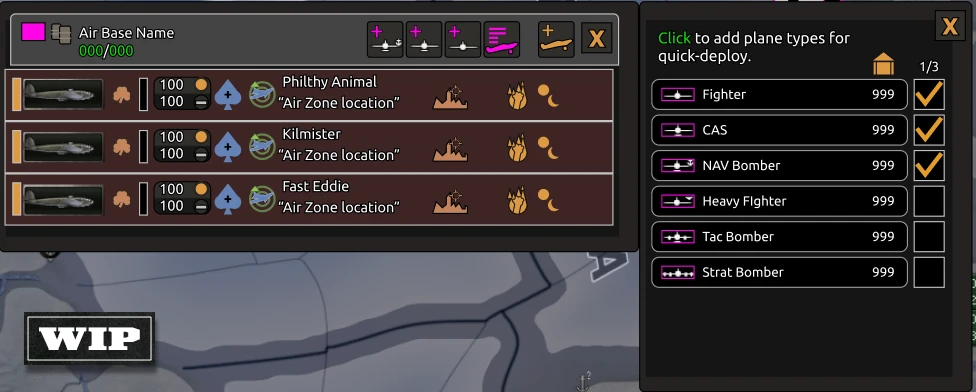
Choose the air region that covers the operation you are preparing. Open air map mode and inspect the relevant wings. Confirm their base, aircraft type, strength, selected mission and target region.
Use wings capable of the air-superiority mission. Select that mission and assign the intended region, then inspect the resulting orders. The developer’s interface explanation separates selecting a mission from choosing where the wing should perform it.
Aircraft capability matters as well as orders. In the designer explanation, weapon modules unlock available missions. Where the designer is available in your installed setup, read the actual design’s permitted missions instead of assuming that its name establishes its role.
Recheck assignments after moving wings between bases or changing the front. An order that supported yesterday’s attack can be aimed at the wrong region for today’s advance.
Check actual coverage and airbase conditions
Use the wing’s actual base and range to assess coverage. Being near the ground battle on the map is not enough to establish effective access to the whole air region.
Read the mission-efficiency and range information the current interface shows. If coverage is poor, compare another usable airbase or a design with suitable range. Then verify the new result rather than assuming the relocation solved everything.
The amended 1.19.4 notes fix an exploit where a halted wing movement could acquire the destination base’s range without actually transferring there. That makes the completed relocation and actual base important checks, rather than relying on a movement arrow.
Inspect the base’s capacity, condition and any displayed operational penalties. Adding wings to an already struggling base deserves a check before you count those aircraft as useful reinforcement.
Read fuel and supply warnings too. If a wing is not performing as expected, address the condition identified in its tooltip. Aircraft production, available aircraft and aircraft able to carry out the current mission are separate observations.
Read detection and combat results
Open the region’s combat information and inspect what your aircraft are doing. Separate fighter engagements from bombing and interception results, using the filters or panels available in the current interface.
The official air-interface explanation identifies detection as an important factor and describes radar as one contributor. More aircraft and better detection address different parts of the problem; read both before committing industry.
Compare your losses, enemy losses and mission disruption over a meaningful period. The developer describes disruption as missions forced to turn back, such as after interception damage. A bombing force can therefore be hindered without every aircraft being destroyed.
| Observation | First inspection | Possible planning response |
|---|---|---|
| Wings contribute little | Mission, target region and actual coverage | Correct orders or choose a usable base |
| Enemies are poorly detected | Regional detection and available modifiers | Assess radar or other relevant support |
| Losses exceed replacements | Combat results, reserves and production | Reduce exposure or improve the replacement plan |
| Bombing missions are disrupted | Interception and mission-specific results | Reassess fighter support and the bombing commitment |
These are diagnostic categories, not guaranteed fixes. Use the displayed cause and compare the result after changing one relevant part of the setup.

Keep fighter and bombing roles distinct
Plan air control and bombing as related jobs with different mission requirements. A force assigned to attack ground targets is not automatically performing the same task as wings contesting enemy fighters.
The older interface explanation distinguishes air-superiority fighting from bombing and intercepts. The later designer description allows some aircraft to support several missions through their modules. Inspect the current design and selected mission together.
For a hypothetical offensive, identify the region where fighters need to contest the enemy and the bombing mission you want to support there. Check each wing’s actual orders instead of selecting every icon without a defined purpose.
Do not interpret a favorable air-region indicator as proof that every ground battle receives the desired support. Inspect the battle’s own information and the relevant bombing results to confirm the effect you are trying to achieve.
Balance aircraft design against replacement output
Choose aircraft your industry can supply in the role and region you need. A more elaborate design deserves scrutiny if its cost delays deployment or prevents you from replacing losses.
The plane-designer explanation presents tradeoffs between specialized and flexible designs. It also describes module choices that exchange range and other capabilities. Use that as a reason to inspect current statistics, not as a current ranking of the best modules.
Compare the intended mission, usable range, production cost and resource requirements. Check the actual available design in your campaign. Expansion availability and patches can affect what options are present.
Read the reserve and production pipeline alongside combat losses. If wings are losing aircraft faster than production replaces them, the force’s useful strength can decline even while you continue issuing the same orders.
A design change can also affect the production schedule. Coordinate the upgrade with the operation date instead of assuming researched aircraft immediately appear in deployed wings.
Concentrate for one operation and reassess
Commit fighters where air control supports a concrete objective. Spreading a limited force across every region can leave the operation you actually intend to launch poorly supported.
For an illustrative attack across one front, check its air region, move the necessary wings to suitable bases, assign the mission and observe the regional results before beginning. Keep the force commitment within the aircraft and fuel you can sustain.
After the front moves, repeat the coverage assessment. A successful advance may shift the battle away from the base that previously served it. Protect or repair newly useful bases before treating them as ready destinations.
Do not assume an organizational grouping adds combat strength. The 2022 air-management discussion describes air groups as a selection and organization tool. Group wings to make their orders easier to manage, then assess their actual combat contribution.
Revisit the allocation when losses, enemy pressure or another threatened objective changes. Choose from the observed results and campaign priorities, rather than trying to preserve one permanently fixed air deployment.
FAQ and the next sortie
Why do more fighters fail to improve air control?
Check mission assignment, target region, usable coverage, base conditions and detection before treating aircraft numbers as the only cause.
Can every aircraft design fly air-superiority missions?
Read the design’s permitted missions. The developer explains mission availability through aircraft equipment and modules.
Does air superiority prove bombing is working?
Inspect bombing, disruption and ground-battle information separately. Regional fighter control does not answer every support question.
Use the Hearts of Iron 4 beginner guide for broader preparation. Before your next operation, verify one region’s wings, observe their results and check the replacements needed to sustain that commitment.
Sources and further reading
- https://store.steampowered.com/app/394360/Hearts_of_Iron_IV/
- https://steamstore-a.akamaihd.net/news/externalpost/steam_community_announcements/4249665521683215943
- https://steamstore-a.akamaihd.net/news/externalpost/steam_community_announcements/4292505348821808762
- https://steamstore-a.akamaihd.net/news/externalpost/steam_community_announcements/4598757090446530193
- https://steamstore-a.akamaihd.net/news/externalpost/steam_community_announcements/1847286114049046
Keep exploring
Hearts of Iron 4 occupation laws: control resistance without draining reserves
Match occupation policy to resistance, compliance and a garrison you can actually supply; use stronger control only when the situation justifies its cost.
Games Like Hearts of Iron 4: choose what you want to command
Choose Stellaris for another empire project, CK3 for personal politics and heirs, or Ultimate General Civil War for tactical army progression.
Stellaris vs Hearts of Iron 4: discovery or industrial war planning?
Choose Stellaris for discovering a galaxy and shaping a space society; choose Hearts of Iron IV for coordinating industry, army design and politics around a WWII nation.