TL;DR: Use Steel Division 2 supply trucks to support a force that has a specific resupply need, not as another vehicle sent toward the enemy. Check the supported unit’s ammunition, the truck’s remaining stock and the current supply controls, then use a protected route. Plan around limited stock rather than assuming an empty truck automatically refills off-map.
Choose the unit you need to keep working and the position where it can receive supply. A truck is useful when it reaches that job with stock remaining. Buying one without checking the route, coverage or supported unit can leave the same ammunition problem unresolved.

Official roster and patch announcements establish supply units and unit-specific transport options. Detailed stock and resupply discussions cited here are dated player reports, not a current verified mechanics manual. Inspect installed-game behavior for exact range, consumption and capabilities; this guide gives no invented fuel, repair or refill guarantee.
On this page
Give Steel Division 2 supply trucks a specific unit to support
Start by selecting the unit whose continued work matters to the position. Check its displayed ammunition and current task before deciding a truck is the required purchase.
For a hypothetical village defense, a supporting weapon might have used much of the ammunition relevant to its job. If the position remains useful and the unit can receive the current game’s supply support, bringing stock toward it can be more practical than replacing the whole unit.
Read the actual problem first. A unit with ammunition remaining may be unable to act because of its order, view or target suitability. A supply purchase does not automatically fix those conditions.
For a second example, a group making repeated support missions can create a continuing supply demand. Decide which position and unit should receive the next stock rather than parking all trucks near the first weapon you bought.
Choose priorities from the current force. Supporting a useful holding position and supporting an optional repeated action are different demands on the same limited purchase plan. Name the job before moving the truck.
Distinguish an ordinary delivery truck from a supply unit
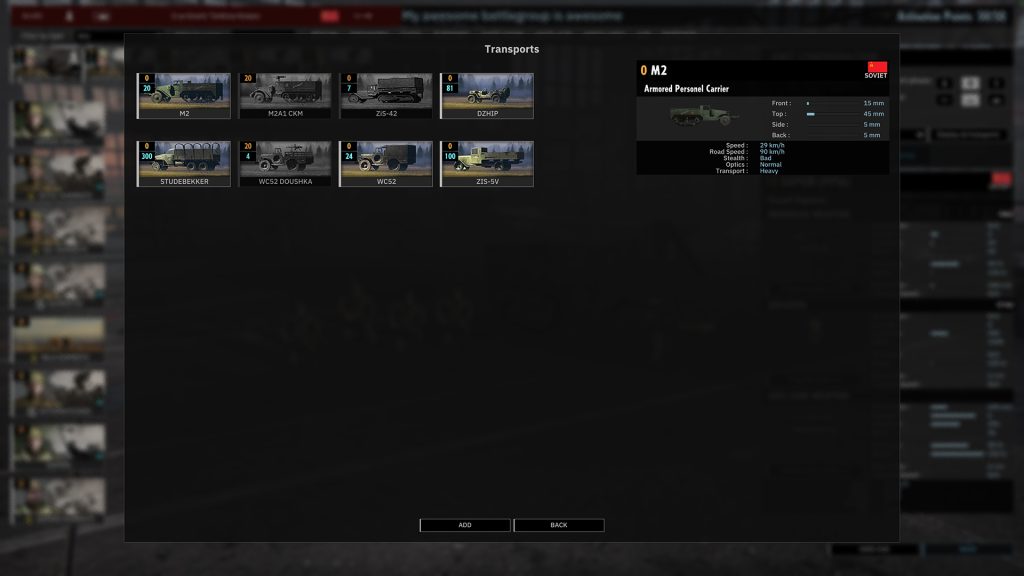
Check the actual card and unit role. A truck transporting infantry is not automatically a supply truck merely because it has a familiar cargo-vehicle shape.
Eugen’s deck-builder explanation describes ordinary and armed infantry transports. Separately, its War Reserves release announcement identifies the FORD V8 098T HUOLTO as heavy supply for Finnish divisions.
That named supply example gives you a role to inspect, not a reason to assume every Ford or every truck provides the same function. Read the current selected unit’s information and stock display.
Some equipment can have a supply vehicle as a transport option. Eugen’s historical range-rework patch changed supply DUKW options for particular howitzers. Those changes are evidence that the option is unit-specific and version-sensitive.
Inspect the combined purchase when such an option is available. Do not count an ordinary infantry transport as your supply plan or assume the same attached supply choice exists on every weapon card.
Check ammunition need, available stock and the current controls
Select the supported unit and the supply unit, then inspect their current information. Look for the ammunition need and the stock available to address it before moving farther forward.
The 2020 supply-cost discussion asks about fully replenishing units, with replies discussing ammunition supply consumption. Its numerical caliber and rocket examples are unverified historical player claims and are not used as a current cost table here.
Compare the actual stock change and the supported unit’s ammunition in your installed game. That observation is more useful than assuming one truck always replenishes a fixed number of weapons regardless of their loadouts.
Inspect supply coverage or applicable controls where the current UI presents them. A truck being nearby is not enough evidence that the intended support is taking place. Confirm the supported unit changes as expected before declaring the job complete.
Keep additional capabilities separate. Do not assume the same truck repairs every critical damage state, restores every lost crew member or supplies every possible resource. Check the current unit’s documented capabilities and actual feedback for the specific problem.

Bring supply by a protected route
Choose a destination behind useful defended ground and inspect the path from the entry point. The truck’s route matters as much as the fact that the card has stock.
For the village example, approach the supporting unit from the protected side rather than driving through the contested road in front of it. If the position has become exposed, consider moving the supported unit or using a different supply destination.
Confirm the movement order and any queued commands. A purchase can fail its intended job if the vehicle continues beyond the staging point on an earlier order. Watch the arrival and the unit’s active task.
Avoid gathering every truck and supported weapon in one compact cluster. Give each vehicle a useful destination and keep the support relationship clear. Adding stock does not remove the ground force’s responsibility for the area around it.
Reassess the route when the frontline changes. The path used by the first delivery may no longer be protected for the next one. A supply plan should follow the actual supported position, not an obsolete opening destination.
Keep a replacement plan for limited stock
Inspect the truck’s remaining stock after supporting a unit. Do not treat the continued presence of the vehicle as proof it can perform the same supply job again.
The 2021 Empty Supply Trucks discussion contains a request for off-map refilling and replies describing limited resources as part of the game’s balance. That is a dated player discussion, so this guide does not promote it into a tested statement about every current modification or mode.
The practical planning choice is to avoid assuming unlimited automatic stock. Check what the installed game and selected scenario actually provide, and retain available cards and points for further supply where needed.
Compare stock demand with the card schedule. A later supply option cannot help before it becomes available. A remaining supply card still needs tactical points and a workable arrival route.
If an empty vehicle has another possible role, inspect its present controls and compatibility before using it. A historical reply discusses conditional towing, but it does not prove every truck can tow every weapon. Do not replace a verified supply task with an assumed universal transport capability.
Separate tactical resupply from campaign supply
Army General supply status and action recovery are strategic systems. A supply truck inside a tactical battle should not be treated as an automatic solution to every campaign isolation problem.
Read the campaign’s own status and participation information when that is the problem. This article concerns a tactical unit receiving supply, not a universal method for changing the strategic state of an encircled battalion.
After a failed delivery, identify the missing condition: unsuitable unit role, empty stock, wrong destination, unavailable card or an exposed route. Fix that condition before buying another identical vehicle.
Use the Steel Division 2 hub for related phase and movement checks. For the next supply purchase, name the supported unit, its current need and the protected destination where you will confirm the stock is doing useful work.
FAQ
Is every truck a supply truck?
No. Inspect the role, stock and current unit information. Ordinary infantry delivery and supply are separate jobs.
Do empty trucks automatically reload off-map?
Do not assume that. Historical players requested refilling; check the installed mode and any modifications rather than planning around an unverified automatic feature.
Does a supply purchase fix every inactive weapon?
Check ammunition, orders, view and the current task first. An inactive unit can have a problem unrelated to supply.
Can one truck repair or restore every kind of loss?
No universal capability is claimed here. Inspect the specific unit’s documented support functions and confirm the actual effect in your game.
Sources and further reading
- https://steamstore-a.akamaihd.net/news/externalpost/steam_community_announcements/1794102528065812
- https://steamstore-a.akamaihd.net/news/externalpost/steam_community_announcements/4074045878072394391
- https://steamstore-a.akamaihd.net/news/externalpost/steam_community_announcements/3702426087238377874
- https://steamcommunity.com/app/919640/discussions/0/3153060475190726751/
- https://steamcommunity.com/app/919640/discussions/0/2252308752459259587/
Keep exploring
Steel Division 2 artillery correction: connect the observer area to the target
Identify the radio-equipped observer and eligible artillery, place the intended target inside the correction area, then check the shot and move the observer when the task changes.
Steel Division 2 anti tank positioning: match the lane, target and ammunition
Choose an observed lane that matches the gun’s actual ammunition range, set its engagement behavior, and reassess after the target or observation changes.
Gates of Hell Ostfront vs Steel Division 2: Conquest or Army General?
Pick Ostfront for researching and developing a Conquest army with switchable unit control; pick Steel Division 2 for battalion-map planning and battlegroup decks.