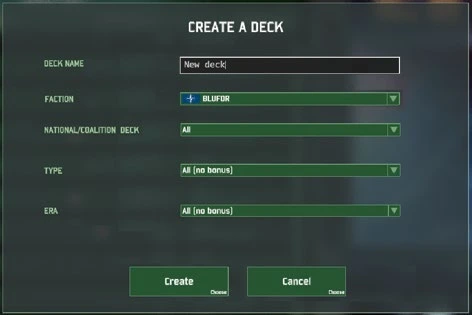
Wargame Red Dragon coalition deck rules restrict a deck to the nations in the selected coalition while keeping it within one faction. Choose BLUFOR or REDFOR, select the national or coalition option, and then apply the theme and era restrictions you want. Those choices jointly determine which cards, prototypes, slots and availability options the builder permits.
A coalition is a named in-game roster, not permission to combine any countries that seem related. NORAD, for example, was introduced with Canada and the United States. Selecting a coalition also does not mean every card from its members survives an era or specialization restriction. Build the legal roster first, then judge whether it provides the roles and affordable purchases your match needs.

Checked November 9, 2026. This is a source-based rules guide, not a hands-on test or a current bonus spreadsheet. The official 2014 manual explains the restriction system; dated release and patch announcements supply concrete examples. Read the current builder for exact availability. Our Wargame: Red Dragon review covers the broader game.
On this page
1. Wargame Red Dragon coalition deck rules begin with faction
The manual explicitly separates BLUFOR and REDFOR decks and says their units cannot be mixed. Begin with that faction choice. A coalition combines eligible nations within its faction; it does not bypass the faction boundary. If you want equipment from both sides, create separate decks rather than expecting a coalition setting to make one mixed roster legal.
Keep lobby opposition settings separate from deck legality. The manual describes lobbies where players all use BLUFOR, all use REDFOR, or choose sides in confrontation. Those settings determine the game’s permitted opposition context. They do not alter the basic rule that a single deck stays in its chosen faction. Seeing the same faction on both teams is not evidence that the deck builder permits mixing sides.
For a concrete starting example, create a new BLUFOR test deck and select NORAD in the national or coalition field. Inspect which countries and cards the builder offers before adding restrictions. If a desired model belongs to a country outside that roster, it is a reason to consider a different deck choice, not a reason to expect NORAD to include it.
Give this test deck a name identifying the faction and coalition. A saved name is useful when several experiments look similar in the deck list. Before joining a lobby, confirm that the intended version is selected and legal for the lobby. Do not infer the active constraints from a nickname somebody attached to an imported deck string.
2. Use named coalitions, rather than imagined country combinations
The February 2015 v609 announcement introduced NORAD as Canada plus the United States and LANDJUT as Denmark plus West Germany. It also introduced a Soviet-Korean combination of the USSR and North Korea. These are concrete examples of developer-defined groupings. Their existence does not imply that every pair of countries has an equivalent coalition option.
| Officially documented example | Named nations in that announcement | Practical use |
|---|---|---|
| NORAD, February 2015 | Canada and United States | Compare the two members’ legal role options |
| LANDJUT, February 2015 | Denmark and West Germany | Check the roster and specialization restrictions |
| Soviet-Korean, February 2015 | USSR and North Korea | Keep the combination within REDFOR |
| Scandinavian, February 2015 release | Sweden, Denmark and Norway | Check the coalition rather than assume one national roster |
The Norse Dragons release announcement names Sweden, Denmark and Norway as the Scandinavian coalition’s nations. Use these dated records to understand the intended grouping, then verify the offered choices in your installed game. This table is a set of sourced examples, not a claimed complete current coalition directory.
When evaluating a coalition, compare complementary jobs across its allowed nations. In a NORAD test deck, look at the legal command, infantry, reconnaissance, ground combat and supply cards from both members. You may find a role combination you prefer to a national deck. However, more countries do not automatically mean a better opening: prices, transports, experience and card counts still determine whether the selection is practical.

3. Check prototype access together with other restrictions
The manual describes access to the selected nations’ prototype units as part of choosing a national or coalition restriction. A broad faction deck therefore need not offer the same prototype access as a matching restricted deck. Treat that access as one part of deck legality. The prototype label does not make a unit exempt from its era, specialization, ownership or other selection conditions.
Try a controlled comparison if a particular card motivates your choice. Create an unrestricted-theme coalition test deck and search for the card. Then apply the intended era and theme one at a time. If it disappears after one change, you have identified a relevant restriction. Return to the broader test version to inspect the card and decide whether keeping it is worth the options lost elsewhere.
The February 2015 v610 Windows and Mac patch fixed LANDJUT and NORAD not receiving the intended prototype permissions and not appearing correctly in the lobby. A separate Linux announcement confirmed the fix there. These are historical corrections, rather than evidence that the same defect exists in the current version.
If your installed result differs from an old example, first compare faction, coalition, theme, era, filters, ownership and version. Keep the exact missing card’s name in your notes. Searching for an old display name or leaving a role filter active can look like a legality problem. Do not immediately explain a missing card as a broken prototype rule without checking the conditions you control.
4. Read availability bonuses as coalition-specific values
Availability is the number of units you can call in from a selected card, rather than deployment money. Coalition bonuses can affect that number, but there is no safe rule that every coalition gets the same positive percentage. The v609 announcement listed NORAD and the Soviet-Korean coalition at zero percent availability bonus when introduced, while LANDJUT had a different value.
Later changes reinforce the need to read dates. The September 2021 SADF release update changed Commonwealth coalition availability from zero to ten percent. That is a confirmed change in that patch. It is not an evergreen promise for all coalitions or a calculation to copy into every future version.
In your current builder, compare the displayed rank options and available counts for the exact card you intend to use. The manual explains that experience choices have the same deployment price but different availability. A coalition bonus and a veterancy choice belong to the card’s selection context; selecting high experience does not eliminate the need to check how many units remain.
Judge the practical value of the counts. If you repeatedly exhaust a frequently purchased infantry option, more availability can matter. If a specialist card usually retains unused copies, a larger number may offer little benefit in your practice matches. Choose the coalition because its legal cards and counts address your actual role requirements, rather than because a percentage looks impressive in isolation.
5. Treat specialization and era as additional filters
A national or coalition choice determines the country pool. Theme specialization and era then narrow the equipment and can change builder benefits. The manual describes specialization in terms of experience, additional slots and lower category costs. Era restrictions can provide additional activation points while excluding newer equipment. These are tradeoffs: more builder resources do not automatically replace a capability removed from the roster.
Use LANDJUT as a dated example of why combinations need checking. The v609 announcement explicitly said this coalition had no Marines deck. Do not assume that every specialization exists for every coalition simply because the specialization appears elsewhere in the interface. Read the options currently offered for the selected coalition before designing a list around an unavailable theme.
Suppose your unrestricted coalition test provides the infantry transport and recon choices you want. Apply an era limit and inspect both categories again. If a required card disappears, decide whether a legal alternative performs the same job affordably. The extra activation points only help if the remaining roster can still form the opening and reinforcements you need.
A dated example is the August 2024 addition of ANZ’s 1995 LEOPARD AS1 RECON. A roster addition bearing that year is a reason to check the selected era before expecting it in an older-period deck. First verify that ANZ is eligible for your selected national or coalition roster, then check the era and theme. This example illustrates the order of legality checks; it does not establish that ANZ belongs to every BLUFOR coalition or that an old announcement contains all current card restrictions.
After applying a theme, check command, supply and anti-air access as carefully as the main combat category. A specialization that strengthens one area can leave you dependent on fewer alternatives elsewhere. For a learning deck, compare it against the unrestricted-theme version under the same match settings. That controlled comparison is more useful than declaring a whole specialization universally strongest or weakest.

6. Separate nation-pack ownership from coalition membership
A downloadable nation adds equipment under the conditions defined for that content. Owning it does not authorize an arbitrary coalition combination. The August 2024 Italy release announcement describes Italy as a standalone NATO nation. It does not establish that Italy automatically joins NORAD, LANDJUT or another coalition you select.
Before adapting a shared deck, identify whether any intended cards require content you own. Then inspect whether those cards are legal under the saved coalition and other restrictions. These are two different checks. A card may be absent because the nation is outside the selected coalition even when you own its content; another may require ownership before you can use it.
Check display names against dated patch changes when comparing old lists. The September 2024 v131544 notes renamed Italian GRUPPO DI CONTROLLO to GRUPPO COMMANDO and several supply units from CARICO to LOGISTICO. An old guide’s name can therefore differ without proving that the role or card was removed. Match the card through the current roster and complete information panel.
Do not buy a nation pack solely because an unsourced list claims it unlocks a desired coalition combination. Read the official content description and the builder conditions for the deck you actually want. If you cannot establish that combination from the available information, keep the plan conditional rather than presenting an assumed membership as a confirmed rule.

7. Validate the finished deck with a practical role checklist
Once the restrictions are set, fill a playable role mix: command, infantry and transports, reconnaissance, suitable ground firepower, anti-air protection and supply. Compare activation costs in the builder and deployment prices for an actual starting purchase list. Legal cards can still create an unaffordable or poorly balanced opening, so completing the roster is only the beginning of validation.
Run a Skirmish test with the intended match settings. Observe whether the coalition gives you the needed reinforcements after the opening, not merely whether its first expensive unit performs well. If a role runs out of available copies, consider its rank or card choice. If it is excluded entirely by specialization, reconsider the restrictions rather than adding another unrelated combat card.
Keep a simple missing-card diagnosis: faction first, coalition membership second, theme and era next, then active filters, content ownership and version. Review one condition at a time. When sharing the exported deck string, state those conditions along with the intended mode and any content requirement. A deck code by itself does not communicate why the combination is legal or useful.
The practical rule is to select a documented coalition, read its current offered cards and bonuses, and test whether that restricted roster serves your match. Do not use historical percentages as a permanent tier list. Continue through our game guide library when a specific mechanic, rather than coalition legality, becomes the next obstacle.
Sources and further reading
- https://store.steampowered.com/manual/251060
- https://store.steampowered.com/app/251060/
- https://steamstore-a.akamaihd.net/news/externalpost/steam_community_announcements/511492468658879786
- https://steamstore-a.akamaihd.net/news/externalpost/steam_community_announcements/511492468658970495
- https://steamstore-a.akamaihd.net/news/externalpost/steam_community_announcements/517122602976563868
- https://steamstore-a.akamaihd.net/news/externalpost/steam_community_announcements/517122602979437991
- https://steamstore-a.akamaihd.net/news/externalpost/steam_community_announcements/3938951840879373846
- https://steamstore-a.akamaihd.net/news/externalpost/steam_community_announcements/6240387642453556247
- https://steamstore-a.akamaihd.net/news/externalpost/steam_community_announcements/6240387642453562978
- https://steamstore-a.akamaihd.net/news/externalpost/steam_community_announcements/6250522009513403198
Keep exploring
wargame red dragon radar anti air management: coverage and weapon-state decisions
A source-backed guide to managing specific radar-related weapons within a complete Wargame Red Dragon air defense.
wargame red dragon sead aircraft: choose a mission that helps
A concise source-backed guide to choosing and reassessing a useful SEAD mission in Wargame Red Dragon.
wargame red dragon korean war campaign: keep a usable campaign roster
A practical wargame red dragon korean war campaign guide using the official manual, with explicit assumptions and the limits of archived game information.