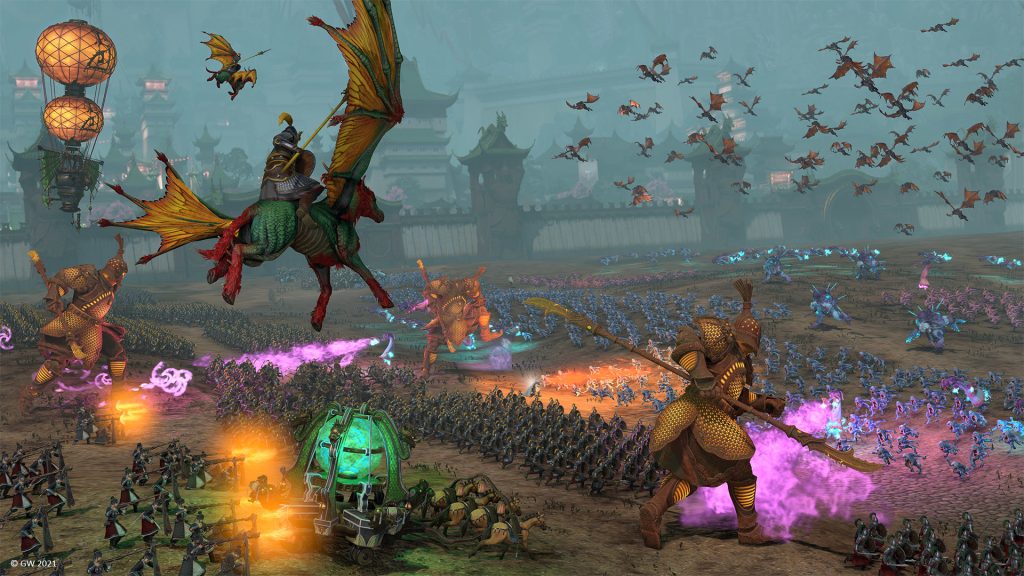
TL;DR: Total War Warhammer 3 co op campaign setup needs a shared campaign choice, compatible game versions, and a plan for turns and battles. Choose Immortal Empires for a sandbox, check every player’s unlocked lord, and decide between simultaneous and sequential turns before starting. Different DLC collections can play together; they do not unlock each other’s characters.
For two friends learning the game, choose factions that can support a shared local objective and begin with settings both understand. Use sequential turns if you want time to explain every move, or simultaneous turns when both players are ready to manage their factions at once. Agree on battle responsibilities before the first fight, because allies can receive units to command while another player owns the army.

The official co-op preview establishes turn choices and shared battle control. The September 2026 new-player FAQ confirms multiplayer with different owned content. These rules support the setup below; specific menu labels and compatibility details should be checked in the installed build rather than copied from an old lobby screenshot.
On this page
Total War Warhammer 3 co op campaign setup: choose the campaign before choosing characters
Start with the campaign experience the group wants. Immortal Empires is the world-spanning sandbox, with up to eight players according to the official Immortal Empires FAQ. It does not run the Realm of Chaos soul race or the Eye of the Vortex mechanics. Choose it when exploration, empire building, and faction objectives are the main attraction.
The original WARHAMMER III co-op preview lists Realm of Chaos for up to eight players, Darkness and Disharmony for up to eight, and Something Rotten in Kislev for three. The latter two are focused multiplayer campaigns rather than interchangeable names for the full sandbox. Check availability in your current campaign selection, especially if someone entered through a newer content pack.
Do not assume a pack that grants Immortal Empires also grants every narrative campaign. The current Lords of the End Times FAQ describes its access bundle specifically. If the group wants Realm of Chaos, verify that every participant has the relevant campaign available before spending time arranging lord choices.
Check each player’s collection and version
Each person should identify an unlocked Legendary Lord in the selected campaign. Creative Assembly explicitly says multiplayer campaigns and battles work with different content collections. Ownership determines the races and lords available to each individual, not whether unowned factions appear in the world.
That distinction prevents unnecessary purchases. If your friend owns a lord you want to fight beside, they can select that lord while you choose one from your own collection. Their purchase does not grant you the same selection. Agree on compatible faction choices using the lords each person can actually play.
Keep each person’s relevant game content on the same store. The official FAQ distinguishes cross-play from cross-store ownership: meeting a Steam player does not combine your Epic and Steam purchases into one library. Cross-play also requires compatible releases; an April 2026 official update changed the version number specifically to maintain compatibility with other platforms.
Finish updates before creating the lobby. Compare the displayed game versions when a connection fails. Begin without mods when establishing that the group can connect, then add a mutually compatible mod setup deliberately. A modded save can introduce another compatibility problem even when all players own the correct campaign.
Create a lobby with settings everyone understands
For an Immortal Empires game, use the multiplayer campaign controls to create a new hosted campaign, then select Immortal Empires. Give the lobby a recognizable name and use its invitation or join controls to bring in the agreed players. Guests should join this host’s campaign lobby, rather than starting separate single-player campaigns. Confirm that everyone appears in the same lobby before selecting factions.
Choose each player’s unlocked lord and confirm the intended cooperation setting before anyone marks themselves ready. Immortal Empires has documented team and free-for-all choices: for a fixed cooperative group, put the cooperating players on the same team where that selector is available. Free-for-all allows changing diplomatic relationships; agreeing verbally to cooperate does not make it the same fixed-team setup. This distinction is documented in an April 2023 Immortal Empires player report, so verify the team controls in the installed build. Do not assume the focused Kislev and Cathay campaigns use an identical selector or victory condition.
Check the campaign name, participants, lord selections, team relationship and turn mode together. Each guest then uses the lobby’s ready control, and the host starts the campaign when the lobby permits it. Ready-state behavior is documented in player reports for both new and resumed campaigns; if the lobby will not proceed, fix the missing or mismatched participant state before trying another start.
Once the campaign map loads, confirm that each player controls the intended faction and that the diplomacy relationship matches the group’s plan. Read the displayed campaign objectives too: shared turns, a military alliance and a shared team victory are different things. Resolve a wrong faction or relationship before making first-turn moves, rather than discovering it after both armies have committed to a war.
Review campaign difficulty and battle difficulty together. The Update 4.0 developer notes added an independent slider for AI battle-stat bonuses. Read it alongside the battle difficulty rather than assuming one label explains every enemy advantage. For a first group campaign, use a stable setup that lets everyone learn why a fight was won or lost.
For Immortal Empires, inspect any endgame scenario controls exposed in your installed multiplayer setup. Availability has differed from single-player in documented earlier builds, so do not promise the group a setting that its current lobby does not offer. Agree on the displayed choices before starting.
Pick simultaneous or sequential turns deliberately
Simultaneous turns let players act during the same campaign turn. The official preview presents this as a way to keep multiplayer moving. It works best when both players can make ordinary recruitment and building decisions without needing the host to narrate each action.
For co-op, coordinate before moving into a contested area. If both armies intend to support the same offensive, state who will initiate the fight and where the other army should be. The ability to act at once is a pacing option, not a replacement for a shared plan.
Sequential turns give each person more room to think and explain. The preview says this can be selected in the options. Use it when teaching a newcomer, discussing diplomacy, or running a group that prefers a slower campaign. Choose the pace that makes decisions clear enough for your group to enjoy them.
Agree on an end-turn signal even with simultaneous turns. One player may be ready while another is still reviewing a treaty or choosing a building. A short verbal check avoids turning the faster player’s routine into pressure on everyone else.

Plan how the group will share battles
Players can enter battles as spectators and receive forces to control, according to the official preview. Give an ally a coherent job: the cavalry wing, the missile group, or a supporting formation. A named responsibility is easier to coordinate than distributing unrelated units just to keep every player occupied.
Discuss the plan before combat begins. Decide who protects the artillery, who watches the flanks, and who calls a withdrawal. If one person owns the lord and spellcaster while another controls infantry, they should know when support is arriving rather than guessing from the battlefield effects.
Remember that lending battle control does not transfer ownership of the entire campaign army or change a player’s DLC collection. The army still belongs to its faction outside the fight. Shared control gives friends something useful to do during the battle, and the post-battle army condition remains a campaign concern for its owner.
Keep the first shared battle simple. Practice selecting and ordering the assigned units, then review the result together. Add more complicated responsibilities when the group can explain its formation and targets without competing commands or unclear expectations.
Coordinate expansion and region transfers
Choose a local objective both players understand: defeat a nearby enemy, protect a border, or secure a route between your starting areas. Nearby starts can make mutual support easier, but do not assume every pair of lords from the same race begins together.
The multiplayer preview confirms that regions can be gifted to allies. Use that when a settlement fits your ally’s position or campaign plan better than yours. Discuss the intended owner before an offensive so a successful capture does not turn into a disagreement over who was supposed to receive the province.
Read diplomatic proposals before accepting them. Supporting your friend is the central purpose of co-op, but a new military commitment can affect both players’ plans. State which enemy the group intends to fight next and avoid creating a second front through an unexamined agreement.
Save a campaign the group can resume
Before leaving, make a named manual campaign save through the in-campaign save controls and note the turn, participating factions and next objective. A September 2026 player discussion confirms that multiplayer campaigns support ordinary manual saving as well as turn autosaves. Check that the intended save exists before everyone exits; a memorable name helps distinguish it from an older autosave.
For the next session, have the host reopen the existing multiplayer campaign save through the game’s multiplayer continue or load controls. Select the saved campaign rather than creating a new one with the same lords. Loading an in-progress multiplayer game returns the host to a lobby for the campaign; player reports document this save-to-lobby behavior, including a June 2026 report describing the host’s Resume route. Exact labels can vary by build, so use the route that presents your existing multiplayer saves.
Invite the returning players into that lobby or have them join the host’s listed game. Recheck the lobby’s name and privacy or password choices; do not assume those choices were retained with the save. Confirm that each returning person has the intended saved faction before using ready and letting the host continue. If a player is missing or has the wrong assignment, correct it in the lobby rather than starting and hoping the campaign will sort it out.
After loading, compare the actual campaign turn, faction ownership, army positions and outstanding objective with the notes made before closing. Continue only when everyone recognizes the saved state. If you accidentally loaded an earlier autosave, return to the lobby and choose the intended manual save before making new moves. This final check completes the recovery process; a successful network connection alone does not establish that the right campaign was restored.
Keep the shared campaign’s version and mod choices consistent between sessions. If an update arrives, check whether the save and mods remain compatible before everyone joins. Official patch notices recommend verifying game files and checking mods when new problems appear; repeated lobby invitations cannot fix a mismatched installation.
If a player cannot reconnect, isolate the cause in order: campaign access, selected lord ownership, completed updates, game version, then mods and connection. Use SEGA Support when the basic checks leave a repeatable error. Record the actual failure rather than assuming different DLC collections are inherently incompatible.
Use the Total War Warhammer III guides hub for the group’s next faction lesson. The setup is ready when everyone can name the campaign, their lord, the turn pace, their battle job, and the next shared objective.
FAQ
Do we need identical DLC collections?
No. The current official FAQ permits different collections in multiplayer. Each player selects from their own unlocked races and Legendary Lords.
Can two people take their turns at the same time?
Yes. The official co-op preview lists simultaneous turns and an optional sequential mode. Choose based on how much discussion and teaching the group wants.
Can I command units in my friend’s battle?
Yes. A spectator can receive forces to control. Assign a clear battlefield role so shared control helps the army rather than creating conflicting plans.
Are all multiplayer campaigns eight-player campaigns?
No. The original preview lists Something Rotten in Kislev for three players, while Realm of Chaos and Darkness and Disharmony support eight. Immortal Empires separately supports up to eight.
Sources and scope
- Official co-op campaign preview: campaign limits, simultaneous and sequential turns, spectator control, and region gifting.
- New Player Survival Guide and FAQ, September 2026: different DLC collections and individual ownership.
- Immortal Empires FAQ: eight-player sandbox, cross-play, and campaign distinctions. Original launch ownership rules are superseded by later announcements.
- Crossplay Patch 7.2.1: version alignment for cross-platform compatibility.
- Update 4.0 Developer Update 1: independent AI battle-stat slider.
- Immortal Empires team and free-for-all report, April 2023: dated player documentation of team choices and loaded saves returning to a lobby; not a universal selector for every campaign.
- Multiplayer Campaign saving discussion, September 2026: player confirmation of manual saves and turn autosaves, separate from DLC ownership.
- Host resume and ready-state report, June 2026: player documentation of Resume returning a host to a lobby and a reported ready-state failure. The workflow above does not promise that this fixes desyncs or loading errors.
Sources and further reading
- https://store.steampowered.com/news/app/1142710/view/714539392537986113
- https://store.steampowered.com/news/app/1142710/view/3664291964248626227
- https://store.steampowered.com/news/app/1142710/view/3371527460689106706
- https://store.steampowered.com/news/app/1142710/view/3120434657829763702
- https://store.steampowered.com/news/app/1142710/view/690881000795800437
Keep exploring
Total War Warhammer 3 vs Stellaris: battles or a galaxy to discover?
Choose WARHAMMER III for commanding fantasy armies; choose Stellaris for exploring a galaxy and shaping the society, technology and fleets of an empire.
Total War Warhammer 3 vs Total War Rome 2: fantasy or empire?
Choose WARHAMMER III for fantasy races and Legendary Lords; choose ROME II for classical empire building, politics and historical battles.
Total War Warhammer 3 vs Total War Attila: fantasy or survival?
Choose WARHAMMER III for fantasy races and Legendary Lords; choose ATTILA for late-antique survival, vulnerable territory and destructive warfare.