TL;DR: Pick Company of Heroes 3 for Mediterranean campaigns, squad RTS command and optional single-player Tactical Pause. Pick Steel Division 2 for an Eastern Front setting, turn-based strategic campaigns connected to real-time battles and a pre-battle deck-building system.
Company of Heroes 3 vs Steel Division 2 is a purchase decision between different ways of organizing a WWII strategy game. The shared setting does not make their campaign maps or army-selection systems equivalent. Begin with the campaign and control perspective you want to spend time learning.

Our six buying criteria are campaign structure, battle perspective, pre-battle selection, solo pacing, group activities and purchase requirements. We read the official Steam descriptions and examined publisher-supplied screenshots on November 8, 2026. The recommendations are based on those documented differences, without a claimed playtest or invented performance rating.
On this page
Company of Heroes 3 vs Steel Division 2: six useful fit checks
| You want | Start with | Reason |
|---|---|---|
| Italy and North Africa | CoH3 | Its base campaigns emphasize the Mediterranean |
| A 1944 Eastern Front campaign | Steel Division 2 | Operation Bagration is its documented base setting |
| An optional solo planning pause | CoH3 | Full Tactical Pause is explicitly listed for single-player |
| Turn-based army management with battle autoresolve | Steel Division 2 | Its strategic campaign description names both |
| A pre-battle deck system | Steel Division 2 | Division and unit selection are named features |
| A Windows Steam purchase | Either | Both current listings identify Windows support |
1. Choose the campaign layer you actually want
Steel Division 2 describes turn-based Dynamic Strategic Campaigns set around Operation Bagration in 1944. Its product information distinguishes army management on a strategic map from the real-time battles that follow. It also lists battle autoresolve for players concentrating on the strategic layer.
CoH3’s Italian Dynamic Campaign Map also connects wider campaign choices with tactical battles. Its North African campaign is separately named in the base description. The presence of a strategic map in both products does not establish identical turn structures, progression or campaign rules.
For a buyer attracted specifically to turn-based army management, Steel Division 2’s documented arrangement provides a direct reason to investigate it. For a buyer who wants the Italian campaign and CoH3’s unit-command interface, the Mediterranean structure can be the stronger match.
Read the campaign description before comparing a package by its mission count. An expansion can add content without adding the exact campaign format you wanted. The CoH3 Italian campaign guide covers its map and progress interfaces separately.
Steel Division 2’s official description gives its campaign a specifically named historical frame: Operation Bagration on the Eastern Front in 1944. It also describes large strategic maps and army management. Those details help distinguish the campaign you are investigating from a generic collection of WWII matches. They should not be treated as a promise that every expansion uses identical content.
Autoresolve is relevant when you want a campaign session focused on management, while real-time battles matter when you want to command individual engagements. The official listing provides both options for Steel Division 2. Compare that documented arrangement with the actual CoH3 campaign you want, rather than assuming that every game with a strategic map makes the same choices available in every situation.

2. Compare how the battle is presented
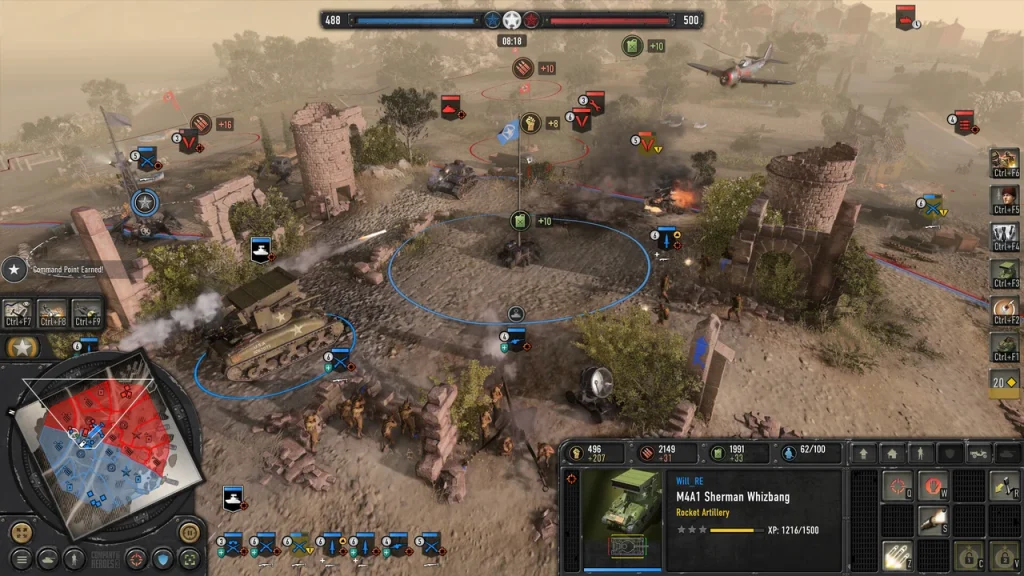
CoH3 is described as squad-based real-time strategy with supporting units, territory and command tools. The screenshots show the selected-unit panel, command buttons and minimap alongside the game world. This is the command perspective to evaluate when choosing a new RTS.
Steel Division 2 presents real-time tactical battles alongside its larger campaign layer. Eugen’s store page emphasizes a substantial unit catalog and division selection. That makes the product worth considering if browsing a wider roster and organizing the available force are central parts of your interest.
A larger advertised catalog does not establish that the game is better for every player. It gives you more product information to examine, while the useful comparison remains which system you want to manage. A buyer wanting a smaller set of squad interactions has different priorities from someone wanting to study divisions.
Eugen’s base description advertises more than six hundred units and twenty-five maps. We report those as the publisher’s catalog description rather than a verified total for all editions and later DLC. For a buyer, the meaningful question is how the advertised variety relates to the campaign or mode they intend to play, not whether a raw count can name a universal winner.
The official screenshots do not measure camera usability, readability on a small display or frame rate. We therefore do not claim that either interface is easier or faster. Watch current interface footage at the screen size you expect to use before making those experience judgments.
3. Decide whether deck-building belongs in your evenings
Steel Division 2 explicitly advertises a deck-building system in which the player selects a division and chooses units. One supplied screenshot shows unit categories, selection cards and configuration controls around a vehicle preview. That is direct visual evidence of a selection interface, rather than evidence of its current balance.
CoH3’s base description lists four multiplayer/co-op factions. Its documented structure asks the buyer to consider faction access and unit command, while separate content listings can add specialist options. Those access questions should not be collapsed into Steel Division 2’s division-and-deck terminology.
Someone who enjoys preparing an army selection before starting a match has a concrete reason to examine Steel Division 2. Someone who wants to begin with a faction and learn the production interface through an AI practice game can investigate CoH3’s approach first.
Neither route eliminates learning. More selection options do not guarantee more useful choices for your particular mode, and a named faction is not a promise that every specialist unit is part of the base purchase. Verify the selected edition and activity instead of buying from a roster screenshot alone.
The pictured Steel Division 2 interface organizes choices into categories such as reconnaissance, infantry, tanks and support. It also shows name/type filters and deployment-phase controls. Those visible features help a buyer recognize the preparation interface they would be learning. We do not copy the pictured weapon values into a current balance guide.
Ask whether this preparation is part of the enjoyment you are seeking. A player who likes browsing available units before a session has a different purchase priority from someone who mainly wants to begin a campaign mission. Neither preference requires a claim that the other game’s roster is inferior.
For a group purchase, compare that preference with your friends’ chosen activity. Agree on the mode before discussing which division or faction looks attractive. This keeps the decision tied to the game you will actually play together, rather than an isolated selection-screen image.
4. Separate Tactical Pause from strategic turns
Full Tactical Pause is an optional CoH3 single-player feature for planning and queuing orders. It gives the solo buyer a specifically documented pacing tool. It does not turn all CoH3 battles into turn-based play, or provide the same pause during competitive multiplayer.
Steel Division 2’s turn-based strategic campaign is a different feature. Turns describe how army management progresses on that campaign layer. The developer also describes real-time tactical battles and autoresolve; each answers a different question about how you spend the session.
If you mainly dislike handling several real-time commands at once, CoH3’s solo pause deserves attention. If you primarily want strategic army management with the option to resolve battles without personally commanding each one, read Steel Division 2’s campaign description closely.
Do not buy either game solely because another article calls it slow or demanding. We have not timed a beginner’s learning process. Identify the documented pacing feature you need, then inspect the mode in which it is available.

5. Confirm the group’s activity before comparing match sizes
Steel Division 2’s official store information lists solo, multiplayer and cooperative modes, including large ten-versus-ten battles. That provides a reason for a large-match buyer to investigate it, but an advertised size is not a measured guarantee of full lobbies or reliable queue times.
CoH3 lists competitive and cooperative play as well. Its four multiplayer/co-op factions are documented base-product information, not a statement that every campaign or custom scenario supports the same cooperative arrangement. Confirm the exact activity your friends want.
For a regular group, ask whether the goal is an AI session, a campaign activity, a competitive match or a particular community creation. Then check platform, version and content requirements together. Several people owning a game does not establish that all the selected activities are compatible.
Our comparison does not rank current player populations. Those change and were not measured here. If a particular lobby or mode determines your purchase, investigate it directly instead of using the release year or a store category as a substitute.

6. Check platforms and content ownership
Both current Steam listings identify Windows support. This comparison does not verify a native macOS or Linux version for either product, or test compatibility-layer behavior. A purchase for a specific computer should use that game’s current system requirements.
Steam lists Workshop support for Steel Division 2, but this feature alone does not establish that a particular community item meets your requirements. A downloaded scenario or modification can have its own version and content dependencies. Read those before inviting friends to install it.
Compare the base edition with the exact additions offered in a package. The product descriptions include base settings and roster information, while separate DLC can change the available campaigns or units. We do not use an advertised base catalog count as a total for every subsequent expansion.
If you already own content for either game, compare the package against that library before purchasing. Record the campaign, mode or roster access you still need. A new package name does not establish that all its items are new to your account, and unrelated extras do not improve the fit of the campaign you were planning to play.
Price comparisons need a purchase date, currency and package scope. We have not checked equivalent live bundles for these two games, so we omit a price winner. A temporary discount cannot explain whether the included content serves the activity you actually want.
Make the choice from a specific playing plan
Choose CoH3 first if your plan is to learn its squad RTS interface, play the Mediterranean campaigns and use Tactical Pause in solo sessions. The beginner guide explains the basic command routine, and the CoH3 review discusses edition and platform considerations.
Choose Steel Division 2 first if your attraction is a 1944 Eastern Front strategic campaign, division selection and the option to autoresolve battles. Those are named product features; they do not establish an easier tutorial or a more accurate experience.
If both sound appealing, select one intended activity and compare it directly. The decision is more useful when it produces a campaign or multiplayer plan than when it rests on a general claim that one WWII game is more serious.
Frequently asked questions
Is Steel Division 2 entirely turn-based?
No. Its official description distinguishes turn-based strategic campaigns from real-time tactical battles, with autoresolve also listed for campaign battles.
Does CoH3 include a single-player pause?
Yes. Optional Full Tactical Pause is documented for single-player planning and queuing orders. Do not assume it applies to competitive matches.
Do both games offer co-op?
Both official Steam listings include cooperative play. Confirm the specific mode or scenario, required content and group configuration before buying together.
Which game has the better performance?
This comparison does not supply that verdict. We have not benchmarked either game on the same hardware, version and settings.
Sources and further reading
Keep exploring
Games Like Company of Heroes 3: three different tactical choices
Choose COH2 for familiar squad tactics, Gates of Hell for direct unit control, or Steel Division 2 for division decks and Army General.
Company of Heroes 3 Mortar Tactics: 7 Practical Decisions
Use mortar fire to change a defended position, choose damage or smoke by the task, and move the supported army while the opportunity exists.
Company of Heroes 3 Battlegroup Selection: 7 Useful Decisions
Choose a battlegroup to supply a specific capability, then match its unlock path and spending to the battlefield problem you observed.