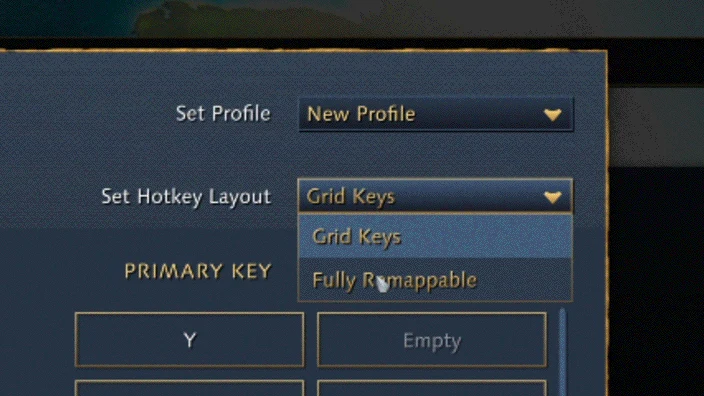
For an Age of Empires 4 hotkey setup on PC, start with one control profile, choose Grid Keys or Fully Remappable, and change a few frequently used actions at a time. The official help guide says these layouts are separate profiles and changes do not automatically copy between them. Verify the active profile before assuming a saved binding has disappeared.
Fully Remappable starts from the default Grid layout when first selected, then permits independent reassignment. Resolve conflicts between actions that can occur in the same context and test the result in a quiet skirmish. Hiding conflict warnings does not turn an actual simultaneous conflict into two usable commands.

This guide uses the official remapping FAQ and its real settings demonstration. It covers keyboard and mouse setup rather than a controller layout, and it does not claim a measured improvement in actions per minute. The Age of Empires 4 beginner guide explains the underlying economy and unit tasks first.
On this page
Age of Empires 4 hotkey setup in 6 checks
The useful sequence is active profile, layout choice, a small change, context-aware conflict checks, a practice test, and saved-profile verification. Keep the original configuration understandable. Reassigning many unfamiliar actions at once makes it harder to identify which change caused a command to stop working.
1. Open controls and identify the profile
The official demonstration shows Settings, Controls, and the View and Remap Controls option. Use that controls page to identify the selected profile and hotkey layout. The labels shown here come from the publisher’s demonstration, not a claim that this article has opened your installed game’s current menu.
Record the profile you intend to edit before changing bindings. If you keep several configurations, give them names you can recognize later. A remembered key from a different profile can look like a failed save when the active layout simply differs from the one you last edited.
2. Choose Grid Keys or Fully Remappable
Grid Keys and Fully Remappable serve different setup preferences. The official FAQ says the first switch to Fully Remappable aligns its defaults with the Grid layout. After that, you can reassign bindings independently. Choose the mode you want to maintain rather than switching back and forth while expecting every change to synchronize.
The same FAQ states that the profiles are completely separate, including changes to Global Keys. If you alter a global action in Fully Remappable and return to Grid, the change is not automatically copied. That is a profile distinction to manage, not proof that the game has ignored every edit.
3. Change one frequent action first
Choose an action you use repeatedly, such as a worker-selection or production-management action available in the current list. Read its exact name before assigning a key. A camera focus action and a unit selection action can serve different jobs, even when both seem related to the same part of the economy.
Pick a comfortable binding and note it as your personal choice, not a published default. This guide does not prescribe one universal keyboard map. Your existing habits, hand position, and other bindings matter. Start with a change you can remember and verify before modifying every building or army action.
4. Inspect conflicts by usable context
The official FAQ explains that conflict alerts do not always account for whether two actions can be available simultaneously. Its example is House and Ovoo, which do not coexist for the same civilization in normal play. A repeated key in mutually exclusive contexts is therefore different from two competing actions available at the same time.
For an actual simultaneous conflict, the FAQ says only one key action can activate, leaving the other unavailable through that binding. Review the affected actions and separate them when both need to work. Turning off the Warn conflicts toggle prevents new alerts; it does not supply a second working action for a real collision.
5. Test the change in the relevant game context
Use a quiet AI skirmish to test the edited action with the correct unit, building, or menu selected. Verify what the key actually does rather than judging from the settings list alone. An action can be unavailable because of context even when its saved binding is correct.
Repeat the test for any other action sharing that key. If those actions can occur together, confirm both remain accessible through your intended controls. A test with one civilization or one age does not prove that every building-menu context has been checked. Keep the exercise focused on the changes you actually made.
6. Save and verify the active layout again
Use the controls page’s save or confirmation flow and inspect the active profile afterward. Record the layout and changed actions so you can restore your understanding after an update or a profile switch. Do not rely only on remembering which key felt convenient during one practice session.
Return to the game and repeat the small test after leaving the settings page. If the behavior differs, first check the profile, selected context, and conflicts. Those checks can explain the problem without deleting an otherwise useful configuration or rebuilding every binding from memory.
Global actions and context actions need different checks
A global action is intended to be available more broadly than a command tied to one selected building or unit. The official remapping FAQ specifically discusses Global Keys when explaining separate profiles. Read the category and action name so you know what is being changed, rather than assuming every repeated key has the same scope.
For a context action, select the relevant unit or building before testing. A building option can also depend on age or civilization. If it is not available in the current menu, the absence of a response does not establish that the binding itself is broken. Confirm that the action can actually be performed in that state.
Keep camera and selection behavior clear in your notes. An action that moves your view and an action that changes the selection can feel similar at first, but they affect the next command differently. Choose the behavior you need and test the resulting selection state before issuing further orders.
This guide does not assign a default key to every category without checking the current profile. The official FAQ links a default shortcut chart, while Fully Remappable permits edits. The action name and your active saved binding are the reliable pair for a configuration you have already customized.

Why an exact older-game building layout may not transfer
The official guide says buildings remain grouped by their respective age, even with fully remappable keys. It therefore warns that a one-to-one building-hotkey mapping from another Age title is not available in that structure. Independent remapping gives flexibility without erasing every difference in the building menus.
If you are coming from another game, start with a few familiar global actions and then learn the current building groups. Avoid rewriting the whole layout solely to imitate a remembered sequence that the current menu structure does not support. Test the actual building action in the relevant age and civilization.
Write down the places where the layouts differ. A short note is more useful than repeatedly expecting an unavailable older-game command to work. Your setup should make the current game understandable, including its context changes, rather than treating every mismatch with an older title as a saving error.
A small practice routine for a new profile
Choose three changes you can describe clearly: one frequently used global action, one production or selection action, and one building-context action available in the test civilization. Record the action names, new keys, profile, and layout. These are proposed practice choices, not a claim that a particular map has already been tested here.
In the skirmish, use each changed action and verify the result. Then revisit the key-sharing contexts identified in the conflict list. Keep the mouse option available while learning so a forgotten binding does not stop the whole exercise. The useful outcome is a working, understood configuration, not an invented performance score.
After the test, remove a change that did not serve a useful task or revise a real conflict. Keep the changes that are both comfortable and predictable. Expanding a profile gradually makes it easier to distinguish a context issue, a profile switch, and a genuinely conflicting assignment.
Do not describe one successful press as a complete all-civilization test. Record what you actually checked: the selected profile, civilization, age, and actions. That gives you a practical starting point for future changes without claiming coverage of menus and contexts you have not visited.


Troubleshooting and quick answers
Why did my Global Key change vanish when I switched layouts? The official FAQ says Grid Keys and Fully Remappable are separate profiles and changes do not automatically copy. Select the layout you edited and inspect its saved binding before concluding the change was lost.
Why do I see many conflicts immediately after enabling Fully Remappable? It begins from the Grid schema, and warnings can include actions that never coexist. Check actual simultaneous availability. The official House-and-Ovoo example explains why the warning list needs context rather than automatic clearing of every repeated key.
What happens with a real simultaneous conflict? The official guide says only one action can activate. Give the competing actions different usable bindings when both are needed. Hiding alerts does not repair that assignment.
Can I duplicate every building hotkey from an older Age game? The official guide says buildings remain grouped by age, preventing a complete one-to-one transfer. Use the current action groups and test the configuration you actually need.
Why does a saved key work in one menu but not another? Check the action’s selected context, age availability, civilization, and active profile. A command that is unavailable in the current state is different from an unresponsive binding for an available action.
Start with a small profile you can explain and reproduce in practice. The official Fully Remappable Keys guide and its real settings demonstration were read on November 8, 2026. Your active profile and current controls page remain the reference for subsequent edits.
Sources and further reading
Keep exploring
Games Like Age of Empires 4: economy, settlement or tactics?
Northgard fits resource and victory planning; Manor Lords fits settlement design; COH3 fits tactical combat with a campaign layer.
Age of Empires 2 Definitive Edition vs Age of Empires 4: where to start
Choose campaign breadth in AoE II DE or documented onboarding and newer presentation in AoE IV.
Age of Empires 4 Team Game Trade Routes: 6 Useful Checks
A funded team-route guide separating valid endpoints,per-trip distance value,actual completed journeys and Market exchanges.