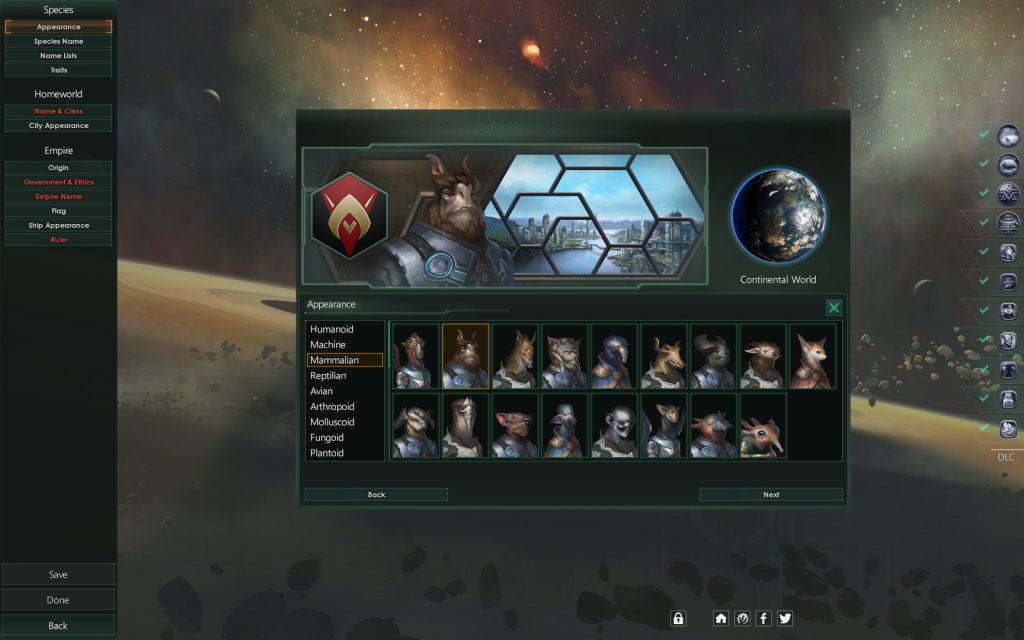
TL;DR: Build a custom empire around one clear campaign plan. Choose an origin, compatible ethics and authority, then civics and legal species traits; verify the saved result in a paused new game before relying on its opening economy.
Stellaris empire creation works best when the empire’s origin, government, civics and species traits support a playstyle you understand. Choose the start first, check which rules it changes, then select compatible options and save the finished empire. For a first custom build, a settled empire with a straightforward opening makes it easier to learn the economy before adding a demanding story origin or a specialist population system.

The Empire Creator mixes identity choices with mechanical choices. Portraits, names and colors help you recognize the empire; traits, origins and government settings can change how you play it. Read the tooltip for each selection in your installed version. This is a PC 4.x selection workflow, not a numerical tier list or a guarantee that a copied build will perform identically across patches, DLC selections and mods.
On this page
Stellaris Empire Creation: Decide what the campaign should ask you to do
Write a short description of the empire’s intended behavior before selecting bonuses. An exploration campaign might prioritize discovering nearby space while maintaining workable relations. A development campaign might focus on making colonies support each other. A military campaign needs an economic and diplomatic plan that can sustain the fighting you intend to start.
Keep the description specific enough to reject an unsuitable option. “A strong empire” does not tell you which civic to choose. “A settled empire that develops colonies before considering a war” gives you a reason to avoid an origin that immediately demands a special military response. It also lets you evaluate whether a bonus affects something you will actually do.
Decide how much complexity you want to learn at once. A specialized population, unusual homeworld and restrictive diplomatic rule can each be interesting, but selecting all of them means several departures from ordinary guidance. For a first custom campaign, choose one feature you want to explore and leave the rest manageable.
Paradox’s official Stellaris overview describes customization through traits and ideologies alongside exploration, diplomacy and warfare. The practical task is to connect those customization choices to the activities you want in this particular game. You can change the theme between campaigns without needing every new empire to reproduce an online competitive build.
Pick the origin before completing the government
Read the origin’s start conditions, requirements and restrictions. Note what replaces the ordinary beginning: the homeworld arrangement, starting population, surrounding situation or a special objective. A strong-sounding reward may come with a requirement that occupies the first part of the campaign.
Hard Reset gives you a concrete compatibility test. The official 4.0 development diary introduces this Synthetic Dawn origin as cybernetic battle thralls suddenly disconnected from a Driven Assimilator, with hostile barrier fleets nearby. If your plan is a quiet settled-colony opening, choose a different available origin. If managing that military start is the point of the campaign, select Hard Reset only with its required content enabled, read the current origin summary, and check the surrounding fleets and starting economy in the paused new game. The diary establishes the type of opening; its early details do not establish current numerical bonuses.
Check whether it is available with your enabled DLC. Free patches can expand systems while a particular origin still belongs to a paid pack. For example, the developer’s 4.5 Cygnus release announcement opens several existing options to Nomadic Empires but explicitly says those options still require their respective DLC. A compatibility update does not make every associated feature part of the base game.
A nomadic campaign also changes the starting assumptions. Its moving Arkship arrangement is a different learning task from managing a settled homeworld. If you want to follow a conventional colony opening, choose an origin that actually begins that way. If you want nomadic play, inspect the origin and its dedicated rules before applying settled-empire advice.
Separate appearance from species mechanics
Choose a portrait and species name that make the empire recognizable, then inspect the traits separately. The creator’s species section includes appearance, names and traits, but a visual choice alone does not describe the complete species rules. Where a selection changes the available mechanics, read the displayed requirements and consequences before continuing.
Review the selected traits as a group. Identify what each affects, when it will matter and whether it fits the origin. A trait helping work that your planned economy barely uses may be less valuable to you than a modest effect on a function you will rely on continually. A penalty deserves the same scrutiny: it is part of the build, not merely a way to obtain another positive trait.
Use the creator’s displayed point and selection limits to finish a legal species. Check for incompatible combinations rather than assuming that two individually attractive traits can always coexist. The available pool can differ by species type and installed content, so a list from another player’s setup may contain choices you cannot select.
The free 4.0 Phoenix update explanation says traits that previously generated additional job resources can instead generate bonus Workforce for those jobs. When comparing 4.x traits with an older build guide, compare the actual current wording. A familiar trait name is not enough to establish that its effect still works in the same way.
Match ethics with the government you want to operate
In the government and ethics section, inspect the selected ethics and the authorities available with them. Read both the bonuses and the restrictions. Your choices should permit the diplomacy, population treatment and internal management you intend to use, not simply produce an appealing total of modifiers.
After changing an ethic, revisit the authority and civic selections. The creator can show options that depend on conditions you have just changed. Resolve any unavailable or conflicting selection before treating the empire as complete. This is especially useful when adapting a preset: several of its original choices may have been designed around the ethic you removed.
Consider the practical consequences during the campaign. If you want broad diplomatic flexibility, scrutinize choices that limit contact or agreement options. If you want a society organized around a particular population role, read the conditions for that role and the needs it creates. Keep a brief note of the restrictions you accepted so that an unavailable action later does not look like a broken interface.
Ethics also remain relevant after creation. The 4.5 announcement explains that Pop Groups track percentages belonging to ethics and factions, with attraction tooltips showing influences. Your starting identity does not mean every pop will permanently share the same position. Learn what the faction screen is showing when internal demands become important, while leaving a full faction-management strategy for that later task.

Select civics for a usable combination
Read each civic’s complete tooltip and ask which part of your plan it supports. Some bonuses are broad; others change specific jobs, infrastructure or interactions. Choose a combination whose benefits you can turn into actions and whose conditions remain compatible with the origin and government.
A hypothetical development empire might choose one civic because it supports a production role the player intends to establish and another because its recurring benefit fits the same opening. Before finalizing that combination, the player should check that neither civic requires a different authority or introduces a population obligation they have overlooked. The example is a selection method, not an assertion about a named optimal pair.
Pay attention to replacement effects. If a civic changes jobs or adds special buildings, find out what supplies their inputs and where they fit on the colony. A new benefit can be difficult to use when the empire lacks the Workforce or resources it needs. The creator summary gives you a starting point; the homeworld’s actual production and job tooltips will show the operating chain once the campaign begins.
Read any note about later removal or reform. Do not select a difficult opening on the assumption that every choice can be discarded immediately. Where the current tooltip describes a fixed choice or a restriction, incorporate that into the plan. Where you cannot verify how a future reform works, avoid relying on it to make the starting build viable.
Check the homeworld and habitability assumptions
Inspect the homeworld class and any origin-specific starting system. Make sure the selection is valid for the build you have assembled. A homeworld choice is also a cue to read how the species will fare on other worlds; the galaxy can offer colony candidates different from the one you begin on.
Avoid choosing a planet solely for its artwork. Compare the mechanical information provided by the creator and origin. Once you start, inspect planetary features and the actual species habitability before colonizing elsewhere. An empire that needs a particular kind of world asks you to evaluate expansion differently from one whose starting arrangement supports broader options.
The 4.5.3 released notes include corrections to habitability displays and adapted habitability concepts. They are a reason to use the current species-and-planet breakdown instead of treating a screenshot or a past guide’s value as universal. The creator establishes your starting choice; it cannot tell you which useful worlds a particular generated galaxy will place nearby.
Leave advanced species modification decisions until their technologies or traditions are available. The 4.0 documentation introduces default species templates and integration over time under specified unlocks. That later system offers development options, but it should not be used as an unexplained promise that every awkward starting trait will disappear immediately.
Finish names and colors after the rules fit
Choose the empire name, flag, ship appearance and ruler details once the mechanical selections are coherent. Use names you can quickly recognize in diplomacy and on the map. If you plan several versions of a build, give them distinct names so that you do not load the wrong one when starting the next campaign.
The 4.5 update adds independent choices for map border, map fill and ship colors. Those controls can help you make the empire easier to identify. They do not substitute for checking traits or government rules. Treat an older promotional screenshot as an illustration of the creator’s sections rather than an exact picture of every control in the current build.
Reopen the origin, traits and government pages before saving. Confirm that changing the portrait, homeworld or ethics did not leave a choice you no longer want. Then save the empire and check its summary in the selection list. The useful review is whether the finished summary still describes the campaign you set out to play.
Validate the build in a new paused campaign
Start a new game with the saved empire and inspect its homeworld, population, resources and starting ships while paused. Compare those observations with what the origin and civics led you to expect. The 4.5.3 notes include fixes to starting buildings and their specialization placement, so checking the actual opening is worthwhile when you are troubleshooting a build after an update.
Read the jobs created by special starting infrastructure and identify their inputs. If the economy has an unfamiliar need, trace it to the relevant trait, civic or origin rather than copying a standard opening blindly. Decide what the next colony or construction should supply to make the selected benefits usable.
When something is unavailable, check the in-game reason and your active DLC and mod settings. A saved empire from another configuration can involve content that the current session does not offer. Resolve that configuration mismatch before assuming the whole build concept is invalid.
Use the Stellaris guide collection for the next campaign task. Keep the saved creator configuration as your reference, and change one major feature for the next experiment. That gives you a practical comparison: you can see how the new origin, civic or species rule alters an opening you already understand.
FAQ
Which empire should a beginner create?
A settled origin with an opening you can explain is a useful learning choice. Read the restrictions before adding a specialist population system or story start that requires a different opening.
Does the portrait determine the entire build?
No. Inspect traits, origin, ethics, authority and civics separately. Where a species selection changes available mechanics, the displayed requirements determine the legal options.
Why is a civic or origin unavailable?
Read the failed requirement in the creator, then check ethics, authority, species, other selected options and enabled DLC. Revisit dependent choices after changing a major selection.
Can I trust an old competitive build in PC 4.x?
Compare every current tooltip first. The 4.0 update changed how some traits supply job benefits through Workforce, while later updates changed other systems. A familiar name does not establish identical mechanics.
Sources and further reading
- https://www.paradoxinteractive.com/games/stellaris/about
- https://steamstore-a.akamaihd.net/news/externalpost/steam_community_announcements/1798454487635615
- https://steamstore-a.akamaihd.net/news/externalpost/steam_community_announcements/1844115010503624
- https://steamstore-a.akamaihd.net/news/externalpost/steam_community_announcements/1848557880479130
Keep exploring
Stellaris vs Hearts of Iron 4: discovery or industrial war planning?
Choose Stellaris for discovering a galaxy and shaping a space society; choose Hearts of Iron IV for coordinating industry, army design and politics around a WWII nation.

Total War Warhammer 3 vs Stellaris: battles or a galaxy to discover?
Choose WARHAMMER III for commanding fantasy armies; choose Stellaris for exploring a galaxy and shaping the society, technology and fleets of an empire.
Stellaris vs Crusader Kings 3: build a society or guide a dynasty?
Pick Stellaris when your campaign idea starts with a civilization and unknown stars; pick Crusader Kings III when rulers, relationships and the next heir are the central attraction.