TL;DR: For Stellaris multiplayer setup, first decide whether friends control separate empires or share one through cooperative play. Agree on the same game branch and mod setup, have one player host, confirm everyone is assigned correctly, and run a short connection and save test before starting a long campaign.
Stellaris multiplayer setup is easier when the group chooses its mode before creating the galaxy. Regular multiplayer supports separate player empires. Cooperative PvE puts the human players into the host’s empire, while cooperative play enabled in a regular multiplayer lobby allows teams to share selected empires.

This guide follows the official cooperative-flow explanation and later patch evidence. Menu labels can differ by PC version and storefront. Console Edition has its own release and networking context; a PC cross-platform option is not proof that a console can join that PC game.
On this page
Stellaris multiplayer setup: choose the correct mode
Choose separate empires if everyone wants their own economy, expansion and diplomacy. Friends can negotiate alliances during that campaign, but separate ownership also means separate decisions. Agree on whether player wars and hostile diplomacy are part of the game.
Choose Cooperative PvE when the purpose is teaching or sharing management against the galaxy. The official Gemini design starts this from the cooperative main-menu entry. The host selects the empire and galaxy, starts the session, and other players hotjoin that empire. This flow bypasses the ordinary empire-selection lobby for joining players.
For teams inside a normal multiplayer campaign, host a regular multiplayer game with cooperative play allowed. An empire can then open itself to teammates. The official introduction describes up to five players sharing an empire; confirm the current lobby’s displayed capacity before organizing a larger group. A server password and an empire’s cooperative password serve different access decisions.
Agree on a branch and mod setup before hosting
Have everyone launch the intended version before searching for the server. Compare the version and checksum displayed by the game, and record the branch you are using. A public release and a testing branch are different setups even when their names look similar.
For a first connection test, disable mods through the selected launcher playset and relaunch. If the group wants mods, agree on the exact playset, enabled items, order and versions before the full campaign. A shared workshop collection helps communicate the list, but it does not prove that every player’s installed files and settings match.
Inspect the host’s enabled expansion content and the empire choices available in that actual lobby. Do not promise that every custom empire will remain legal under a different host configuration. If a player cannot select the intended empire, read its failed requirements and resolve those before starting. Preserve the campaign’s configuration so returning players know which setup to launch next session.
Host a named session and check access
One player should host the campaign and maintain its saves. In the relevant game browser, choose the option to host a new game, give the session a recognizable name and use the access controls appropriate for your group. Send the group the session details through your normal communication channel.
If the players use different PC storefronts, inspect the game’s available cross-platform or cross-store multiplayer setting on everyone’s installation. Make sure the group uses a compatible connection route. The official Gemini release notes document a cross-platform checkbox, but that historical entry does not establish universal support for every platform or version.
When the server does not appear, recheck browser filters, the session name, the host’s open state and the chosen multiplayer route. If direct joining is available, use the session’s displayed connection information. An absent server and a failed join are different problems: record which one occurs before changing the setup.
Confirm empire assignments before the clock runs
In a standard lobby, verify each player’s selected empire and readiness. If sharing an empire, check that the joining player is actually listed inside the intended cooperative team. A player being connected to the server is not sufficient evidence that they control the correct empire.
The official cooperative lobby example shows two players within one empire and an explicit cooperative toggle. Use the current assignment display as your confirmation. Inspect or lock an empire where those controls are available, especially if the session includes unfamiliar players.
For Cooperative PvE, check the hotjoined player’s access after the host starts the game. Give the new player a simple harmless task, such as opening the colony or research view, while everyone stays paused. Confirm they see the same empire and can navigate the relevant screen before proceeding into a tutorial or competitive opening.

Set galaxy rules that the group can finish
Choose settings for the intended session length and the slowest practical pace in the group. A very large galaxy with many participants creates more management and a longer campaign. Start with a manageable setup instead of treating the maximum galaxy size as the default multiplayer choice.
Agree on difficulty, AI behavior, crisis settings and major date settings before starting. Decide whether players may use hostile builds, rush wars or become a player crisis. In a teaching game, leave enough room for questions and recovery. For competitive play, write down the permitted rules so a dispute does not begin after someone has committed to an empire.
Decide who controls speed and when pausing is acceptable. A useful casual rule is to announce a pause and its reason, then resume when the player handling that issue is ready. Schedule a stopping time for the first session. Reaching a clean save point is more valuable than starting a galaxy the group cannot resume consistently.
Divide cooperative duties and event choices
Sharing an empire works best when the players have clear responsibilities. One can manage exploration and science, another colonies and economic construction, and another fleets and diplomacy. Define those roles before the first war rather than allowing everyone to edit the same build queue.
The cooperative introduction explains presence markers that show teammates’ active interface tabs. It also explains that events are visible to the team and any player can select an answer. Assign one person to make major event and diplomatic choices after discussion. Otherwise, a teammate can commit the empire while another player is still reading.
Review resources together before expensive construction or fleet upgrades. A player managing colonies needs to know that the fleet manager has reserved alloys, while the fleet manager needs to know whether upkeep can be sustained. For a teaching game, explain the consequence of a choice and let the learner perform it. Shared control is most useful when it builds understanding.
Test saving and reconnecting early
Run a short session before the main campaign. Advance a little time, let everyone interact, save, and verify that the host can reopen the intended save and that players can join again. Keep the test separate from a campaign opening people would be frustrated to repeat.
If the game goes out of sync, save the relevant state when possible and restart from a clean shared setup. Record the version, checksum, mods and action preceding the error. Recent official patch notes document fixes to hotjoin-related out-of-sync errors, so a desync is not evidence that one player must have bad internet.
If it repeats, test a new unmodded save on the same release before adding modifications back. Preserve important campaign saves before changing branches: the official beta instructions warn that cross-version save compatibility is not guaranteed. Use the Stellaris beginner guide for the learning session and the Stellaris hub for related planning.
FAQ
Can friends control the same Stellaris empire?
Yes, through supported cooperative modes. Choose Cooperative PvE for a shared teaching game, or allow cooperative teams in a normal multiplayer lobby.
Do allied empires mean shared control?
No. Separate empires can cooperate diplomatically while retaining their own controls. Cooperative mode explicitly places multiple players in one empire.
Why can I not find my friend’s game?
Check the session name, filters, branch, version and multiplayer route. Then distinguish a visibility problem from an error that happens after joining.
Should everyone update during a campaign?
Keep the group on an agreed setup and back up the save before changing versions or branches. Save compatibility across versions is not guaranteed.
Sources and version boundaries
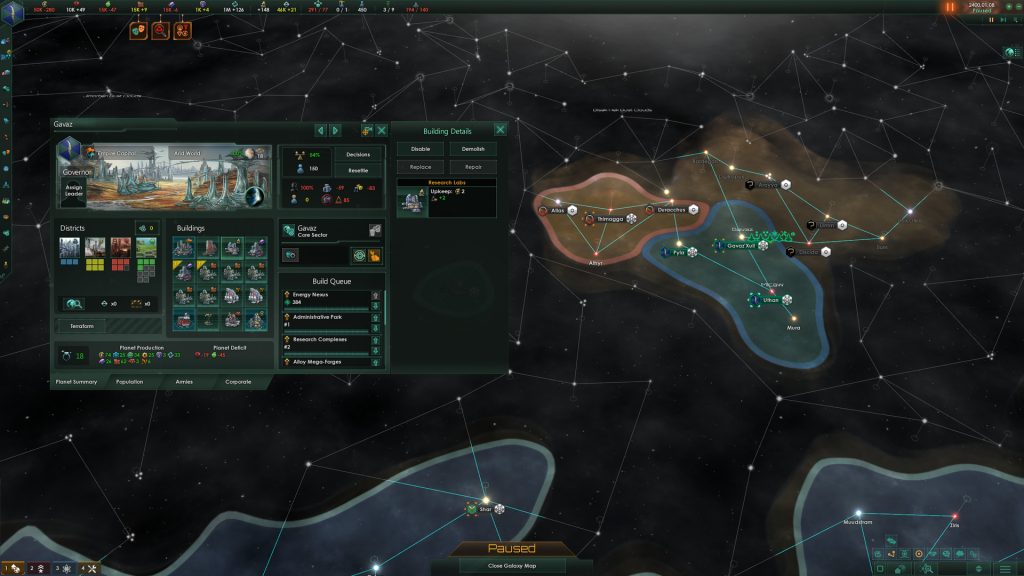
See the official Introducing Coop diary, Gemini cooperative beta instructions and 4.5.3 stability notes. Historical screenshots illustrate the mode distinction and assignment controls, not a claim of a personally tested connection.
Sources and further reading
- https://steamstore-a.akamaihd.net/news/externalpost/steam_community_announcements/5121196841288104857
- https://steamstore-a.akamaihd.net/news/externalpost/steam_community_announcements/5133583099794770594
- https://steamstore-a.akamaihd.net/news/externalpost/steam_community_announcements/1848557880479130
Keep exploring
Stellaris vs Crusader Kings 3: build a society or guide a dynasty?
Pick Stellaris when your campaign idea starts with a civilization and unknown stars; pick Crusader Kings III when rulers, relationships and the next heir are the central attraction.
Total War Warhammer 3 vs Stellaris: battles or a galaxy to discover?
Choose WARHAMMER III for commanding fantasy armies; choose Stellaris for exploring a galaxy and shaping the society, technology and fleets of an empire.
Stellaris vs Hearts of Iron 4: discovery or industrial war planning?
Choose Stellaris for discovering a galaxy and shaping a space society; choose Hearts of Iron IV for coordinating industry, army design and politics around a WWII nation.