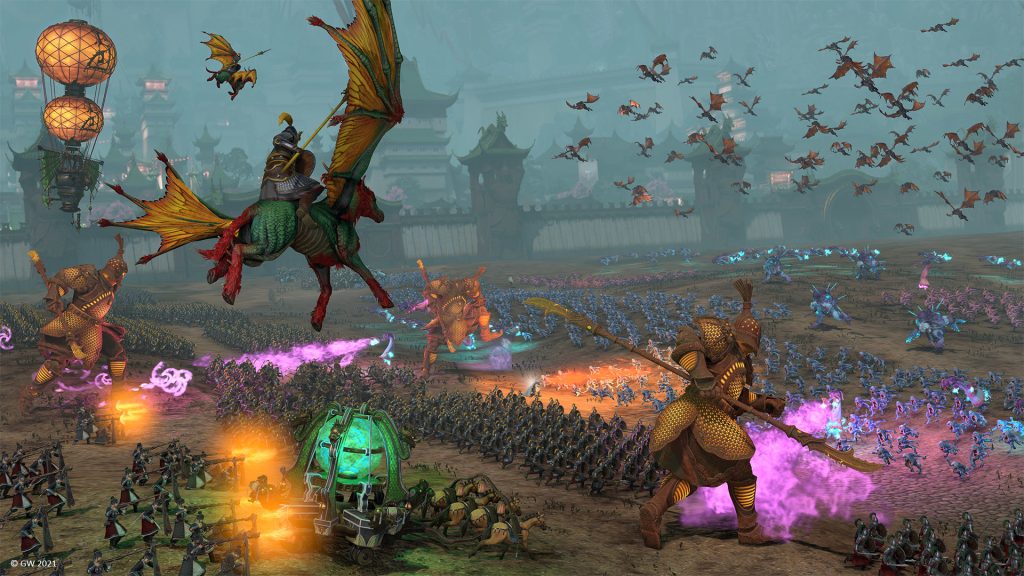
TL;DR: Use Total War Warhammer 3 Tzeentch Changing of the Ways to solve a specific campaign problem before committing your army. Inspect the available action, target, resource cost and cooldown, then choose the effect that changes the next few turns. The published Update 4.0 rework replaced Halt Faction with Halt Army, added Borrow Time and Force Peace, and improved Force Rebellion.
Halt Army affects one selected army, so it is useful for isolating a threat rather than freezing an entire enemy faction. Borrow Time restores an army’s movement range, while Force Peace ends a war between the selected factions. Force Rebellion also damages the targeted settlement’s walls under the documented rework. Confirm the installed action text before spending.

Plan the army move and the campaign action together. Spending resources to halt an army has little value if you cannot exploit the pause. A forced peace can be valuable without a battle if it removes a dangerous front. Choose the outcome first, then use the action that can actually produce it.
On this page
Total War Warhammer 3 Tzeentch Changing of the Ways: choose an outcome
Begin with the immediate problem: an enemy can reach a vulnerable city, your army lacks movement for a useful attack, a settlement is difficult to approach, or a war is diverting troops from the intended target. One clearly stated problem is easier to solve than a general desire to disrupt every rival.
Open the feature and inspect what your selected faction has unlocked. Do not assume a guide for another Tzeentch lord supplies the same full menu or progression. Read the available action’s cost, targeting restrictions and cooldown before trying to build a campaign route around it.
Compare the effect with the army’s position. If an action only helps after three turns of travel, an immediate defensive use might be more valuable. If your army can reach the affected target now, the same action may open an opportunity that ordinary movement cannot provide.
Keep resources for the operation you actually intend to perform. A low-value disruption can leave you unable to buy the action that saves an important army later. Being able to activate something is not the same as having a good reason to activate it.
Halt one army rather than expecting a faction-wide stop
Update 4.0 changed Halt Faction into Halt Army. Select the enemy force that creates the problem and read the effect on that target. Other armies belonging to the faction should not be treated as stopped merely because you used the action on one of them.
This is useful when one army is about to reinforce another or reach a vulnerable settlement. Consider what the remaining enemy forces can still do. If two separate armies can attack your city, halting only the nearer one might not make the city safe.
Use the pause to create a result: reposition the defense, attack a now-isolated opponent or leave an unfavorable area. Do not waste it by keeping your own army stationary without another purpose. The value lies in the change you can make during the interruption.
Check the target again before the next campaign turn. A successful single-army action does not erase the wider war. Continue watching the enemy’s other forces and the route toward your territory.
Borrow Time when restored movement enables a useful move
Borrow Time replenishes an army’s movement range according to the official rework. Use it when additional movement changes an immediate choice, such as reaching a favorable position or a target your army can safely defeat.
Preview the destination before paying. More movement is only useful if terrain, stance, army condition and the target allow the intended operation. Restoring movement does not independently make a difficult battle winnable, remove casualties or guarantee that every campaign restriction disappears.
Compare an offensive use with an escape or repositioning use. Sometimes the best result is leaving an exposed position before another enemy arrives. Sometimes it is reaching a settlement while an opponent is unable to support it. Both are stronger reasons than moving farther without a defined destination.
After activating, confirm the actual movement available and give the planned order. Treat the installed effect and resulting map state as the operational check. Do not assume that the amount shown in an old screenshot reflects all of your current modifiers.
Force Peace to reduce the number of problems you must fight
Force Peace forces peace between two factions that are at war under the Update 4.0 description. Inspect the eligible pair and ask which peace changes the strategic situation in your favor. It is a diplomatic intervention, not simply another battlefield damage tool.
For your own dangerous front, peace can buy room to regroup or redirect troops. For two other factions, ending their war can change where their armies are needed. That can help or hurt your plan, so consider both sides before deciding that every peace is beneficial.
Do not interpret a forced peace as a permanent alliance, lasting protection or a guarantee that another war can never happen. The documented action supplies peace; the subsequent diplomatic situation still needs to be monitored.
Review the war state after use and adjust army orders accordingly. An army moving toward a former enemy’s settlement should not continue following an attack plan without checking that the necessary war and target conditions still exist.

Use Force Rebellion as preparation rather than a promised conquest
The reworked Force Rebellion also damages the targeted settlement’s walls. Creative Assembly described that change as making it easier for the rebellion to attack. It gives you a reason to consider the settlement’s defensive situation as well as its public order.
Look at the local garrison and nearby enemy army before spending. A rebellion appearing beside a strong relief force is not equivalent to a guaranteed capture. The action creates pressure; the outcome depends on what can respond and what the rebellion actually accomplishes.
If you intend to exploit the disturbance, position your own force so it can use the opening. A weakened or distracted settlement on the far side of the map might have little practical value to you. Choose a target that supports the campaign you are playing.
Check the changed wall and army situation before launching an attack. Do not assume that a damaged wall removes every defensive obstacle. A settlement battle still requires an army and an approach suited to the surviving defenders.
Keep Winds manipulation as a separate decision
Update 4.0 also clarified the interface for changing provincial Winds of Magic strength. It shows active effects, including buildings whose effects become stronger, and makes the adjustment limits clearer. That is related Tzeentch management, but it is not the same action as Changing of the Ways.
Inspect the province that benefits and the province you are weakening. A stronger economic or other displayed building effect can be useful, but reducing Winds elsewhere may affect another part of your plan. Compare both provinces rather than focusing only on the improved one.
Patch 9.0.5 also changed the Eldritch Librarian’s increased Grimoires-from-buildings effect to faction-wide scope. Read the current recipient and value instead of assuming an old local effect description still applies. Resource generation and spending deserve the same scope check.
Troubleshoot a missing or unavailable action
First check the selected lord, unlocked actions, available resources, cooldown and eligible target. A feature that exists for the race does not imply every action is available immediately. Read the reason presented by the installed interface before searching for an old workaround.
Remove obsolete actions from your plan. Update 4.0 removed Give War Co-ordination Target and Show Faction Intentions. A guide recommending either as a central step is describing a previous menu, not a missing button you must somehow restore.
Finish with a simple confirmation: the action affected the intended target, the resulting map or diplomatic state supports your plan, and your army has a useful next order. If none of those changed, reconsider whether another action would have addressed the problem more directly.
FAQ
Can Halt Army stop every force in a faction?
No. The documented rework replaced the faction-wide action with a single-army target. Review other enemy forces before assuming a province is safe.
Does Force Rebellion guarantee a settlement will fall?
No guarantee is made here. The reworked action also damages walls, but defenders, nearby armies and subsequent battles still affect the result.
Why does an older guide show different actions?
Update 4.0 changed and removed several actions. Compare the guide’s version with the installed feature, especially for Halt Army, Borrow Time and Force Peace.
Sources and scope
Official Update 4.0 Tzeentch developer notes document the changed actions and Winds interface. Patch 9.0.5 documents the later Grimoires effect scope. This guide explains those published actions with planning scenarios; it does not claim a played campaign, universal current prices or a guaranteed rebellion result. See the Total War Warhammer III guide collection.
Sources and further reading
Keep exploring
Total War Warhammer 3 vs Stellaris: battles or a galaxy to discover?
Choose WARHAMMER III for commanding fantasy armies; choose Stellaris for exploring a galaxy and shaping the society, technology and fleets of an empire.
Total War Warhammer 3 vs Total War Rome 2: fantasy or empire?
Choose WARHAMMER III for fantasy races and Legendary Lords; choose ROME II for classical empire building, politics and historical battles.
Total War Warhammer 3 vs Total War Attila: fantasy or survival?
Choose WARHAMMER III for fantasy races and Legendary Lords; choose ATTILA for late-antique survival, vulnerable territory and destructive warfare.