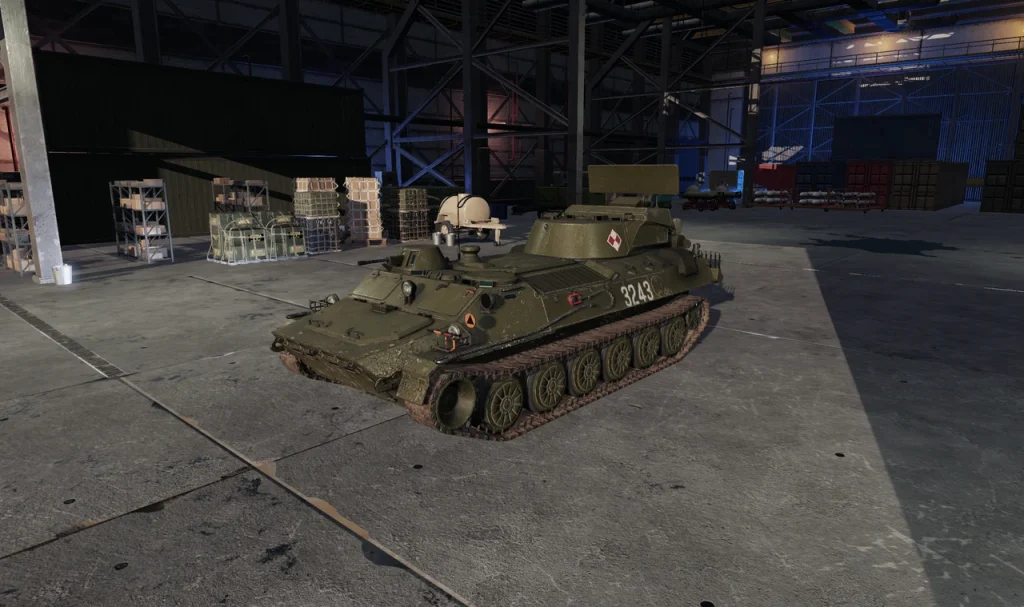
TL;DR: For WARNO artillery counter battery, use an eligible artillery weapon to answer enemy artillery and use Counter-Battery Radar as an information tool. SNAR-10, VAB RATAC, Green Archer and the later-added FV436 CYMBELINE are documented radar examples. The radar reveals firing-unit information; it is not the gun that performs the response. You can use the Counter Battery Smart Order for computer-assisted artillery handling, while current range, ammunition and setup or pack-up state determine what your selected weapon can do.
Quick choice: Pair useful artillery with available information and supply, respond to a currently visible firing location, and account for the time your own artillery needs to set up or pack. Do not build the plan around an announced Artillery Commander feature that was put on hold.

Checked November 9, 2026. This is source-based game advice, not a hands-on test. Sources include the official artillery rework explanation, v188908 release and named Smart Order or unit updates. Numerical examples retain their source version.
On this page
WARNO artillery counter battery: combine information and a usable weapon
| Game task | Useful tool | Important limit |
|---|---|---|
| Identify currently firing artillery | Counter-Battery Radar or the game’s visible trajectory information | The radar marker is not permanent after firing stops |
| Make an artillery response | An eligible current artillery weapon or Counter Battery Smart Order | Radar information does not supply range or ammunition to the gun |
| Your own artillery cannot act immediately | Read setup, pack-up and weapon state | The released rework includes distinct states and a mortar exception |
| Repeated responses use resources | The division’s supply options | A source’s capacity and a weapon’s ammunition state are different fields |
| An old guide recommends an artillery commander | Verify the actually released feature and current card | The April 2026 proposal was explicitly put on hold |
1. Separate the radar that finds artillery from the weapon that answers it
Counter-Battery Radar supplies game information about artillery activity. The v188908 notes confirm the mechanic and name SNAR-10, VAB RATAC and re-roled Green Archer entries. A later April update confirms FV436 CYMBELINE being added to the British 2nd Infantry Division.
Use an available radar card to support the task when your division supplies it. Do not count the card as if it were another firing artillery weapon. The current roster and unit description establish what information role it provides.
Your response still needs a weapon with the relevant game capability and range. The radar does not create ammunition, remove a setup state or make every gun reach every revealed location. Keep the selected firing unit and information source as separate objects when making the decision.
The developer also describes manually observing trajectories as an existing way to identify artillery activity before the radar improvement. Radar adds a more explicit information aid; it is not proof that the Counter Battery command requires a radar card in every case. The command was described independently in earlier official material.

2. Use current firing information while it remains relevant
The March and April 2026 explanations describe radar tracking artillery activity and revealing the firing location. They also say the marked position is lost when the opposing unit ceases firing. That state dependency matters to the game decision.
If you want the current information to guide a response, use the marker while the game actually presents it. Do not treat an older screenshot or previously seen mark as a permanent guarantee of the unit’s present location. The selected weapon still needs its own relevant targeting and resource conditions.
The April explanation also mentions identifying the type of firing unit. Use that information to distinguish the artillery problem from another role. A map mark, a firing-unit type and the selected responding weapon are related observations, not one interchangeable capability.
If the mark is absent, do not invent a hidden current location from the screenshot alone. Work with the information the match reveals. This keeps the gameplay decision tied to a present signal rather than a stale assumption about where the opposing artillery must still be.
3. Choose a response weapon with actual range and ammunition
The v188908 artillery rework separately changes trajectories, standardizes range and increases minimum range. These are weapon rules to consider when selecting a response. A revealed firing location does not by itself establish that the selected artillery can engage it.
Read the current weapon’s full range labels, including a minimum-range qualifier when present. An ordinary range value and a minimum range are different fields. Do not choose a unit only because one old maximum value looks large.
The release groups mortar, howitzer and MLRS range values separately. Keep the weapon type and selected card explicit instead of copying a figure from one group into another. The named values are historical release data; the installed card provides the current number.
Ammunition is another independent requirement. If the weapon is not contributing after repeated use, inspect its actual resource state before concluding that the radar failed. An information marker and an empty or unavailable weapon are different game problems and need different corrections.
4. Use the Counter Battery Smart Order on an eligible artillery selection
The developer’s Hello World announcement describes Smart Orders as computer-executed commands and gives automatic counter-battery handling as an artillery example. This is a useful option when you want the game’s automation to manage the relevant artillery role.
Use the actual current command offered for the selected unit. Patch 6 fixes shortcuts invoking Smart Orders unavailable to the selection, so the existence of a command in the game is not proof that every card can use it.
The v146198 notes restore a behavior allowing several artillery units assigned the counter-battery order to fire at the same time. The later v160943 hotfix specifically fixes the Counter Battery order working again. These show a real command with versioned behavior, not an invented feature.
Judge the current selection and available command rather than memorizing a shortcut from an old image. The order, the radar information and the gun’s range or resources remain separate. Automation can manage the command; it does not make an ineligible weapon or unrelated radar vehicle into the missing firing unit.

5. Account for setup and pack-up when using your own artillery
The released April 2026 rework gives artillery a ten-second setup delay and twenty-five-second pack-up time, with a fifteen-second mortar pack-up value. These are dated release values that explain why acting and relocating have distinct game states.
After using your own artillery, account for the displayed pack-up state before expecting an immediate relocation. If it cannot move or act instantly, inspect the current state rather than assuming an issued command has already completed. Use the present card and later updates for the installed-version value.
The rework’s stated game-design goal is to make counters viable while avoiding universal vulnerability. In practical WARNO play, keeping an artillery piece indefinitely at an already revealed position is a different choice from relocating it after the game permits packing and movement. Do not confuse a delay with a broken movement control.
Towed artillery adds another object-state context. The v188908 notes fix a loading-into-transport issue. A loading problem, a pack-up state and another selected unit are distinct symptoms. Keep the gun, carrier and actual feedback clear when diagnosing why the move you intended has not completed.

6. Keep ammunition and supply part of the response
WARNO’s official FOB explanation separates ammunition, fuel and health repair. Use the available supply system to maintain the actual resources limiting your selected artillery. Repeatedly assigning a command does not itself replenish a weapon.
Keep a supply source’s capacity distinct from the gun’s ammunition state. A resource problem in the selected weapon is not proof that Counter-Battery Radar or the Smart Order lacks its role. Read the resource that is actually missing.
The later v183203 notes fix a specific supply-priority interaction, while v160324 fixes supply failures under particular conditions. Those dated corrections do not supply a universal current logistics formula, but they reinforce the need to identify source, recipient and state rather than describing every problem as the same bug.
When choosing additional artillery, include the cost of maintaining useful firing availability in the decision. More weapons that cannot use their ammunition are not the same as a functioning response. The current roster, resource state and relevant game conditions determine whether another gun or more support is the useful addition.
7. Correct the actual weakness and ignore unconfirmed features
If you lack information, an available Counter-Battery Radar can help identify the firing activity. If a gun cannot reach the revealed location, choose a suitable current weapon. If resources are missing, supply is the problem. If a pack-up state prevents immediate movement, account for that state.
Do not build the response around the proposed Artillery Commanders feature merely because a development blog discussed it. The April rework update explicitly puts that introduction on hold. The released radar mechanic and a paused separate proposal are different evidence states.
The current patch and card supply the actual numerical conditions. Use historical notes to explain changes, while preserving the selected weapon, command and version. This avoids turning an old timer or range into a guaranteed formula for every later match.
Continue with the supply guide, the radar-role guide and the WARNO hub. A useful WARNO artillery counter battery response combines current information, an eligible supplied weapon and the game’s actual command or movement states.
Sources and further reading
- https://store.steampowered.com/app/1611600/
- https://steamstore-a.akamaihd.net/news/externalpost/steam_community_announcements/1830163047256664
- https://steamstore-a.akamaihd.net/news/externalpost/steam_community_announcements/1827626365769745
- https://steamstore-a.akamaihd.net/news/externalpost/steam_community_announcements/1828894815556846
- https://steamstore-a.akamaihd.net/news/externalpost/steam_community_announcements/1830797770232358
- https://steamstore-a.akamaihd.net/news/externalpost/steam_community_announcements/4224938027302509533
- https://steamstore-a.akamaihd.net/news/externalpost/steam_community_announcements/4247462367448914600
- https://steamstore-a.akamaihd.net/news/externalpost/steam_community_announcements/1790848102613209
- https://steamstore-a.akamaihd.net/news/externalpost/steam_community_announcements/1805431065303342
- https://steamstore-a.akamaihd.net/news/externalpost/steam_community_announcements/1800357164531286
- https://steamstore-a.akamaihd.net/news/externalpost/steam_community_announcements/5036749277232271511
- https://steamstore-a.akamaihd.net/news/externalpost/steam_community_announcements/1825727806706776
- https://steamstore-a.akamaihd.net/news/externalpost/steam_community_announcements/1803527891952965
Keep exploring
WARNO Recon Positioning: observe the fight before you join it
Put recon where it answers the force’s next movement question; preserve a useful view, cover the flank and move it when the front changes.
WARNO Command Unit Placement: capture safely, then use the leader
Bring command behind protection, complete the capture, then relocate or support nearby troops; WARNO does not require permanent parking after capture.
WARNO Division Deck Building: give every card a battlefield job
Build a division deck around an opening and reinforcement plan; cover battlefield jobs before spending cards on optional specialists.