TL;DR: For WARNO deployment planning, choose an opening objective, assign ground units and support to specific jobs, inspect useful sight lanes, and spend the initial budget on a group you can control. Include reconnaissance, appropriate command units, infantry, relevant ground weapons, AA and supply according to the task. Prepare available pre-combat orders, then adjust when the first contacts reveal what your opening actually faces.
Practical goal: Build a manageable opening that can reach its objective, identify threats, keep support working and respond when the original plan stops fitting.

Checked November 9, 2026. This is not a hands-on test or a current strongest-opening ranking. Recommendations use WARNO’s official mode description, dated developer explanations and released fixes. Current prices, card options and controls come from the installed game; archived examples retain their source dates.
On this page
WARNO deployment planning: give each purchase a job
| Opening need | Useful planning decision | Check before committing |
|---|---|---|
| Reach or hold an objective | Assign suitable ground and command units | Actual objective, capture eligibility and passenger state |
| Learn what the opening faces | Give reconnaissance a specific observation job | Checked sight lane and supported approach |
| Keep the group working | Include relevant AA and supply | Threat coverage, route and resources |
| Respond to an unexpected contact | Retain a clear reinforcement or repositioning option | Available points, cards and the current situation |
1. Plan for the mode and the actual objective
Read the selected activity and its objectives before choosing units. WARNO distinguishes standalone Skirmish, scripted Operations and turn-based Army General campaigns. A custom battlegroup is relevant to one setup, while an authored mission or campaign battle can supply a different roster and conditions.
Choose an opening task you can explain in one sentence: establish control in the relevant area, hold an assigned position or move the supplied ground units toward the scenario objective. Use the mission’s actual victory conditions rather than assuming every game asks for the same capture pattern.
For a beginner, a manageable task with coordinated support is easier to evaluate than several disconnected pushes. Decide which units perform the main ground job and which keep that job viable. If you cannot name the purpose of a purchase, reconsider it before spending the initial budget.
Read any time limit, starting-resource or reinforcement setting shown by the selected mode. These change what an opening must accomplish. A dated campaign screenshot’s deployment points are not a universal budget for your Skirmish. Use the current setup to decide what you can field and what can arrive later.

2. Choose a battlegroup with the roles your task needs
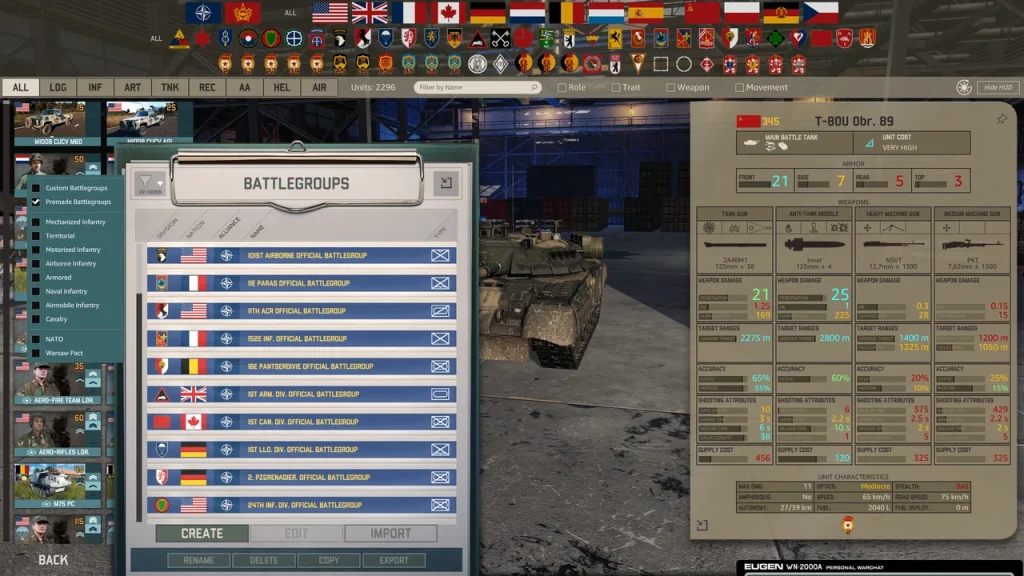
Inspect the division and saved battlegroup actually selected for the session. WARNO’s official description makes divisions and brigades the parent formations for customized battlegroups, so a familiar unit in the overall Armory is not automatically an option in every deck.
Check the roles needed for the planned ground task: reconnaissance for information, infantry for suitable ground positions, appropriate command units for the displayed objective rules, and weapons that address likely ground threats. Add relevant AA and supply to keep that group functioning rather than spending everything on one impressive-looking unit family.
The division-selection redesign provides useful context when choosing the roster. The v183203 notes confirm the redesigned filters being introduced. If a formation appears missing, inspect the active alliance, nation, type and ownership filters before changing the entire plan.
Use a formation’s Gameplay description to understand its options, then inspect the actual cards. Signature Units are examples of a division’s identity, not proof that every highlighted entry is mandatory or strongest. The opening should serve your task using available choices, rather than copying the largest image in the selection panel.
3. Spend the opening budget on a working group
Review the initial purchases together. A tank without useful reconnaissance, a ground squad without the support it needs, or a group without a way to replenish relevant ammunition can leave the opening unable to perform its intended job. Check the connections between purchases before adding more of the same unit.
Compare the combined infantry-and-transport choice where relevant. A carrier can deliver a squad and sometimes contribute afterward, but passenger and vehicle remain distinct units with different weapons and tasks. Choose the actual pairing supplied by the division rather than assuming any familiar transport can accompany every squad.
Retain a response option appropriate to the setup. That may be available points, a planned next purchase or units held for another task. There is no permanent optimal reserve percentage here: the mode, income, roster and objective determine what is possible. The point is to know how you will respond if the first contact differs from the expected one.
Keep deck category-slot costs, in-session purchase prices, card availability and supply capacity separate. Official patches change these fields independently. A historical slot-cost change does not calculate your current starting budget, and a supply vehicle’s health value does not describe how much supply it carries.
4. Preview the ground positions and support connections
Use the sight tool to compare the positions you want the opening group to use. The developer’s Line of Sight explanation distinguishes actual sight, intermediate shared-information areas and separately labeled weapon rings. A long weapon ring alone does not establish a usable shot through terrain.
Give reconnaissance a specific observation job and ground weapons a lane they can actually use. Infantry and its carrier may need different destinations: the squad performs its ground task while the vehicle keeps a useful support position. Do not send every selected unit to one point simply because it is near the objective.
Check how the group remains connected to supply and other support. A route that forces a resource source into the same exposed position as the combat unit is a different plan from bringing a depleted unit back toward a checked supply location. Compare those options before relying on a large capacity value.
When the current setup provides a FOB, consider its access and protection during deployment. The February 2023 FOB explanation describes initial-phase placement and capture or destruction risk. Keep that preview context when using the example, and verify the selected mode’s current option rather than assuming every scenario permits the same depot purchase.

5. Prepare available orders and confirm passenger tasks
The official description supports issuing commands during pre-combat deployment. Use that time to give units the opening jobs you have chosen, inspect the destination and check the controls available to the actual selection. Avoid relying on a remembered shortcut when the current unit does not offer the relevant order.
Keep Smart Orders and Rules of Engagement distinct. The developer describes the former as computer-executed tasks and the latter as configurable behavior. Choose automation for a task you can monitor, then check whether its settings fit the group. Automation is assistance, not a guarantee that the opening will adapt as you intended.
For transported infantry, plan both the carrier movement and the passenger’s ground task. The Patch 6 notes specifically require command infantry to unload before zone capture. Confirm that the relevant passenger actually disembarks before depending on that unit for the displayed objective.
When issuing group orders, inspect which units are included. A squad holding a useful position, a recon unit observing an approach and a supply source serving recipients may need separate commands. Preparing one broad movement for all three can undo the role division that made the opening sensible.

6. Adjust after the first useful information arrives
Once the session begins, compare the actual contacts with the planned ground task. If reconnaissance identifies a threat outside the group’s useful roles, reconsider the next movement or purchase. Do not keep sending the same unit forward solely because that was the deployment plan.
Check whether the main group still has the information, weapons, command eligibility and resources it needs. A blocked firing lane suggests another position; spent useful ammunition suggests supply; an unsuitable ground matchup may require another unit. These different problems do not all improve by buying another copy of the first vehicle.
Preserve units that can still contribute. Moving a damaged or depleted unit back toward support may maintain more useful strength than remaining in an unfavorable exchange. The relevant decision depends on the current encounter; this guide does not promise one universally safe destination or fixed opening sequence.
Watch your supporting units as the ground task changes. Reconnaissance can retain information while the group repositions, AA can continue covering it, and supply can wait at a checked location. Updating each job is more useful than forcing every unit to chase the same newly visible contact.
7. Review one opening decision and fix the actual cause
After the attempt, identify one decision worth changing: the objective, purchase mix, observation position, support connection or first response. Change that item in the next practice match. Replacing the entire deck at once makes it harder to tell what caused the difference.
If the loaded roster was wrong, check the session’s selected saved entry. If the lobby configuration is empty or behaves unexpectedly, preserve the actual mode and error. The v188908 notes fixed a particular empty-deck lobby crash and conditionally allowed multiple mods that do not change the same game area. They do not diagnose every current setup problem.
Keep archived replay evidence tied to its version. The v183203 notes discuss incompatibility for saves and replays predating version 169425. An old frame can teach you about a past opening, but it should not silently supply current card values or prove a present patch outcome.
Continue with division deck building, recon positioning, supply logistics and the WARNO hub. WARNO deployment planning becomes useful when every opening unit has a clear job and the next decision responds to what the game reveals.
Sources and further reading
- https://store.steampowered.com/app/1611600/
- https://steamstore-a.akamaihd.net/news/externalpost/steam_community_announcements/1822556746168512
- https://steamstore-a.akamaihd.net/news/externalpost/steam_community_announcements/1825727806706776
- https://steamstore-a.akamaihd.net/news/externalpost/steam_community_announcements/5036749277232271511
- https://steamstore-a.akamaihd.net/news/externalpost/steam_community_announcements/4247462367448914600
- https://steamstore-a.akamaihd.net/news/externalpost/steam_community_announcements/4224938027302509533
- https://steamstore-a.akamaihd.net/news/externalpost/steam_community_announcements/1830163047256664
- https://steamstore-a.akamaihd.net/news/externalpost/steam_community_announcements/5395938616793407646
Keep exploring
WARNO Recon Positioning: observe the fight before you join it
Put recon where it answers the force’s next movement question; preserve a useful view, cover the flank and move it when the front changes.
WARNO Command Unit Placement: capture safely, then use the leader
Bring command behind protection, complete the capture, then relocate or support nearby troops; WARNO does not require permanent parking after capture.
WARNO Division Deck Building: give every card a battlefield job
Build a division deck around an opening and reinforcement plan; cover battlefield jobs before spending cards on optional specialists.