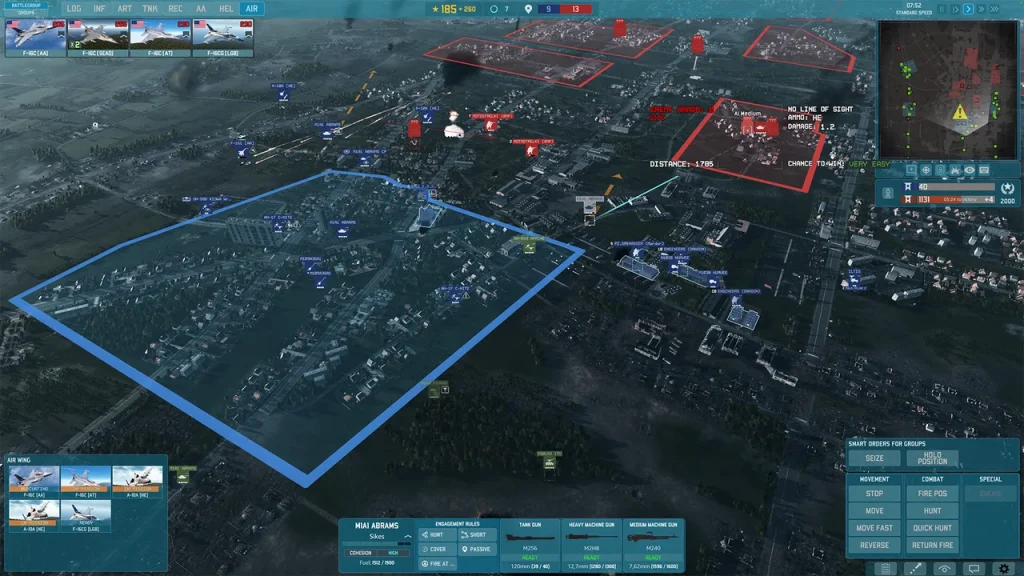
TL;DR: Use WARNO smoke screen tactics to create a temporary opportunity to disengage, cross an exposed game approach or support a ground move. Choose an available smoke-capable unit, place or activate its smoke for the immediate task, and move toward a checked destination rather than waiting inside the effect. Smoke is a temporary visual-screening tool; it does not add armor or solve every weapon and targeting interaction.
Practical goal: Choose between an equipped unit’s smoke control and a smoke-capable supporting weapon, then use the opportunity for a specific movement or recovery task.

Checked November 9, 2026. This is not a hands-on test or a current competitive tier list. The gameplay recommendations below use selected official WARNO descriptions and dated update notes. Historical examples illustrate mechanics and named equipment; use the installed card for current values.
On this page
WARNO Smoke Screen Tactics: choose the next action
| Game situation | Recommended action | Check before committing |
|---|---|---|
| Exposed unit needs to disengage | Use its available smoke and move to a checked position | Equipment, remaining resource and actual movement |
| Group needs a temporary screen | Use an available smoke-capable supporting weapon | Placement, weapon eligibility and the next ground task |
| Group smoke control behaves unexpectedly | Inspect individual equipped units | Selection, button and current state |
| Screen is fading or obscures your own task | Recheck sight and change the next action | Do not treat smoke as permanent protection |
1. Decide what the screen is supposed to accomplish
Start with a specific game task: move a unit out of an unfavorable exchange, let a squad approach its intended ground position or give a damaged unit a chance to return toward supply. A smoke order is useful when it enables that next action. Filling an area with a visible effect without changing the situation can simply spend resources.
Choose the destination before relying on the screen. Inspect the approach using current reconnaissance and the sight tool, then plan the movement you actually intend to issue. The area behind the screen can still contain threats your information has not revealed.
Keep the recommendation temporary and task-specific. Smoke does not improve the unit’s armor, restore its ammunition or remove an opponent from the map. Once the screen is no longer helping, the original matchup may return. Have a follow-up position or another supporting action ready.
The developer’s December 2025 artillery-rework discussion explicitly refers to mortars creating smoke screens. That dated description establishes a game-support use. Its proposed artillery changes remain separate from this ordinary recommendation to use an available screen for an immediate ground task.

2. Choose an actual smoke-capable unit or supporting weapon
Inspect the selected unit before relying on smoke. A vehicle dispenser, infantry smoke equipment and a smoke-capable supporting weapon are different ways to provide a screen. The available button, weapon and current resources determine what that selected unit can actually do.
The v184174 hotfix added a smoke launcher to YPR-765 PRV, and the v188908 notes added launchers to named M113 entries. Those dated additions are concrete examples of capability being specified per card. They do not establish that every member of those vehicle families has identical equipment.
Some infantry can have smoke equipment while others do not. The Marine preview describes smoke grenades on a named leader entry, while other patch notes remove or add equipment individually. If your intended squad lacks the current option, choose an appropriate supporting source instead of repeatedly pressing an unavailable control.
During deck planning, consider whether the units expected to make exposed moves have a usable screen option or access to support that provides it. This is a missing-role check, not a requirement to buy one particular unit. The division and current scenario determine which options you can actually select.
3. Use a vehicle screen together with a deliberate movement
When an equipped vehicle needs to leave an unfavorable game exchange, activate the available smoke control and issue the movement toward a position you have checked. Watch that the unit actually moves and does not simply remain in the original exposed location after the effect appears.
Preserve its connection to support during the withdrawal. A tank returning toward a protected lane or supply has a clear next job; a vehicle moving blindly away from everything may enter another unsuitable encounter. Use the screen to change the engagement, not to chase the same target through uncertain terrain.
If several vehicles are selected, check which ones have the equipment and which actually responded. The v184174 notes fixed smoke-button behavior under multi-selection. That historical control issue explains why a group button and an individual unit state should be checked separately.
Do not infer a guaranteed escape from a drawn smoke effect. Current weapon interactions, information and movement still matter. If the unit remains under threat, change the destination or use another appropriate supporting response. The screen is one available tool within the game decision, rather than a universal counter.
4. Use a supporting screen for a ground task
For a planned ground move, choose a smoke-capable supporting weapon that is available in the current battlegroup. Compare its actual reach and command with the area you need to screen, then link the order to the infantry or vehicle movement it is intended to help.
Think about the relevant sight lane rather than drawing smoke on a random point near the objective. Preview the destination with the sight tool, use currently detected information and watch how the screen changes the useful view. Exact present interaction and effect timing should come from the installed game, not an old ammunition figure.
After the screen becomes useful for your task, move the intended ground units and keep other support on its job. Reconnaissance can retain information, AA can continue covering the group and the smoke-capable weapon can prepare its next action. A broad selection order can unintentionally move units you wanted to keep supporting.
If the screen blocks the view your own supporting weapon needs, reassess the plan instead of automatically adding more smoke. Screening changes the information and engagement you can use. The best immediate action may be moving to the next checked position, holding briefly or choosing another unit for the exposed job.

5. Manage ammunition and the unit’s next job
The v122779 release notes reduced the ammunition cost of vehicle smoke dispensers at that release. This confirms that resource use matters; it does not provide a permanent duration, shape or current cost formula for every smoke-capable entry.
Inspect the relevant current ammunition or resource state before planning repeated screens. A weapon or control existing on the card does not prove it can be used indefinitely in the tactical session. If the source is depleted, bring actual supply where appropriate or choose another available source for the next task.
Keep smoke use connected to the unit’s purpose. Spending a screen on a move with no clear destination can leave the same unit without the resource when an unfavorable exchange develops. Practice deciding the next action first, then using smoke to support that decision.
Supply, repair and smoke remain separate needs. A damaged tank that successfully disengages can still need repair and relevant gun ammunition. A mortar that provides a useful screen may need support for its later weapon tasks. Complete the recovery or support plan rather than treating the smoke animation as the end of the job.

6. Recheck sight and avoid reading too much into the animation
Observe the screen and the selected units after the order. Check whether the intended movement is happening, whether the relevant sight lane changed and whether the destination remains useful. A visual effect on the map is feedback to inspect, not proof that every possible enemy interaction has been prevented.
The developer’s Line of Sight explanation separates actual sight, intermediate shared-information areas and weapon-range rings. Use those labels while checking the screen. A colored overlay and a smoke effect are different interface elements, so avoid treating either as an unlabeled universal radius.
The v188908 notes corrected 10v10 effects, including smoke, disappearing visually before the effect ended. That is a dated rendering fix. If an effect looks unexpected now, separate what you see from the equipment, resource and control states before guessing at the cause.
Similarly, the v169014 patch fixed smoke launchers not functioning on certain vehicles. A historical equipment-behavior fix and a later display correction address different problems. For a suspected present bug, record the exact selected card, mode, control and result rather than using one old patch to explain every symptom.
7. Practice a screen, move and recovery sequence
In a small practice encounter, choose one smoke-capable unit and one clear task. Inspect its equipment, choose a checked destination, use the available screen and watch the actual movement. Then reassess the unit’s sight, resources and support after it reaches the intended position.
Review the decision rather than only the appearance of the cloud. Did the screen help the unit leave the bad exchange? Did you move toward support? Did another threat make the destination unsuitable? Change the relevant choice in the next attempt instead of assuming a larger screen automatically improves the result.
If you use a supporting weapon, keep its order and the ground unit’s movement distinct. This helps you recognize whether the problem was the selected source, screen placement, timing in your own attempt or the follow-up position. Do not promote one successful practice result into a universal current tactic or measured author benchmark.
Continue with supply logistics, tank engagement ranges and the WARNO hub. WARNO smoke screen tactics should produce a useful next action: a completed move, a recovered unit or a better supported ground task.
Sources and further reading
- https://store.steampowered.com/app/1611600/
- https://steamstore-a.akamaihd.net/news/externalpost/steam_community_announcements/1836506165582399
- https://steamstore-a.akamaihd.net/news/externalpost/steam_community_announcements/1826362059923425
- https://steamstore-a.akamaihd.net/news/externalpost/steam_community_announcements/1830163047256664
- https://steamstore-a.akamaihd.net/news/externalpost/steam_community_announcements/5741605105606343947
- https://steamstore-a.akamaihd.net/news/externalpost/steam_community_announcements/5036749277232271511
- https://steamstore-a.akamaihd.net/news/externalpost/steam_community_announcements/1825727806706776
- https://steamstore-a.akamaihd.net/news/externalpost/steam_community_announcements/1822556746168512
- https://steamstore-a.akamaihd.net/news/externalpost/steam_community_announcements/1818118366172123
- https://steamstore-a.akamaihd.net/news/externalpost/steam_community_announcements/1811772772630293
Keep exploring
WARNO Recon Positioning: observe the fight before you join it
Put recon where it answers the force’s next movement question; preserve a useful view, cover the flank and move it when the front changes.
WARNO Command Unit Placement: capture safely, then use the leader
Bring command behind protection, complete the capture, then relocate or support nearby troops; WARNO does not require permanent parking after capture.
WARNO Division Deck Building: give every card a battlefield job
Build a division deck around an opening and reinforcement plan; cover battlefield jobs before spending cards on optional specialists.